What is MCP? A plain-English explanation
You’ve probably heard Model Context Protocol (MCP) popping up in conversations about AI tools. If you're in sales, RevOps, or SaaS, you may have heard the term but haven’t gotten a clear answer on what it actually means, what it does, and how you can use it in your work.
This post explains it plainly, so you can understand how it works without a computer science degree. We’ll cover what it is, what it can do, and how it can help you in your everyday tasks.
MCP defined in plain English
Model Context Protocol (MCP) is an open standard that allows AI models to connect to and interact with external tools, apps, and data. Instead of building a custom connection for every tool, MCP gives AI a standardized way to read data, take action, and return results, and this can be done within a single conversation.
Think of MCP like a universal remote. Instead of keeping track of a separate remote for each device, you have one that can connect to everything. Or like having one charging cable that works for everything vs. holding on to a bunch of different cables because you’re not sure which one you need.
MCP does the same thing for AI–one universal connector instead of a different custom integration for every app.
Anthropic introduced MCP in November 2024, but MCP is not a proprietary Anthropic product. It's an open standard, and adoption has grown well beyond Claude. A wide range of AI tools and third-party providers support MCP.
Why MCP exists: the problem it solves
AI assistants are good at generating text. But for a long time, that's basically all they could do. An AI assistant could produce a draft in a chat window, but then you had to copy, paste, and format it and send it yourself. The AI wasn’t integrating with other tools.
Every time an AI tool needed to connect to a specific app, like your CRM, your document platform, or your calendar, someone had to build a custom connection.
If you had ten AI tools and 15 business apps, you would be looking at potentially 150 separate integrations to build and maintain. MCP simplifies this complexity. Each tool publishes one MCP server. Each AI learns one protocol. One standard replaces dozens of custom integrations, and the whole ecosystem gets more capable at once.
How MCP works (without the jargon)
You don't need to understand the technical architecture to understand what MCP does. Here's the plain-English version of what happens when you use an AI tool that supports it.
There are three pieces involved in the process.
Your AI tool. The assistant you're talking to (Claude Desktop, an AI-powered sales tool, whatever your team uses). This is where you type your request.
The MCP layer. A connector that runs in the background. It links your AI to any tools that have published an MCP server. You don't interact with this directly.
The MCP server. Published by each tool or service. It tells the AI what the tool can do and accepts instructions from the AI.
The flow looks like this:
You type a request: "Send the renewal contract to Acme Corp."
The AI checks which MCP-connected tools are available and which one can handle the job
It calls the right tool, in this case, a document platform with an MCP server.
The tool takes action or returns data
The AI delivers the result back to you in the conversation
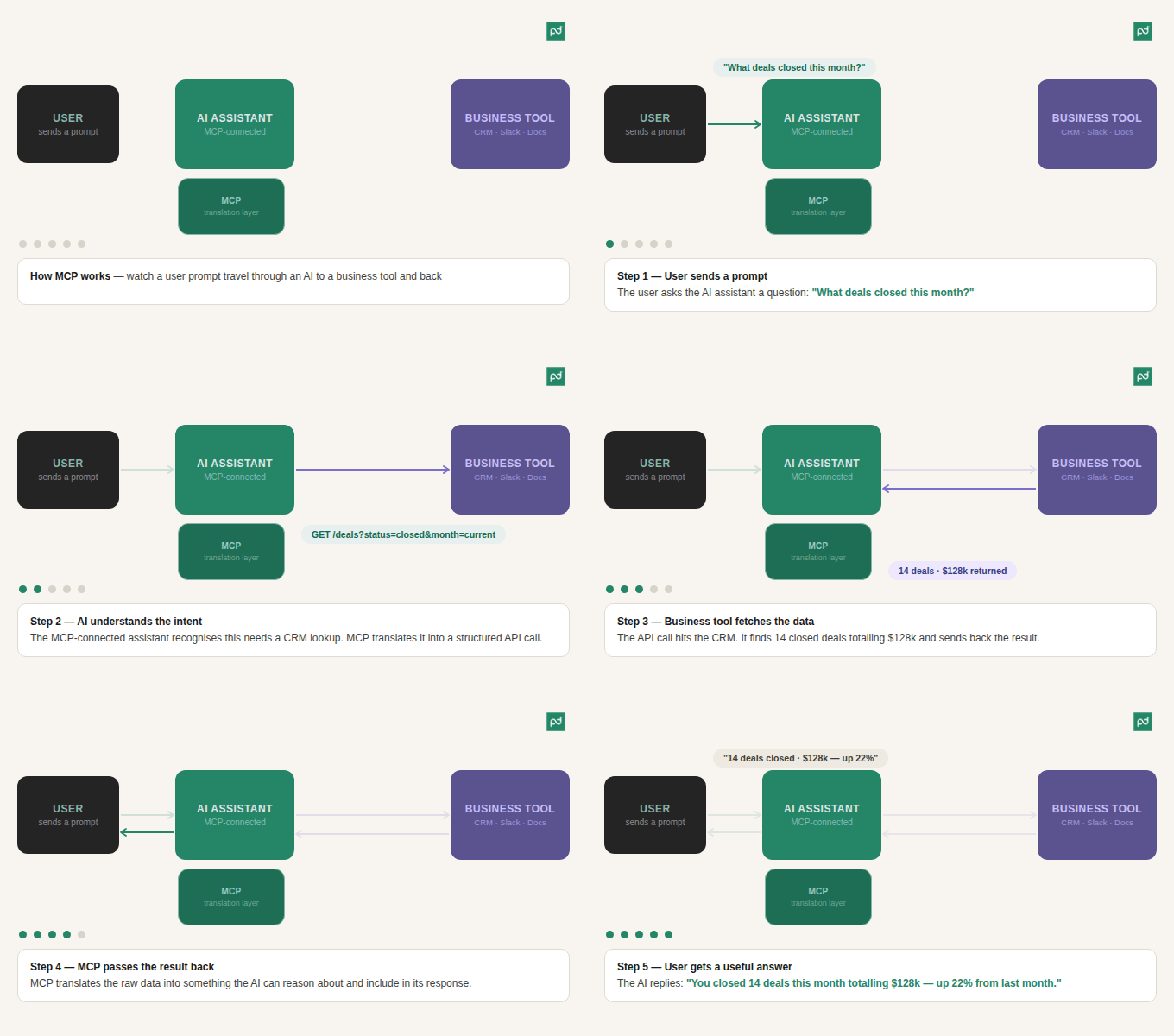
The key thing to understand is that you're not managing any of this manually. It happens in the background. From your perspective, you typed a request and something got done. That's the experience MCP is designed to create.
If you want to learn more about the mechanics behind the MCP process, you can see the official documentation here.
MCP vs. API: What's the difference?
If you've worked in SaaS, you're familiar with APIs. A fair question is, what does MCP actually add?
The short answer is that APIs let software talk to software. MCP lets AI talk to software. The two are designed for different purposes, and understanding the difference helps clarify why MCP matters.
There are three practical differences between MCP and APIs.
Discovery. A traditional API requires a developer to know the exact endpoints in advance–which calls are available, what parameters they take, and how they're structured. An MCP server is self-describing: the AI can automatically discover what a tool can do, without a developer mapping every endpoint.
Context-awareness. When an AI makes a call through MCP, it passes the conversation context alongside the request. The tool understands what the user is trying to accomplish, not just the isolated action being requested.
Standardization. Every traditional API integration is custom-built. MCP is one protocol that works across tools. Build it once, work with everything that supports the standard.
MCP | Traditional API | |
Who calls it? | AI assistants and agents | Software and code |
How it’s discovered | Self-describing. AI learns available actions. | Developers must know endpoints in advance |
Context-aware? | Yes | No |
Standardized | One protocol across tools | Custom per integration |
Primary use case | AI-native processes | General software integration |
MCP doesn't replace APIs. In most implementations, the MCP server is a layer on top of an existing REST API. They work together: MCP is the AI-facing interface, and the API does the underlying data transfer. Think of MCP as the integration standard that makes existing APIs readable and usable by AI agents.

What MCP means for document and agreement workflows
Most AI tools can help you write a contract, but an MCP-connected AI can actually send it.
That distinction matters more than it might seem. Drafting is one step in a process that also includes pulling client data, selecting the right template, routing for approval, and getting it out the door. Without MCP, your AI stops at the draft, and you’re stuck executing the rest of the process.
Here's what that looks like in practice.
Before: A rep finishes a discovery call, opens PandaDoc, manually selects a proposal template, fills in the client's details, and hits send. A sequence of separate steps that takes focus and time, even when everything goes smoothly.
After: The same rep asks their AI assistant to send the standard proposal based on today's call notes. With MCP connected to PandaDoc, the AI selects the right template, populates the client details, and sends the document, without the rep switching tools or managing the steps manually.
The specific actions saved are: opening a separate platform, locating a template, re-entering information that already lives in your CRM, and manually triggering the send. For a single document, that's not a dramatic amount of time, but this adds up quickly across a full quarter of deals.
It's also worth noting that speed doesn't have to mean sacrificing compliance. MCP integrates with PandaDoc security and compliance features, including QES, 21 CFR Part 11, KBA, and more, so compliant workflows can run at the same pace as everything else. AI-powered document workflows are one piece of a broader shift in how teams handle agreements.
The ability to act on documents via AI also pairs naturally with intelligent document processing. Explore PandaDoc workflow recipes to see what agreement automation looks like in practice.
How PandaDoc's MCP Server works
PandaDoc has a native MCP Server that connects AI assistants directly to your document and agreement workflows.
Once it's connected, your AI assistant can take action within PandaDoc based on natural-language instructions.
Things you can do with PandaDoc MCP:
Create documents from PandaDoc templates based on a prompt (for example: "Create a new contract from the Master Services Agreement template for Acme Corp with a $50,000 contract value")
Send documents for signature
Track document status and identify which agreements are waiting for a response
Send reminders to recipients who haven't signed
Search and filter documents across your workspace
Running reports on completion rates, signing times, and document performance

If you're already using an AI assistant, the MCP Server lets you close the loop on document tasks instead of picking them up manually.
PandaDoc MCP is one of many tools to simplify your work and help you get more done faster. PandaDoc's built-in AI Document Assistant handles drafting and editing directly inside the platform, so your documents are written, structured, and ready to send.
Once documents are signed and stored, AI data extraction lets you pull structured information from your contracts automatically: key dates, parties, values, renewal terms, no manual review required. That makes it a practical tool for contract management, not just document creation. Learn more about AI contract data extraction to see what it can pull from your contracts.
Together, these three capabilities cover the full document lifecycle. The AI Assistant builds it, the MCP Server moves it, and AI data extraction makes sense of it afterward.
If you're already using an AI assistant, the MCP Server lets you close the loop on document tasks instead of picking them up manually. Ready to put it all together? Get started with PandaDoc and connect your AI assistant in minutes.
Disclaimer
PandaDoc is not a law firm, or a substitute for an attorney or law firm. This page is not intended to and does not provide legal advice. Should you have legal questions on the validity of e-signatures or digital signatures and the enforceability thereof, please consult with an attorney or law firm. Use of PandaDoc services are governed by our Terms of Use and Privacy Policy.
Frequently asked questions
MCP stands for Model Context Protocol. It's an open standard introduced by Anthropic in November 2024 that provides AI models with a standardized way to connect to external tools and data sources.
Anyone can use MCP, but the initial setup of connecting an MCP server to your AI tool typically requires some technical configuration. You may need a developer or IT support to get things running. But once the connection is established, users just interact with their AI assistant as normal. No coding, no configuration, just type your request and the AI handles the rest.
APIs let software connect to software. MCP is purpose-built for AI. It's self-describing (The AI automatically discovers what a tool can do), context-aware (it passes the conversation context alongside requests), and it’s standardized across tools rather than custom-built for each one.
MCP and API’s complement each other. An MCP server usually sits on top of an existing API rather than replacing it.
Adoption is growing quickly. Claude (Anthropic's AI assistant) supports MCP natively, and a wide range of third-party tools and platforms have published MCP servers. Check the MCP website for the most up-to-date information.
Yes, PandaDoc has a native MCP Server. See Get started with the PandaDoc MCP Server for setup instructions.
No. The PandaDoc API is for developers building custom integrations and automations with code. The MCP Server is for AI-native workflows where the AI handles the instructions. Both exist and serve different purposes.
Author

Maggie Brennand
Senior Product Marketing Manager, AI & CLM
Maggie Brennand is the Senior Product Marketing Manager, AI & CLM at PandaDoc, where she helps teams understand how they can use AI to work smarter every day. Away from the office, she’s often found drinking too much coffee and exploring the outdoors with her dog, Pepper.
Reviewed by

Ashley Kemper
SVP of Marketing
Ashley Kemper leads the global Marketing team at PandaDoc. She's built and scaled marketing programs from the ground up at Asana and launched new brands at Double and HyperComply. Before moving into marketing, she spent years as a digital media producer and graphic designer at National Geographic, Agence France-Presse, and Government Executive. Fun fact: Ashley has survived five cross-country moves with her wife, Malorie, and their French Bulldog, Frannie.