
If you’re evaluating API solutions, you know they will help your team move faster, eliminate manual work, and scale your operations. But there are important questions to answer before you move forward, such as how long it will actually take to launch and, more importantly, how long it will take for your team to fully use it.
The reality is that API implementation timelines vary widely. Some projects take two weeks while others can stretch to six months or more. The difference is rarely about how technically skilled your team is. It usually comes down to what type of API you’re implementing and how well it fits your team’s specific needs.
Inconsistent estimates make your decision even more difficult. Approving the project means committing time, budget, and team resources without a clear understanding of what’s actually involved. But pushing it off means continuing with the manual processes that slow your team down.
The key is understanding what API implementation actually entails, what influences the timeline, and what a realistic rollout looks like for document workflows.
What is API implementation?
API implementation is the process of connecting one system to another so they can automatically share data and trigger actions without manual intervention, often through defined endpoints that enable reliable communication.
In a document workflow, this usually means generating, sending, and tracking documents directly from your existing tools, like your CRM.
From an operations perspective, you’re removing a manual step your team currently handles.
For example, instead of a sales rep creating a contract, copying data from a CRM, and emailing it to a client, the system does it automatically when a deal reaches a certain stage.
It’s important to understand that not all APIs are the same, especially when it comes to API design, architecture, and alignment with your business requirements.
A payment infrastructure API or a general API gateway is designed to support a wide range of use cases. That flexibility comes with complexity. A document API is built for a specific purpose, which makes it faster to implement.
What influences the API implementation timeline?
When you hear that an API implementation will take months, it’s usually due to one or more of these factors.
Scope of the integration
If you’re automating one workflow, such as sending contracts after a deal closes, the timeline is much shorter than if you’re redesigning how your entire organization handles documents. A focused starting point aligned with clear business needs leads to faster results.
How purpose-built the API is
General-purpose APIs require significant configuration before they can do anything useful. A document API is already designed to create, send, and track documents, simplifying API development and reducing the burden on your development teams. That reduces the amount of custom work required.
Your existing tech stack
If the API integrates directly with tools you already use, such as your CRM, the setup can be straightforward, especially when native CRM integrations are already available. If your team needs to build custom connections or manage compatibility across systems, the timeline increases.
Your team’s bandwidth
Even a simple implementation can take longer if the person responsible only has a few hours each week to work on it. Many delays are caused by competing priorities across team members, not technical blockers.
Testing and approvals
Legal review, document formatting checks, and stakeholder approvals all add time. These steps are important and should be planned up front, especially when considering API testing, compliance, and API security.How long does API implementation take?
For document workflows, a focused implementation typically takes two to five weeks. This includes defining the workflow, configuring the API, testing, and going live. Larger or more complex projects can take longer, especially if they involve multiple workflows or custom integrations.
Do I need a developer to implement a document API?
In most cases, yes. However, many document APIs are designed to be implemented by a single developer. The level of effort depends on the complexity of your workflow and whether you’re using prebuilt integrations.
How much does API implementation cost?
The primary cost is internal time, especially developer time during the implementation period. A shorter, focused implementation requires significantly fewer resources than a multi-month infrastructure project.
A realistic API implementation timeline for document workflows
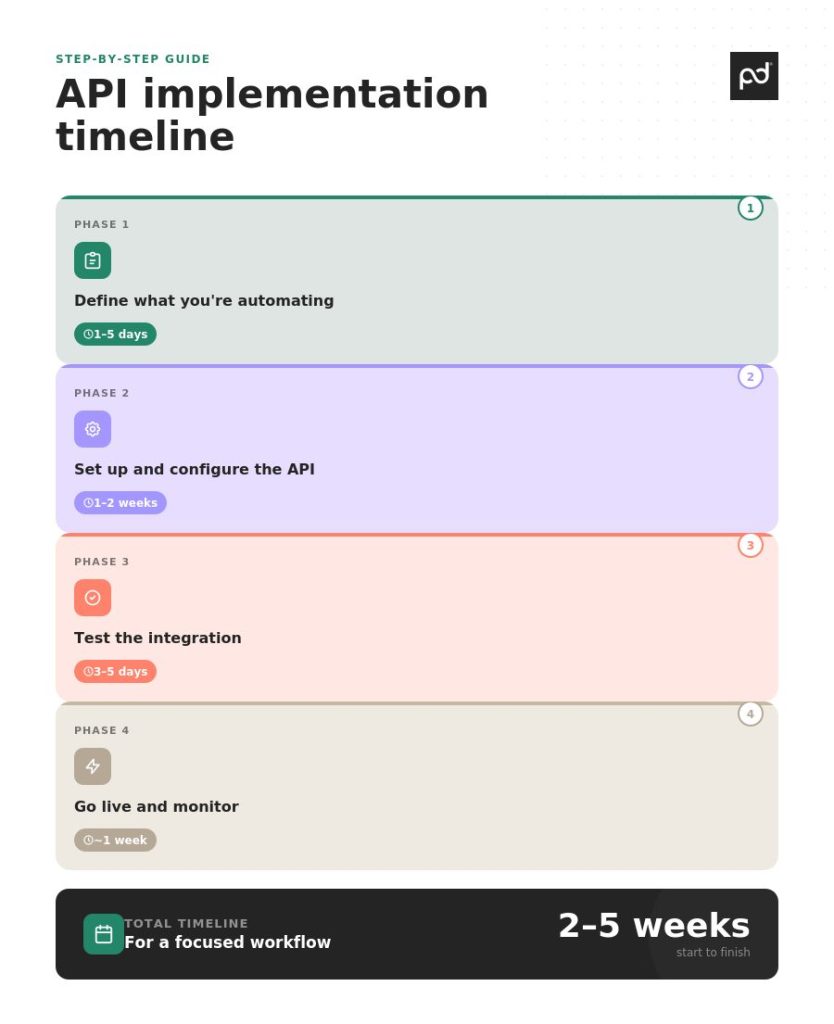
For a focused document workflow, most implementations fall within a two- to five-week range. Here is what that typically looks like in business terms.
Phase 1: define what you are automating (1 to 5 days)
This is where you decide what problem you’re solving first.
You identify a specific workflow, such as sales contracts, NDAs, onboarding agreements, or proposals. You define what triggers the document, such as a CRM stage change or a form submission. You also decide what data should populate the document.
Phase 2: Set up and configure the API (1 to 2 weeks)
In this phase, your developer connects the API to your existing systems, configuring authentication, defining endpoints, and ensuring setup aligns with your broader API architecture. Templates are created or imported, and data fields are mapped so that information flows correctly from your CRM into your documents.
With a document-specific API, much of this work is configuration rather than custom development. The core functionality is already built, which simplifies ongoing API management and reduces complexity in version control.
At this stage, you need to review and approve the templates. Make sure the documents reflect your brand, include the correct terms, and capture the right data.
Phase 3: test the integration (3 to 5 days)
Before going live, your team should run test documents through the workflow.
You check that the data populates correctly, validate API performance, and confirm that API testing scenarios pass before launch. Documents look as expected, and signatures are routed to the right people. You can identify and troubleshoot any issues during this stage.
Your role is to review these test documents and confirm they meet your standards.
Phase 4: go live and monitor (about 1 week)
Once everything is tested, the integration is deployed.
During the first week, your team monitors for errors or edge cases, tracks key metrics, and ensures the integration performs reliably at scale. You also introduce the new workflow to your team and set expectations for how it will be used.
It’s important to communicate the change clearly. Make sure your team understands what’s different and why it matters.
Total timeline for a focused workflow: 2 to 5 weeks
This is a very different picture from the 6-12 week timelines often associated with broader API infrastructure projects. The difference comes down to scope and how purpose-built the solution is.
Why document API implementations are faster than you might expect
Many of the longer timelines you hear about are based on general-purpose API platforms.
These platforms are designed to handle a wide range of use cases, which often require more complex API strategy decisions and ongoing API management. That flexibility requires significant setup and configuration before they deliver value.
Document APIs are different. They’re built for a single category of workflows: creating, sending, tracking, and collecting eSignatures on documents. The features most businesses need are already available out of the box.
This has a few practical implications.
- Less custom development. Your team is configuring an existing system, not building one from scratch.
- Integrations are often simpler. If the API connects directly with your CRM or other tools, you can avoid building custom connections.
- Implementation can often be handled by a single developer without requiring large development teams or extensive coordination across team members.
Colonies, a company that manages high-volume lease agreements across multiple countries, implemented a document API to automate processing 22,500 documents per year. Their initial integration was live in two weeks.
This kind of outcome is possible because the API is designed for scalability from the start, without requiring teams to rebuild core infrastructure.
If you want to explore how a document API works in practice, learn more about PandaDoc API.
Questions to ask before you approve an API implementation project
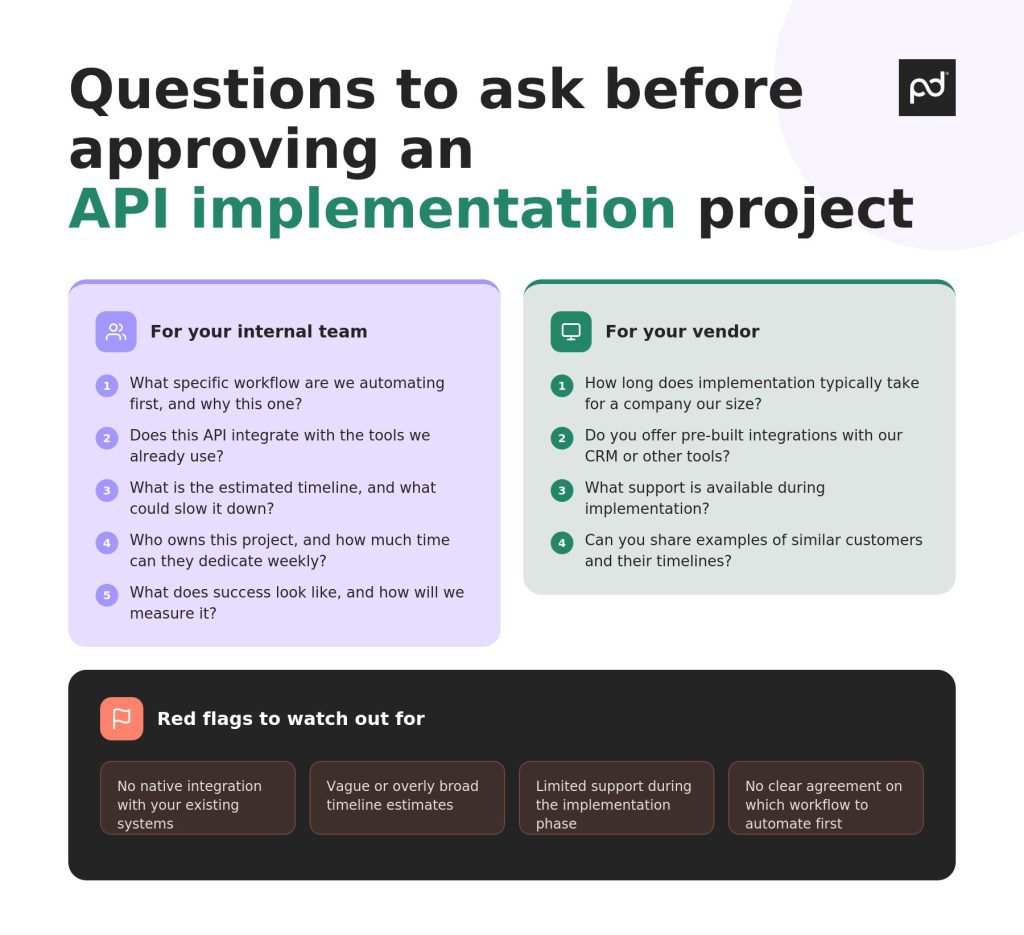
Before committing to any API project, it helps to ask a few targeted questions.
These will give you a clearer picture of the timeline and help you avoid unnecessary delays.
Ask your internal team
- What specific workflow are we automating first, and why this one?
- Does this API integrate with the tools we already use?
- What is the estimated implementation time, and what could slow it down?
- Who owns this project, and how much time can they dedicate each week?
- What does success look like, and how will we measure it using clear metrics tied to business outcomes?
Ask the vendor
- How long does implementation typically take for a company of our size?
- Do you offer pre-built integrations with our CRM or other tools?
- What support is available during implementation?
- Can you share examples of similar customers and their timelines?
Watch for red flags
- No native integration with your existing systems
- Vague or overly broad timeline estimates
- Limited support during the implementation phase
- No clear agreement on which workflow to automate first
These questions help you move from a vague estimate to a realistic plan.
If you’re evaluating whether to move forward with an API project, keep in mind that the timeline is not fixed. It depends on the scope of your project and how well the solution fits your needs.
For document workflows, the process is often much faster and more manageable than expected, especially when the API is built specifically for that use case.
See how PandaDoc’s API can help you launch faster and simplify your document processes from day one. Start your 14-day trial or contact us for a personalized demo.
Frequently asked questions
-
At a high level, API implementation involves connecting your existing systems, such as your CRM, to a document platform. This allows documents to be generated, populated with data, sent, and tracked automatically, without manual input.
This includes managing authentication, maintaining API security, and ensuring long-term compatibility as systems evolve.
-
A document API is purpose-built for creating and managing documents. It includes features like templates, eSignatures, and document tracking out of the box. A general API gateway is designed to support a wide range of use cases and requires more configuration to achieve the same outcome.
Document APIs also simplify API versions and reduce the need for complex API architecture decisions.
Disclaimer
PandaDoc is not a law firm, or a substitute for an attorney or law firm. This page is not intended to and does not provide legal advice. Should you have legal questions on the validity of e-signatures or digital signatures and the enforceability thereof, please consult with an attorney or law firm. Use of PandaDoc services are governed by our Terms of Use and Privacy Policy.