
Closing a deal should feel simple. But all too often, the final step of signing the document creates unnecessary friction.
A prospect is ready to move forward. You send the agreement. They’re redirected to another tool, asked to log in, maybe forced to create an account, and just like that, the momentum is gone. According to a Forrester survey, 31% of organizations reported reduced completion rates or abandoned deals due to inefficient or manual agreement processes.
In-app document signing removes this headache.
Instead of pushing users out of your product, you let them review and sign documents directly in your app or platform using a secure electronic signature experience. No tab switching or third-party redirects.
And when you remove friction at the most critical moment in the buying journey, conversion rates go up.
The problem with manual and app-switching processes
Every extra step in your signing flow creates drop-off risk
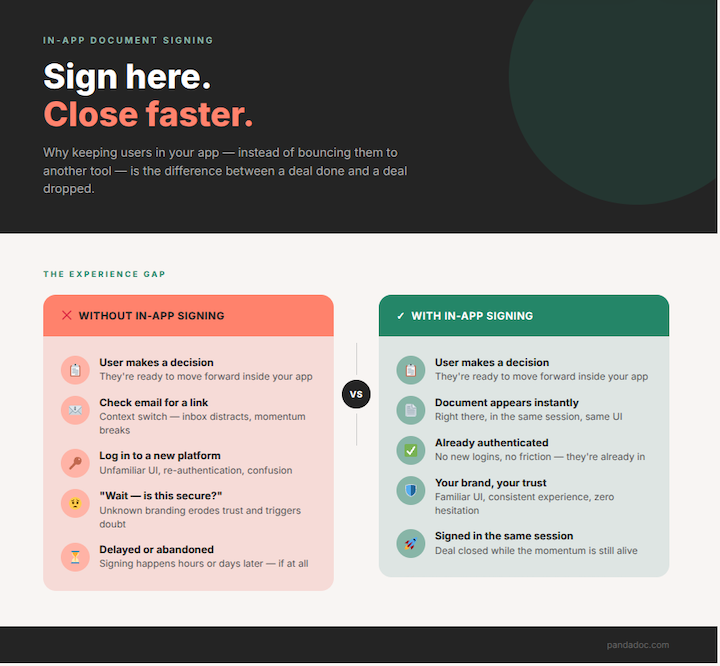
When users are redirected to an external eSignature tool:
- They have to switch tabs or apps
- They may need to log in or create an account
- The branding suddenly changes
- The experience feels disjointed
This may not seem like a big deal, but at scale, these things contribute to:
- Slower deal cycles
- Lower document completion rates
- Abandoned agreements
- A disconnected brand experience
For SaaS platforms, marketplaces, FinTech apps, and any product with embedded contracts, this can directly impact revenue and your ability to close deals efficiently.
The last stages of the customer journey should be easy, not the moment when you lose them.
Why in-app document signing increases conversions
In-app document signing makes the whole process easier for everyone, especially your signers.
Frictionless experience
When users can sign documents directly inside your product, the whole process is faster and easier.
- They stay authenticated
- They stay in the same UI
- They stay focused
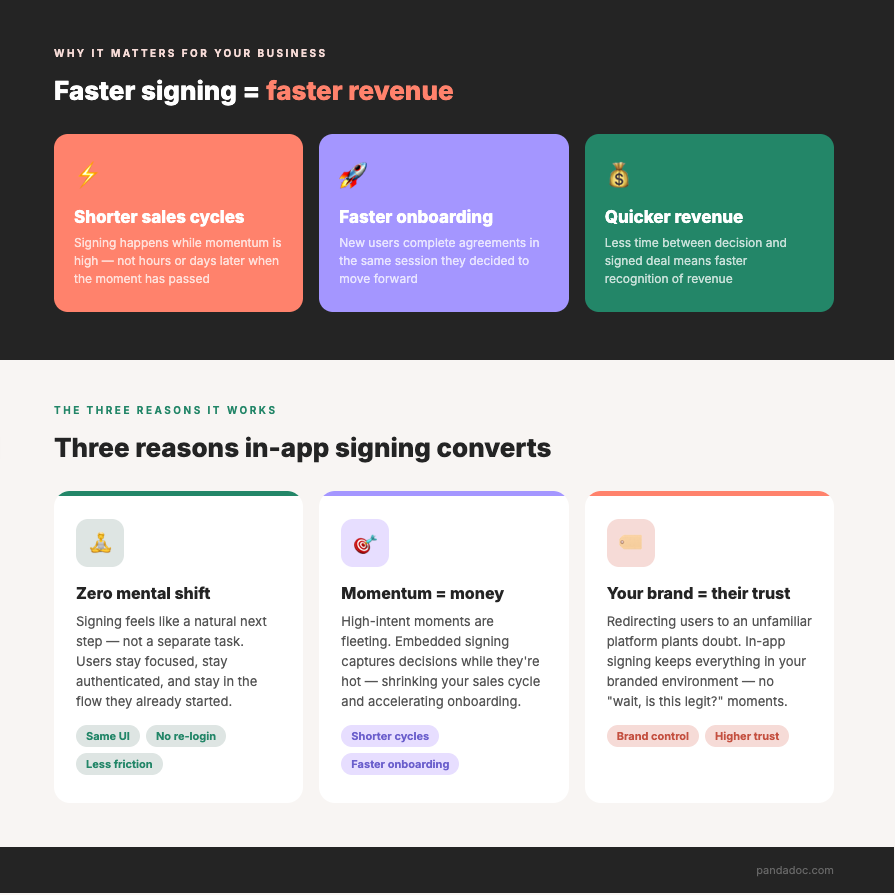
There’s no mental shift from “I’m using this product” to “I’m completing paperwork in a different tool.” Instead, the signing process feels like a natural extension of your app.
Faster decision-making and reduced time to sign
Speed matters in sales, especially when momentum is high. But if a customer needs to check their email, open a new tool, and navigate a new interface, it wastes time.
With embedded signing, the document appears instantly inside your app. Users can review and sign in the same session where they made the decision.
This leads to:
- Shorter sales cycles
- Faster onboarding
- Quicker revenue recognition
Users stay in your brand experience = better trust
Trust plays a major role in conversion. When a user is redirected to another platform with unfamiliar branding, it can create hesitation.
They think, “Is this secure?” “Why am I being sent somewhere else?”
In-app signing keeps everything within your branded experience. You control the look and feel, so the document flow feels like a natural extension of your product.
Modern electronic signatures are legally binding under regulations such as the ESIGN Act, and they include a detailed audit trail that tracks who signed and when.
This consistency reinforces professionalism and builds confidence when it matters most.
Ideal for high-volume or time-sensitive workflows
If your team handles:
- High-volume agreements
- Time-sensitive offers
- Automated onboarding flows
- Subscription upgrades
- Marketplace transactions
Manual sending and external signing simply don’t scale.
Embedded signing allows you to automate document creation and signing flows as part of your larger business processes. Users can move from “interested” to “signed” in minutes without human intervention.
That’s where conversion impact becomes significant.
Imagine a SaaS platform that offers subscription-based project management software.
A user selects a premium plan and clicks “Upgrade.” Instead of:
- Receiving an email
- Opening a separate eSignature tool
- Logging in again
They review, they sign, and their account upgrades immediately.
Behind the scenes, your system updates your CRM through API integrations, stores the completed agreement for easy document management, and logs every action in a secure audit record.
The agreement appears instantly inside the app.
That’s the difference between a smooth revenue event and a stalled deal.
How to enable in-app signing with the PandaDoc API
If you want to implement in-app document signing, PandaDoc lets you embed the signing experience directly inside your product.
Here’s how it works at a high level:
1. Embed the signing experience in your application
PandaDoc lets you present documents for signature within your own interface, rather than redirecting users to an external page.
This keeps the experience consistent with your product and maintains control over the user journey, while still delivering a secure and compliant eSignature process.
2. Customize the look and feel to match your app
You can tailor the embedded experience so it aligns with your:
- Branding
- Layout
- User journey
To your customer, it feels like a native feature of your platform.
3. Automate document creation and delivery
You can automatically:
- Create documents from templates
- Populate fields with CRM or product data
- Assign recipients
- Launch signing sessions
This reduces manual work and keeps your document workflows connected to the rest of your systems.
4. Respond to signing activity in real time
Your system can track when documents are:
- Viewed
- Signed
- Completed
And once a document is signed, trigger next steps, such as:
- Provision access
- Sending confirmation emails
- Updating deal stage in your CRM
- Generating invoices
Learn more about embedding eSignatures into your workflow.
Remove friction and increase revenue with in-app embedded signing
Embedded document signing speeds up and simplifies the process by eliminating tab switching, reducing time to sign, keeping users in your brand experience, and automating high-volume workflows.
If document signing is part of your product flow, embedding it directly inside your app can have a measurable impact on conversion rates.
Want to see how it works? Contact us for a personalized demo or try our API Sandbox and start building in-app signing experiences that help you close faster and scale smarter.
Frequently asked questions
-
To sign a PDF within an app, you need an embedded eSignature solution. Using an API like PandaDoc, you can:
- Upload or generate a document
- Add signature fields
- Create a signing session
- Embed the signing interface directly inside your application
This allows users to review and sign documents without leaving your platform.
Learn more about electronically signing PDFs.
-
The best solution for in-app document signing is one that offers:
- Embedded signing capabilities
- Full API access
- Real-time webhooks
- Customizable branding
- Scalable automation
If you’re building a product or workflow that requires branded signing experiences, an API-first solution like PandaDoc is designed specifically for that use case.
Disclaimer
PandaDoc is not a law firm, or a substitute for an attorney or law firm. This page is not intended to and does not provide legal advice. Should you have legal questions on the validity of e-signatures or digital signatures and the enforceability thereof, please consult with an attorney or law firm. Use of PandaDoc services are governed by our Terms of Use and Privacy Policy.