

The first rule of manufacturing quoting: come first, come correct.
Manufacturers face increasing complexity in how products are sold. Custom assemblies, configurable options, engineered-to-order products, and evolving cost inputs make traditional quoting tools and spreadsheets inefficient and error prone. This is where manufacturing CPQ software plays a critical role.
Manufacturing CPQ software helps teams configure complex products, generate accurate estimates, and automate pricing and approvals. By connecting configuration rules, bill of materials (BOM) data, and pricing logic in a single system, CPQ enables manufacturers to move from manual quoting to streamlined, automated, and consistent quote generation.
At its core, CPQ software for manufacturing connects product configuration to estimating and BOM-driven pricing. Instead of building quotes line by line, sales and engineering teams configure assemblies and options within predefined rules. The system references structured bill-of-materials data to automatically calculate material costs, labor inputs, and pricing outputs. This eliminates manual rework and reduces costly errors in configured products. For more on how BOMs structure product data and cost roll ups, see this guide to bill of materials.
Key takeaways
- Manufacturing quoting software allows you to generate accurate quotes and send them to customers in record time.
- Any solution for handling quotes must have manufacturing estimating software, as well as data analysis and payment integration.
- To get the most out of quote generation software for manufacturing processes, use automated order management and approval workflows to shorten the sales cycle.
- What is manufacturing CPQ software?
- Manufacturing CPQ software is designed specifically for configuring and pricing complex, customizable products. Unlike basic quoting tools, CPQ solutions allow users to:
- Configure multi-level assemblies and product options using rules-based logic
- Automatically generate BOM-driven pricing for configured products
- Apply automated pricing formulas and margin controls
- Generate accurate quotes tied to real-time cost and product data
- Route approvals based on pricing thresholds or configuration rules
- CPQ brings together product configuration, cost modeling, and quote generation into a unified workflow that supports engineer-to-order, configure-to-order, and assemble-to-order environments.
Features needed in manufacturing quoting software
When evaluating manufacturing CPQ software, organizations should prioritize capabilities that directly connect configuration, BOMs, and pricing logic.
Product configuration tied to BOM structures
Manufacturing CPQ should allow users to configure assemblies and options using structured BOM data. As components are selected or configured, the CPQ system references the underlying bill of materials to calculate cost roll ups automatically. This ensures that each configured product reflects accurate materials, subassemblies, and quantities.
Configured assemblies and options management
Manufacturers often offer variations in size, materials, finishes, and performance characteristics. CPQ software must support configurable assemblies with rules that prevent invalid combinations and enforce engineering constraints.
Automated pricing logic
CPQ software should apply pricing rules based on cost inputs, margin targets, or pricing strategies such as cost-plus pricing. By linking pricing formulas directly to configured components and BOM data, CPQ reduces manual calculations and protects margins.
Approval workflows
Complex manufacturing quotes often require approvals based on discount levels, margin thresholds, or custom configurations. CPQ software should automate these workflows to accelerate turnaround while maintaining governance.
Benefits of quoting software for manufacturers
There are several ways an advanced quote builder can help your manufacturing company close more deals.
Let’s highlight a few alongside real-world success stories to demonstrate.
- Quoting tools optimize dynamic pricing. They help original equipment manufacturers (OEM), subcontractors, and small companies use price optimization to stay competitive and maximize profit margins.
- Dedicated software streamlines quote creation with real-time consolidation of manufacturing docs. A quick overview of inventory, sales orders, customer quotes, and more is provided via a CPQ (configure, price, quote) dashboard, reducing unnecessary expenses. For example, by opting for PandaDoc CPQ software, PixelFLEX tripled its quotation volume and increased growth for LED display production by 30%.
- Manufacturers’ sales teams can review requests for quotes (RFQs) to make faster, more informed decisions about pricing and equipment. Furthermore, they can accelerate deal closures and improve win rates by integrating the quote builder with payment solutions and (ERP) software. After armored vehicle manufacturer Invaco implemented PandaDoc quoting and proposal software, they not only provided clients with more transparent, customized pricing — they doubled their close rate.
- Finally, a quoting software solution makes it easy to assign tasks to quantity surveyors, technologists, CNC machine operators, and other personnel in job shops.
CRM integration
Manufacturing CPQ software should integrate seamlessly with CRM systems to keep customer, opportunity, and quote data aligned.
When a product is configured and priced within CPQ, the configured assemblies, selected options, and calculated pricing should sync back to the CRM.
This ensures that sales teams, finance, and operations all reference the same configuration and pricing data. By keeping quote and configuration information consistent across platforms, CPQ reduces data silos and improves visibility across the sales pipeline.
Product configuration and rules
A core advantage of manufacturing CPQ software is its ability to guide users through complex product configurations.
Guided selling capabilities help sales teams select appropriate components and options based on customer requirements. Rules-based configuration ensures only valid combinations are allowed, reducing errors and eliminating the need for constant engineering oversight.
Automated pricing rules apply dynamically as products are configured. As users select materials, components, or upgrades, the system recalculates pricing in real time based on cost inputs, margin targets, or predefined pricing logic. This provides immediate visibility into profitability before a quote is sent.
Manufacturing and estimating costing
Accurate manufacturing quotes depend on precise cost modeling. Manufacturing CPQ software should integrate with estimating systems to incorporate labor, materials, and overhead cost data.
By connecting to estimating tools, CPQ can factor in real production costs when calculating pricing. This includes labor hours, machine time, material inputs, and overhead allocations. Margin controls and cost-plus pricing strategies can be embedded directly into pricing rules. For more on cost plus pricing approaches, read our overview.
Integrating estimating data into CPQ improves quote accuracy and reduces the risk of underpricing complex jobs.
Benefits of manufacturing CPQ software
Implementing manufacturing CPQ software delivers measurable operational and financial benefits.
- Faster configuration for complex products
CPQ streamlines the configuration of multi-level assemblies and options, reducing the time required to generate accurate quotes.
- Fewer pricing errors on configured assemblies
By tying pricing directly to BOM data and configuration rules, CPQ reduces manual spreadsheet errors and miscalculations.
- More accurate estimating tied to costs
Integration with estimating systems ensures quotes reflect real labor, material, and overhead costs.
- Better margin control with pricing rules
Automated pricing logic and margin thresholds help protect profitability across configured products.
- Improved collaboration across teams
Sales, engineering, and operations work from a shared configuration and pricing framework, improving alignment and reducing rework.
How manufacturing quoting software improves accuracy
Manufacturing CPQ software significantly improves quote accuracy by eliminating manual processes and disconnected spreadsheets.
When CPQ integrates with estimating software, cost inputs are pulled directly into pricing calculations. Cost roll-ups from BOMs and configured components are calculated automatically as products are assembled within the system. This reduces reliance on manual cost modeling and minimizes the risk of outdated pricing.
By centralizing configuration rules, BOM data, and pricing logic, CPQ ensures that every quote reflects the most current product structures and cost information.
Integrations
Manufacturing CPQ software must connect with core manufacturing systems to ensure data consistency and operational efficiency.
ERP and MRP integrations allow CPQ to pull real-time product, inventory, and production data. CRM integrations synchronize customer and opportunity information. Estimating system integrations provide labor and cost inputs. Together, CRM, CPQ, ERP, MRP, and estimating systems create a connected ecosystem where configuration, pricing, and manufacturing data remain aligned from quote to production.
Use templates
Unless the order is too specific, always use manufacturing quoting templates.
Why? For starters, these quote templates reduce the time needed to deliver the quotes. This reduces the probability of the client changing their mind or going with your competitor.
Also, store successful quotes in your document repository so you can iterate on them for similar tasks.
Here are the steps for using a manufacturing quote template with PandaDoc:
1. Open the document.
2. Drag in the Quote Builder block. You can also use the Pricing Table block for simple quotes.
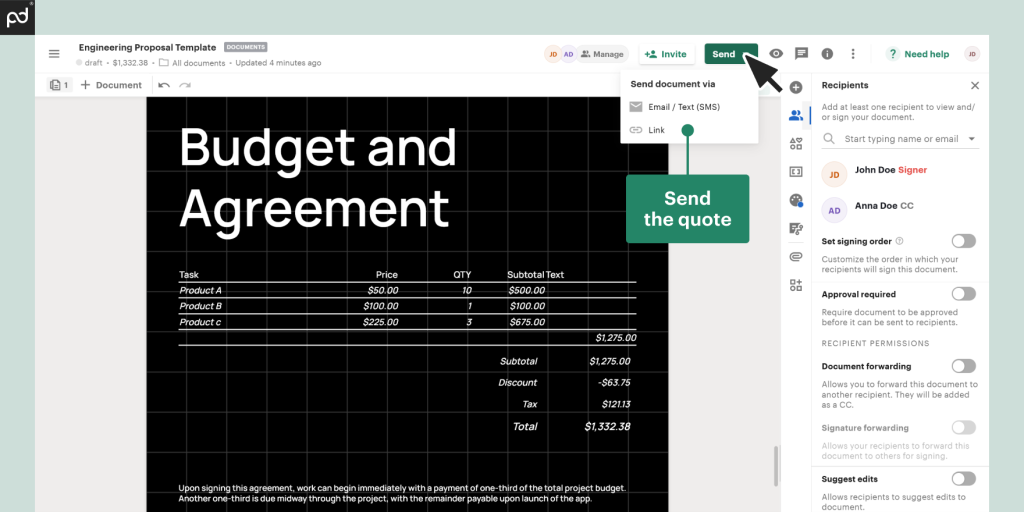
Example of a PandaDoc quote template for a manufacturing job
3. Retrieve products from the catalog or create one from scratch. You can divide them into sections.
4. Add Discount, Tax, and Fees fields.
5. Add product bundles and optional items, if applicable.
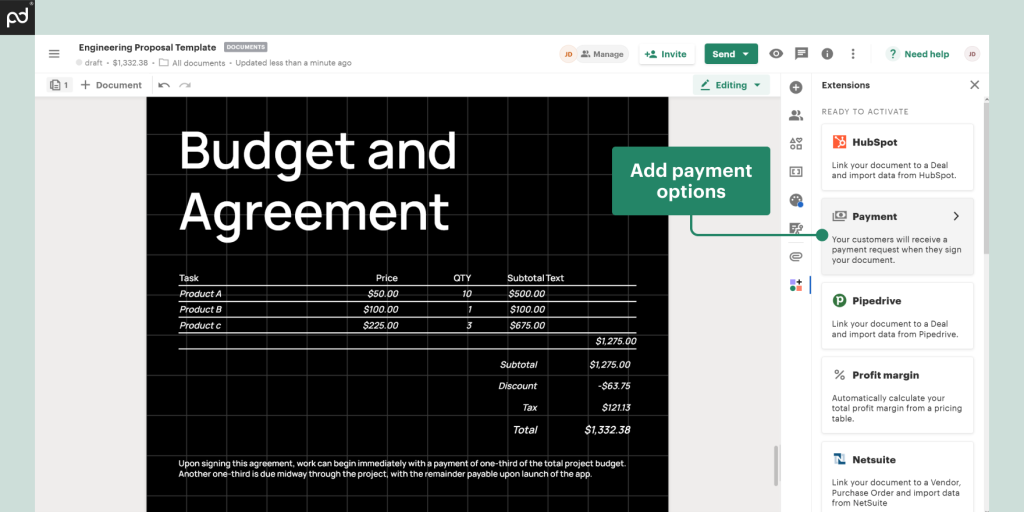
6. Go to integrations and choose your preferred payment option (we’ll use Stripe in this example; other options are available).
7. Set the amount and assign the payer.
8. Add other elements to the document (logo, checkbox, signature fields, etc.).
9. Tag the recipients and signatories via email.
10. Send the quote.
Keep an eye on important data
Monitoring quote metrics will help you, as a manufacturer or subcontractor, determine whether you’re doing something right or wrong.
For instance, the stats will show you whether a bill of materials with images and graphics will bring in more views and closed deals.
Some metrics to track include accuracy, turnaround time, customer satisfaction score, acceptance/rejection rate, request volume, and revenue.
Prioritize security and compliance
Since you’re working with sensitive business data, use encryption and security protocols to prevent unauthorized access.
Implement proper approval workflows and role-based access controls to make sure only authorized users can view or edit the document.
Make sure the manufacturing quoting software is compliant with ISO, GDPR (for personal data use), PCI DSS (for payments), and other relevant regulatory standards.
PandaDoc for manufacturing CPQ
PandaDoc provides manufacturing CPQ software designed to help teams configure complex products, automate pricing, and generate accurate quotes faster.
With configurable product rules, BOM-driven pricing logic, CRM integrations, approval workflows, and automated document generation, PandaDoc supports manufacturers in streamlining their quote-to-cash process. By centralizing configuration and pricing in one platform, PandaDoc helps reduce errors, improve margin control, and accelerate sales cycles for complex manufacturing environments.
Quoting software loved by manufacturers
The use of accurate quoting software for manufacturing projects guarantees faster turnaround times, competitive pricing options, and more revenue.
Features like document generators, CRM and payment gateway integrations, and analysis dashboards make it easier to generate detailed quotes for parts and entire machinery — and you can respond to RFQs with detailed data and pricing in minutes.
To learn firsthand how the PandaDoc platform can accelerate turning your manufacturing quotes into profitable contracts, book a demo with us.
Disclaimer
PandaDoc is not a law firm, or a substitute for an attorney or law firm. This page is not intended to and does not provide legal advice. Should you have legal questions on the validity of e-signatures or digital signatures and the enforceability thereof, please consult with an attorney or law firm. Use of PandaDoc services are governed by our Terms of Use and Privacy Policy.