Document automation democratizes information access, enabling diverse teams to communicate and collaborate more efficiently.
People are clearly hungry for these efficiency gains — a study commissioned by Salesforce found that over 90% of companies reported an increase in the demand for automation over the course of two years.
Manual document processing slows businesses down.
Finance teams re-key invoice data into spreadsheets. HR managers manually review onboarding packets. Sales reps copy contract details into CRMs after every signature. These repetitive tasks create bottlenecks, increase errors, and pull teams away from strategic work.
Automated document processing (ADP) solves these challenges by using software to capture, extract, and manage data from documents automatically. Modern ADP commonly includes data extraction and intelligent document processing (IDP). IDP uses AI and machine learning to extract structured data from unstructured files like PDFs, scans, emails, and images, transforming them into usable, system-ready information.
When executed correctly, automation works hand-in-glove to fuel growth trajectories for businesses.
So, how can you best automate document processing and achieve the highest ROI?
Keep reading to learn how intelligent document processing automation works, how to measure costs and benefits with respect to ROI, challenges to keep in mind, and potential use cases.
Key takeaways
- Automated document processing (ADP) leverages AI, machine learning, and robotic process automation to make working with documents faster and smarter.
- Cloud technologies empower ADP platforms by enabling scalability, cost savings, and a collaborative approach to document management.
- Adopting ADP solutions can significantly boost workflow productivity, maintain data integrity, and free up time for employees to focus on other tasks.
- The core challenges with ADP are data privacy concerns, software limitations, and implementation barriers — which professional ADP solutions can help resolve.
What is automated document processing?
Automated document processing (ADP) is the use of software to capture, classify, extract, validate, and route data from documents with minimal manual input.
Modern automated document processing often includes AI-powered capabilities that extract structured data from unstructured files such as PDFs, scanned images, emails, contracts, and digital forms.
Using technologies like optical character recognition (OCR), natural language processing (NLP), and machine learning (ML), ADP systems can interpret documents, identify key data points, and convert them into structured, searchable, system-ready information.
Instead of manually typing information from documents into systems, ADP automatically identifies important data such as names, dates, totals, contract terms, line items, and signatures, then routes that data to the appropriate tools.
The result is faster processing, fewer errors, improved compliance, and better decision-making.
Background of automatic document processing
ADP’s roots trace back to the 1960s and 1970s with word processors, personal computers, and key innovations like Jacob Rabinow’s 1965 optical character recognition (OCR) machine and IBM’s 1966 scanner.
In the 1990s, advances in machine learning and hardware improved document processing accuracy. By 2012, deep learning algorithms based on convolutional neural networks had revolutionized OCR, significantly improving automated document recognition.
The cloud plays a big part as well. The late 2000s and early 2010s saw cloud-based OCR services from Microsoft Azure, Google Cloud, and AWS.
Cloud computing also enables real-time collaboration, remote access, scalable storage, and cost savings, further enhancing ADP capabilities.
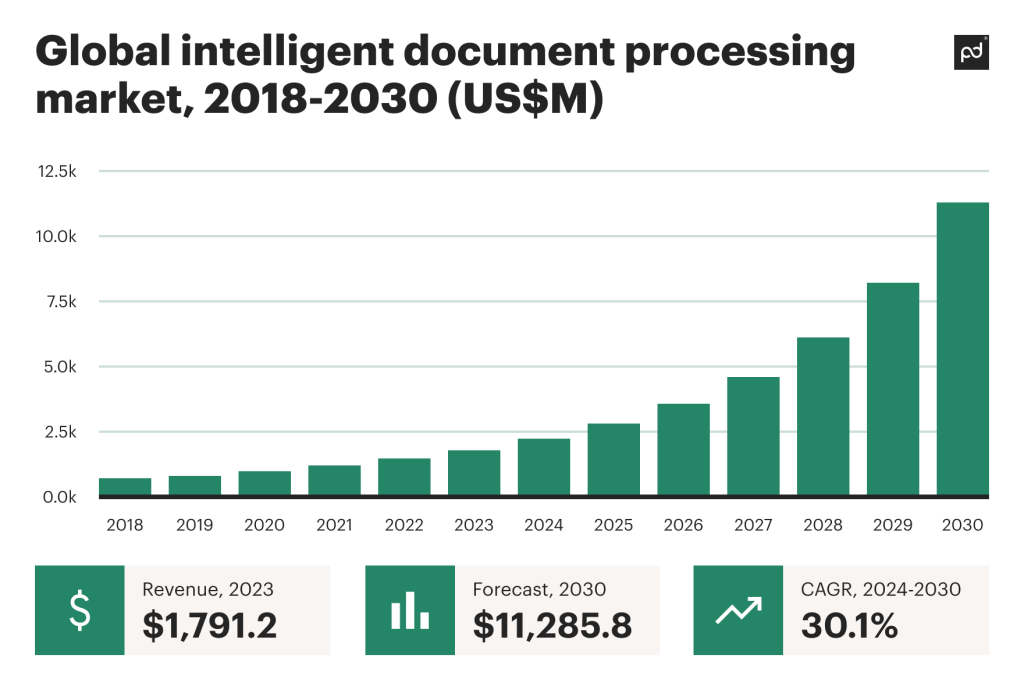
Today, the intelligent document processing market is projected to grow at a 30.1% CAGR from 2023 to 20305, driven by ADP’s efficiency in reducing manual, error-prone tasks.
Research by Gartner suggests that 50% of all B2B invoices globally will be handled via intelligent automation by 2025 — without manual input at all.
Automated document processing vs. intelligent document processing
A similar term, intelligent document processing (IDP), can be (and often is) used interchangeably with automated document processing, like in the above paragraph.
Automated document processing focuses on streamlining repetitive, rule-based tasks and extracting data from structured documents.
Intelligent document processing (IDP) extends these capabilities by applying AI and machine learning to unstructured or semi-structured documents such as contracts, emails, handwritten forms, and scanned files.
IDP can:
• Dynamically classify documents
• Extract structured data from unstructured formats
• Assign confidence scores to extracted data
• Trigger human review workflows when accuracy thresholds are not met
• Interpret contextual information within contracts and forms
In modern platforms, ADP and IDP capabilities are often combined to support end-to-end document workflows.
How automated document processing works
Automated document processing typically follows a structured workflow that transforms documents into usable data.
Document intake
Documents enter the system from multiple sources, including uploads, email attachments, scanned paper documents, cloud storage platforms, CRMs, ERPs, and web forms.
Data capture
Once ingested, the system uses OCR and AI-based data extraction to identify and extract relevant information. Advanced IDP capabilities allow the platform to extract structured data from unstructured documents such as invoices, contracts, forms, and scanned files. The system converts raw document content into structured, usable data fields that can integrate with business systems.
Validation and review
Extracted data is validated using predefined rules, cross-referenced with system records, and assigned confidence scores. If confidence levels fall below thresholds, human-review workflows are triggered to ensure accuracy and compliance.
Routing and approvals
Documents and extracted data are automatically routed to appropriate stakeholders for approvals, collaboration, or additional processing based on business logic.
Storage and system updates
Validated data is stored securely and pushed into integrated systems such as CRM, ERP, HRIS, accounting software, or payment gateways. Audit logs track every action to maintain compliance and transparency.
Automate and secure your documents
Streamline your workflows with advanced automation and secure your documents with top-tier encryption. Ensure compliance with HIPAA and other global standards.
Key benefits of automated document processing
Automated document processing is really useful when you want handling paperwork to be faster, easier, and more accurate.
Here are some of the top benefits of ADP:
1. Save time
ADP does the repetitive tasks for you, including data entry, so your team gets more time back for high-value work.
2. Reduce errors
Humans can make mistakes, so manual data entry tends to be more error-prone. ADP captures information from docs accurately and consistently, plus the use of AI and validation rules means everything is double-checked.
3. Lower costs
If you’re spending less time on manual work, you’ll naturally have lower labor costs (because machines are working for you). Plus, fewer mistakes mean you won’t spend money on extra expenses due to errors, misfiled documents, or delayed processing.
4. Make faster decisions
Your team gets access to information faster because data is automatically extracted and organized. This means faster insights and quicker business decisions.
5. Scale easily
ADP is capable of handling a high volume of docs without needing extra staff, so you can grow your operations without spending more on headcount.
6. Stay compliant
Automated systems keep clear digital records of document processing, which allows you to meet regulatory requirements and make audits simpler.
7. Improve customer experience
Customers get responses and approvals faster when their docs are processed quickly and accurately. This keeps them happy and confident in your service!
Role-specific benefits
Finance
Accelerates invoice processing, improves payment accuracy, reduces days payable outstanding, and enhances visibility into cash flow.
HR
Speeds onboarding, streamlines document collection, and improves employee record accuracy.
Revenue operations and sales
Provides better visibility into contracts, improves forecasting accuracy, shortens sales cycles, and reduces data transfer delays between systems.
Customer experience
Faster processing leads to quicker approvals, faster responses, and improved trust.
How to measure the ROI of automated document processing
When you need to quantify the financial returns from your investment relative to its cost, you implement a return on investment formula.
ROI = (Total revenue − Total costs) / Total costs x 100%
If your business already uses or plans on adopting ADP solutions, you can measure their effectiveness in terms of monetary benefits.
A positive ROI indicates profitability, while a negative ROI suggests the need for adjustments in the solution or its usage.
Measuring costs
When looking at the total costs, you should factor in these key expenses:
- Software licensing or subscription fees are your upfront cost for the software solution.
- Hardware and infrastructure expenditures, including servers and storage, can be substantial.
- Solution implementation and integration costs involve setting up the solution, integrating it with your existing systems, and making it functional.
- Training and change management that your team will require come with a price, but they are necessary to help your team make a smooth transition from legacy systems.
Key challenges in ADP addressed by professional document management solutions
Although automated document processing brings higher operational efficiency and ease to businesses, it can also present possible challenges and barriers to efficient implementation.
These potential roadblocks can often be neutralized with a dedicated tool for document management.
Data privacy concerns
Professional document management software employs the latest encryption methods and aligns with global security standards.
This provides you with a security framework that is compliant with E-SIGN, UETA and HIPAA regulations. Backed by SOC 2 certification, you can store, eSign and share documents with total confidence.
Software limitations
The diverse nature of business operations means document types and formats can vary widely.
Flexibility is at the core of a professional solution, and ever-changing business needs demand an automated document processing solution capable of responding to these complexities.
Tools with customizable templates and rich integration options easily expand the solution’s functionality per request. Consider the following integration capabilities:
- CRMs (Pipedrive, Salesforce, HubSpot)
- Payment gateways (PayPal, Stripe, Quickbooks)
- Communication channels (Slack, Microsoft Teams, etc.)
Cost concerns
With the large variety of pricing options, some ADP tools make it hard for businesses to scale without huge investments.
This is common with flat pricing structures, where you have to pay for features you may not even need (at least in the near future).
That’s why it’s best to seek a solution with either scalable pricing (per seat or per document) or a pay-as-you-go model.
This way, you get a plan more tailored to the features you need now, leaving space for scalability down the road.
Implementation barriers
Getting rid of manual document processing may feel like you are moving in the right direction until you face issues with proper implementation and staff training.
And even with tools that have little to no learning curve, you still need to adjust to a new tool without completely ruining your existing processes.
A smooth transition from outdated to automated processes ideally involves:
- Training resources and a help center offered by the tool you choose
- Onboarding assistance and dedicated support teams
- Webinars on the platform’s capabilities
Use cases and real-life examples of ADP
Here are some real-world case studies that will clearly show you why ADP is a bridge connecting piles of scattered documents into a cohesive structure.
Tax and accounting
AI-powered document processing categorizes tax documents, extracts relevant data, flags discrepancies, and summarizes financial insights.
Healthcare
ADP systems streamline patient records, insurance claims, and billing documentation while reducing administrative workload.
Inventory and order management
Automated workflows update inventory levels, process purchase orders, and streamline proposal generation and eSignatures.
Education
Automation reduces administrative paperwork, accelerates enrollment processing, and simplifies financial documentation.
ADP tools and software
When choosing an automated document processing solution, evaluate the following capabilities:
Security
Encryption, access controls, audit logs, and compliance certifications.
Scalability
Ability to handle increasing document volumes without performance degradation.
Integrations
Seamless connections with CRM, ERP, HRIS, accounting systems, payment gateways, and collaboration platforms.
AI data extraction and IDP capabilities
Ability to extract structured data from unstructured documents including invoices, contracts, forms, emails, and scanned files. Look for high accuracy rates, confidence scoring, and configurable human-review workflows.
Support for multiple document types
Invoices, contracts, onboarding forms, financial statements, scanned records, and digital agreements.
eSignatures
Built-in eSignature functionality enables faster approvals within a unified system.
Analytics and reporting
Insights into processing efficiency, bottlenecks, error rates, and ROI.
AI-powered intelligent document processing helps instantly categorize all the documents, extract relevant data, and compare them with previous years’ filings.
As the user uploads documents, the system immediately flags discrepancies between a vendor invoice and a corresponding bank transaction.
An IDP solution can also summarize the view of the user’s financials and offer insights based on the tax bracket and industry norms.
Optimizing inventory and order management
With the countless components, raw materials, and finished products to track, and a myriad of customer orders, manual handling of vast data can result in costly errors.
Knowing that, Rakuten Super Logistics turned to PandaDoc and, as a result, streamlined document workflows and elevated the customer experience.
By adopting an automated system, the manufacturing facility can scan, categorize, and process documents related to inventory and orders.
The system updates inventory upon receiving raw materials and flags potential shortages when customer orders come in, enabling proactive management and efficient fulfillment.
Likewise, document workflows across other departments have been transformed.
The sales team can now quickly create and send professional proposals, even during calls, reducing sales cycle times and boosting close rates.
The customer experience has improved with easy eSigning, replacing the old print-and-scan process.
This not only saves time but also positions Rakuten Super Logistics as a modern and efficient partner in e-commerce fulfillment.
Minimizing the costs of education
The educational sector is primarily focused on imparting knowledge. However, it also manages student enrollment, academic records, financial aid, and the admin needs of faculty.
If administrative tasks are inefficient, it can hinder the education process. This could cause educational institutions to stray from their core mission.
For example, the founders of the educational program Digital Remit provide workshops and education to business owners around Oxford, London.
Previously, they had their participants spend an hour of each workshop filling out actual (paper-based) paperwork before introducing a document automation system.
Now, with that one change in place, they cut document creation time by 90% and freed up 30% of their teachers’ time.
Furthermore, the IDP system can help with financial tasks. It can automate the collection of fees, the payment of scholarships, and the processing of grant applications.
By minimizing manual work, this institution saves on administrative expenses, and that can allow for spending more on research, facilities, and student services.
Effortless transition to automated processes
Automate your document handling with ease. Benefit from comprehensive support and training to ensure a smooth transition from manual processes.
Embrace the power of ADP for your business
Automated document processing stands as a beacon of efficiency, turning routine document tasks into insightful, data-driven actions.
With proper intelligent document processing operating in your business’s backyard, your team can focus on human-centered and mission-critical tasks.
Once you’ve committed to implementing automated document processing, choose a software that grasps the complexities of ADP and ensures a smooth integration process.Schedule a free demo to learn more about PandaDoc solutions for automated document processing.
FAQ
What is the difference between IDP and RPA?
Intelligent document processing (IDP) and robotic process automation (RPA) are both automation technologies, but serving different purposes. IDP uses AI to understand and extract data from complex or unstructured documents. RPA automates repetitive tasks and workflows in software systems. The two techs are often used together, with IDP extracting data and RPA moving it into other systems automatically.
What are the three phases of document automation?
Here are three phases of document automation:
- Capture: Collecting and digitizing documents from various sources.
- Processing: Extracting, classifying, and validating the data.
Integration: Sending the validated data into business systems for use in workflows, reporting, or analytics.
How does automated document processing improve data accuracy?
ADP automates data entry and extraction, which means there’s less room for human error. With built-in validation rules, AI checks, and cross-referencing with data sources to make sure the info captured is correct and consistent, your team will have cleaner, more reliable data.