How to write an invoice: Steps, checklist, and free templates
Reviewed by:

Ashley Kemper
SVP of Marketing
How to write an invoice: Steps, checklist, and free templates
You’ve finished the job. Now you need to get paid, and that starts with a clear, accurate invoice.
To write an invoice, add your business details, your client’s details, a unique invoice number, the issue and due dates, an itemized list of what you’re charging, the total with any taxes, and your payment terms and methods. Each detail prevents a question that could delay payment.
This guide walks through each step, with a checklist of required details, examples of finished invoices, and a template you can copy and adapt.
What does an invoice look like?
An invoice is a one-page document that lists the work you did, what the client owes, and how to pay. Most invoices follow the same layout, so clients can find what they need quickly.
A typical invoice includes these sections:
Header: The word “Invoice” at the top. Some tax systems, such as Australia’s GST, require “Tax Invoice” instead.
Business details: Your company name, address, phone number, email, and logo.
Client details: The client’s name and billing address.
Invoice details: The invoice number, issue date, and payment due date.
Line items: A table of each product or service, with its quantity, unit price, and line total.
Totals: The subtotal, any taxes or discounts, and the amount due.
Payment terms: When payment is due (e.g., Net 30) and which payment methods you accept (e.g., bank transfer, card, or check).

Get free invoice templates from our library.
What to include on an invoice
Every invoice needs the same core information. Miss one field and you give the client a reason to delay payment or ask a follow-up question.
The checklist below covers what every invoice should have.
Business name and contact details
Put your company name, address, phone number, email address, and logo at the top of every invoice.
If your business is registered for tax purposes, include your tax ID or VAT number here as well.
Client details
Include your client’s full name or business name, billing address, and the name of the contact person responsible for payment if you have it.
Invoice number
A unique identifier for each invoice, for example, INV-001 or a sequential alphanumeric code. Including the number makes it easy to track payments and match records on both sides. Never reuse an invoice number.
Invoice date and due date
The invoice date is the day you issued the document. The due date is the payment deadline.
If you delivered the work on a different date, note that separately so the client’s records are accurate.
Itemized goods or services
List each product or service on its own line, with a description, quantity or hours, unit price, and line total.
Be specific.
Subtotal, taxes, discounts, and total
Show the subtotal first, then list any taxes, fees, or discounts on separate lines.
Make the final total amount due prominent and unambiguous.
Payment terms and methods
State when payment is expected, “due upon receipt” or “Net 30,” for example. List the payment methods you accept, such as bank transfer, credit card, check, or a payment link.
If you charge late fees, say so here.

How to write an invoice, step by step
1. Add your branding and business details
Your invoice should be immediately recognizable as coming from your business. Place your logo at the top and use your brand colors and fonts throughout.
If you don’t have a logo, even a clean text header with your business name works.
Below your logo, include:
Your business name
Your mailing address
Your phone number
Your email address
Your tax ID or business registration number, if applicable in your region
A consistent, professional header builds trust and makes your invoices easier to find and file.
2. Add your client’s details
Include your client’s full name or business name, billing address, and, if you have it, the name of their accounts payable contact.
Getting these details right saves time—an invoice sent to the wrong person or address gets delayed.
3. Assign a unique invoice number
Every invoice needs a unique identifier so you and your client can reference it without confusion. A simple sequential system works well for most businesses: INV-001, INV-002, INV-003, and so on. You can also build in a year or client code, such as INV-2026-001, if that helps your records.
Never reuse an invoice number. Once you issue it, it’s permanent.
4. Add the invoice date and due date
The invoice date is the day you issued the document. The due date is the payment deadline.
Place both near the top of every invoice.
If you delivered the goods or completed the work on a different date, note that separately. Some clients and tax systems require a service or supply date distinct from the issue date.
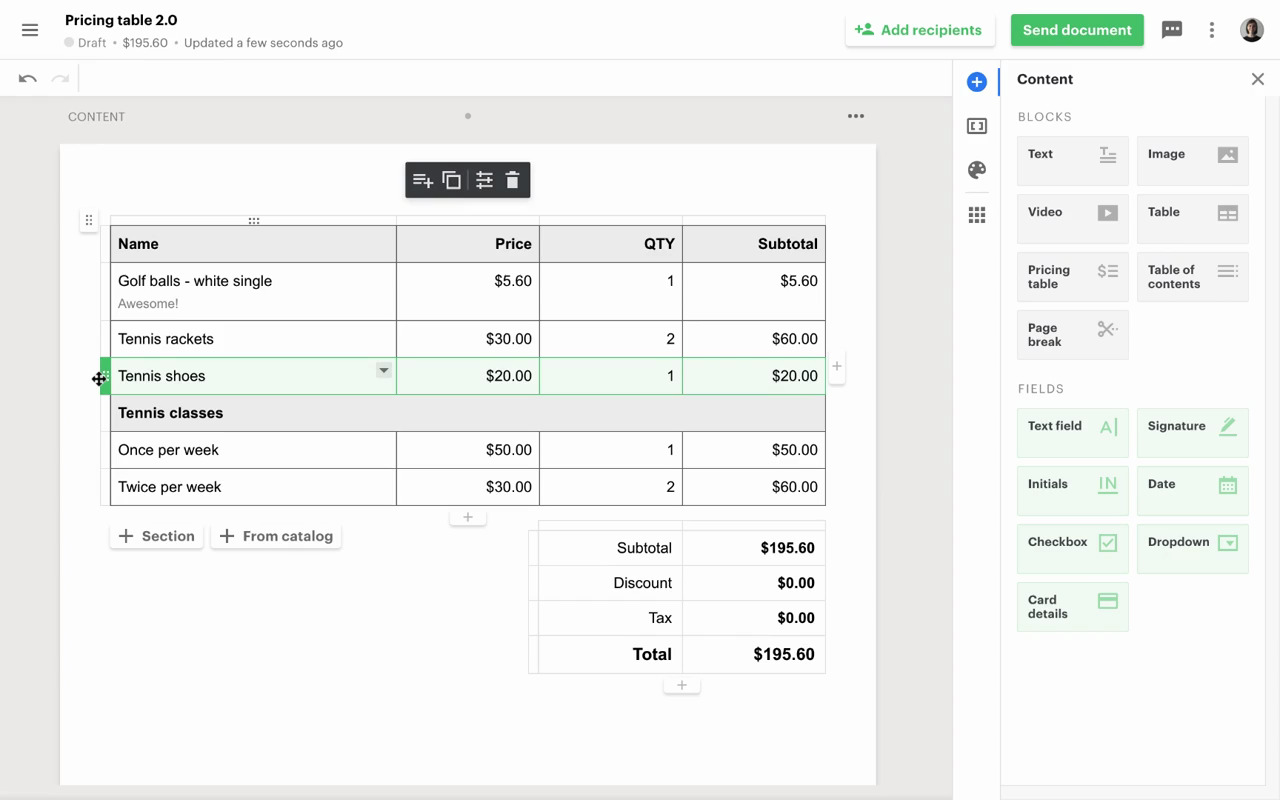
5. Itemize goods or services
List each product or service on its own line.
For each line item, include:
A clear description of what you provided
The quantity or number of hours
The unit price or hourly rate
The line total
Vague descriptions, such as “consulting services” or “project work,” invite questions and slow down payment. Be specific enough that the client can match each line to something they approved or received.
PandaDoc’s Quote Builder lets you add and organize line items directly inside your invoice template, with automatic calculations for each row.
6. Calculate totals, taxes, and discounts
Below your line items, show:
Subtotal: the combined total of all line items before adjustments
Taxes: List each applicable tax on its own line, such as sales tax or VAT, with the rate applied
Discounts: If you’ve agreed to a discount, show it as a separate line so the math is transparent
Total amount due: The final balance, prominently displayed
Double-check your math before you send. Even a small calculation error can delay payment while the client waits for a corrected version. Tax rules vary significantly by location and business type, so verify which taxes apply to your goods or services before you invoice.
7. Set your payment terms
Payment terms tell the client when you expect payment.
The most common invoice terms and conditions are:
Due on receipt: Payment is expected immediately upon receiving the invoice
Net 15: Payment is due within 15 days of the invoice date
Net 30: Payment is due within 30 days of the invoice date
Agree on terms with your client before you deliver the work. An invoice is not the right place to introduce terms the client hasn’t already accepted.
If you charge late fees, state them clearly: the percentage or flat amount, and when they start to apply.
Many businesses add a line such as “A 1.5% monthly fee applies to balances unpaid after 30 days.” Whether you enforce it or not, the warning often moves invoices to the top of the queue.
8. Choose your payment methods
List the payment methods you accept and include enough detail for the client to act without emailing you. For bank transfers, include your account number and routing number. For online payments, include a link.
Common options include:
Bank transfer (ACH or wire)
Credit or debit card
Check
Online payment platforms such as PayPal or Stripe
Mobile payments
When choosing which methods to offer, weigh three things: cost (card processing fees add up), convenience (checks require a bank trip and a hold period), and what your clients actually use.
Accepting a method that works for you but frustrates your client slows down payment.
9. Send your invoice and follow up
Send your invoice as soon as the work is complete or the goods are delivered. Delays on your end signal that payment isn’t urgent. A PDF attached to an email is standard, but invoicing software lets you send a tracked link so you can see when the client opens it.
Build a simple follow-up habit:
Send a reminder a few days before the due date
Follow up again on the due date if payment hasn’t arrived
Escalate to a formal notice if the invoice goes significantly past due
A polite, timely reminder isn't pushy. Most late payments aren’t intentional; they’re overlooked. For more on timing and wording, see our guide to sending payment reminders.

Invoice example
Here's an invoice example for a hypothetical company.

Get professional invoice templates from PandaDoc.
Invoice tips for freelancers and small businesses
Invoicing as a freelancer or small business owner is straightforward with a consistent process. A few habits make a real difference in how quickly you get paid.
Invoice immediately. Send your invoice the same day you deliver the work or finish the project. The longer you wait, the more likely payment is to slip down your client’s priority list.
Agree on terms before you start. Discuss payment terms, rates, and scope with your client before you start. Your invoice should confirm what both parties already expect.
Include a purchase order number if your client requires one. Larger companies often won’t process an invoice without a PO number tied to an approved purchase order. Ask about this at the start of an engagement.
State your late fee policy. Even if you rarely enforce it, including a late-fee clause—such as 1.5% per month on overdue balances—gives you leverage and often motivates faster payment.
Specify the currency. If you work with international clients, label the total clearly: USD, CAD, EUR, or whichever currency applies.
Use a template so you don’t miss anything. A consistent template means you’re not rebuilding the document from scratch each time or forgetting a field under deadline pressure.
Sales tax and VAT on invoices
Tax requirements on invoices vary depending on where your business is registered, where your client is located, and what you’re selling. This section covers the basics for US-based businesses and a general note on VAT.
US sales tax
In the United States, sales tax is governed at the state level, not federally. Whether you’re required to collect and remit sales tax depends on your business type, your products or services, and whether you have nexus, a taxable presence, in the states where your clients are located. If sales tax applies, list it as a separate line item on your invoice with the rate applied.
Tax rules vary significantly by state and change frequently. Consult your state tax authority or a qualified accountant to confirm your obligations. The IRS website is a reliable starting point for federal tax questions.
VAT
Value-added tax (VAT) is used in more than 160 countries, including all EU member states. If your business is VAT-registered, you’re typically required to issue VAT invoices that include your VAT registration number, the applicable VAT rate, and the VAT amount charged per line item.
VAT rules differ by country and transaction type. If you invoice clients outside your home country, your obligations may change. Check with your local tax authority or a qualified accountant before invoicing international clients.
PandaDoc’s Quote Builder lets you add taxes as separate line items with the rate applied, so your totals calculate automatically, and your invoice stays compliant.
Keeping invoice records
Good recordkeeping protects your business during tax season, audits, and payment disputes.
The habit is simple: save a copy of every invoice you send and receive, and organize them so you can find what you need quickly.
How to organize your records
Pick a storage system and use it consistently, such as a dedicated cloud folder, accounting software, or invoicing software that saves documents automatically. Whatever you choose, apply a logical naming format so files are searchable.
A common approach: date, invoice number, and client name, for example, 2026-10-21_INV-042_AcmeCorp.pdf.
Track every invoice's status: draft, sent, paid, overdue, or canceled. A simple spreadsheet works for low volume. Accounting software handles this automatically at scale.
What to keep
Hold on to records for invoices you’ve issued to clients, invoices you’ve received from vendors, contractor and payroll records, and documentation for significant equipment or asset purchases.
How long to keep them
Retention requirements vary by country, tax authority, and business type. In the United States, the IRS provides guidance on how long to keep business records. If you operate in multiple countries or have complex tax obligations, consult a qualified accountant.
As a general rule, don’t discard records until you’ve confirmed your retention obligations with a reliable source.
Back up your data
Enable automatic cloud backups or run regular local backups. An invoice you can’t produce during an audit is as good as one that never existed.
Create and send invoices with PandaDoc
A well-written invoice is only useful if you can send it quickly and get paid without friction. PandaDoc handles both.
Start from a template built for your business type, fill in your details, and send. When your client receives the invoice, they can review it, e-sign where required, and pay directly from the document.
PandaDoc offers invoicing software to help you create and send professional invoices. PandaDoc Payments lets you collect payment at the moment of signing, so your client doesn’t need a separate step, and you don't have to wait for funds to clear. PandaDoc automatically stores every invoice, with a full audit trail of when it was opened, signed, and paid.
Ready to get started? Try PandaDoc free for 14 days.
Frequently asked questions
Every invoice needs your business details, your client’s details, a unique invoice number, the invoice date and due date, an itemized list of goods or services, a total with any taxes or discounts applied, and your payment terms and methods.
See the full checklist above.
Use a sequential system that increments by one for each new invoice and never repeats. A simple format like INV-001, INV-002, INV-003 works for most businesses. You can add a year or client code if it helps your records, for example, INV-2026-001.
A few practices that keep your numbering clean:
Use leading zeros so numbers sort correctly in folders and spreadsheets: 001 before 01 before 1.
Never reuse a number, even if you cancel or void the original invoice. Issue a credit note instead and move on.
Don’t backfill gaps. If you skip a number by mistake, note it in your records and continue with the next one.
Net 30 means the client has 30 days from the invoice date to submit payment. It’s one of the most common payment terms in business-to-business invoicing.
The same structure applies to other common terms: Net 15 gives the client 15 days, and Net 60 gives them 60 days. “Due on receipt” means payment is expected immediately.
Which terms you use depends on your cash flow needs, your industry, and your relationship with the client. Freelancers and small businesses often start with shorter terms, such as Net 15 or due on receipt, to reduce the gap between completing work and getting paid.
Larger clients may push for Net 30 or Net 60 as a standard condition of doing business.
Whatever you agree on, confirm it with the client before the work starts and state it clearly on every invoice.
No. Late fees are optional, and most businesses don’t charge them on every overdue invoice.
If you plan to charge one, state the policy on the invoice—and ideally in your contract or agreement before the work begins. Springing a late fee on a client who never agreed to it damages the relationship and may not be enforceable.
If you do include a late fee, be specific: state the amount or percentage and when it kicks in. A common approach is a flat fee or a monthly percentage, such as 1.5% per month, applied to balances unpaid after the due date.
Late fee enforceability varies by jurisdiction. Check the rules in your state or country before adding terms you may not be able to collect on.
An invoice requests payment before or after delivery; it tells a client what they owe. A receipt confirms that payment has already been made. For a full breakdown, see our guide on invoices vs. receipts.
How to write an invoice: Steps, checklist, and free templates
Reviewed by
Ashley Kemper
SVP of Marketing
Ashley Kemper leads the global Marketing team at PandaDoc. She's built and scaled marketing programs from the ground up at Asana and launched new brands at Double and HyperComply. Before moving into marketing, she spent years as a digital media producer and graphic designer at National Geographic, Agence France-Presse, and Government Executive. Fun fact: Ashley has survived five cross-country moves with her wife, Malorie, and their French Bulldog, Frannie.