
Quoting mistakes cost small businesses time, money, and deals. If you’re running a startup or managing sales at a growing company, you can’t afford clunky spreadsheets or confusing price lists. You need a CPQ (configure, price, quote) system that’s fast, accurate, and built for your business size.
In this article, we break down why CPQ is essential for small businesses, how it works, and the top tools to consider.
Key takeaways
- CPQ for small businesses can streamline the sales cycle, removing bottlenecks that hinder the smooth generation and delivery of quotes.
- You can integrate your CPQ solution with multiple CRM and ERP platforms to centralize all sales data.
- CPQ solutions use automation, guided selling, upselling, and product bundling to maximize profits and satisfy customer needs.
- Before choosing a quote software, ensure it meets your business’s needs and budget. You also need functionality, usability, and customizability.
What is CPQ for small businesses?
CPQ (configure, price, quote) is a sales tool that helps small businesses quickly create accurate and customized quotes for their products or services.
The software is usually cloud-based and automates key parts of the sales process by guiding users through product configuration, applying pricing rules (including discounts or bundles), and generating professional quotes.
For small businesses, CPQ reduces manual errors, speeds up quoting, and ensures consistency in pricing and product offerings.
Benefits of CPQ for small businesses
Sales teams at small businesses often have significant budget constraints.
Adding CPQ software to your toolkit as an SMB can significantly improve your day-to-day sales operations. You can do this by automating product and/or service configurations and prices and generating error-free proposals and quotes.
Here’s how CPQ software helps small businesses:
- Improve productivity by establishing a streamlined system for creating, updating, and delivering professional quotes without bottlenecks. Since team members in a small business environment need to wear several hats, using a CPQ solution will help them manage their time efficiently.
- Customize quotes involving complex products for customers in order to add a personal touch and stand out. Personalization will also increase the chances of a small business outbidding established enterprises while creating a brand presence.
- Enter negotiations against other SMBs and corporations with the upper hand, having access to pricing trends and industry forecasts at every stage of the sales cycle.
- Automate processes by removing manual, redundant tasks that lead to delays within the sales pipeline. This will help your small business spend less and stay competitive with industry mainstays.
- Improve accuracy and reduce mistakes. Manual quoting processes are easy to mess up, which can lead to unhappy customers and ultimately, lost sales, not to mention the time it takes to go back through and fix these errors. CPQ software minimizes these risks by automating complex calculations, so you can rest assured that your SMB’s configurations and prices are always accurate
- Close deals faster and shorten the sales cycle by reviewing quotes using templates. As an SMB, it’s important to provide your sales team with tools to do their job better and with more accuracy. CPQ is one tool that can help significantly reduce the time it takes to transition from proposal drafting to closing a deal. Accurate and fast replies make up the difference between winning and losing a sale.
- Integrate your sales tool with payments, CRM, and ERP systems to reduce the amount of apps/tools needed to acquire and implement these solutions individually.
- Provide better customer experience by fulfilling real user needs in order to guarantee returning, loyal customers for your brand.
- Better forecasting. decision-making, and service recommendations through the help of analytics tools, data visualization, and error-free reporting. CPQ systems are built with you in mind, meaning they have analytics capabilities that provide insights into your SMB’s sales trends, pricing effectiveness, and customer data such as preferences.
- Improve collaborations by seamless data sharing between teams and clients.
- Fulfill all business needs while maximizing profitability and avoiding pricing mistakes.
What features does CPQ offer for SMBs?
Your small to mid-sized business requires attention to detail when selecting the right tools to make your operations efficient and smooth.
For CPQ, look for software with the following key features:
Product and service configurations
Look for a CPQ that can configure products or services to meet specific customer needs, especially ones that can handle all combinations (depending on your industry, some offerings are more complex than others).
Real-time pricing adjustments
CPQ should consider a multitude of factors, including costs, discounts, and current market conditions. This helps you remain competitive in the market while still generating a profit from the sales of your services and goods.
Quote generation
CPQ helps to automate the quoting process, reducing manual effort and the potential for human error (which can cost you in time and money).
Integrations
Your CPQ tool should easily connect to your existing CRM, ERP, and other business systems to help you maintain data consistency and smooth operations.
Guided selling
These tools assist sales representatives in selecting the ideal products or services for their existing and new customers based on their needs.
Having a guided selling tool in place can promote personalization, which leads to satisfaction and long-term loyalty of your customer base.
Learn more about CPQ requirements here.
Does your business need CPQ software?
Any company that provides priced services needs a CPQ solution.
Whether it is a one-time quote for a project or a recurring deal, you need CPQ software with automation capabilities.
Here are industries (with emphasis on niches carved out by small businesses) where using CPQ software is an absolute necessity:
- Manufacturing and construction (specialized parts manufacturer)
- Tech companies (newly formed financial advisory firms, startup building consumer apps)
- Bespoke fashion (custom branded clothing, hand-made boutique items)
- Product sales and services (small-batch or high-ticket items, specialty service offerings)
- Marketing and sales (smaller agencies targeting specific client demos)
- Maintenance and repairs (standalone auto parts or hardware stores)
- Tourism (mom-and-pop travel agencies, local logistics companies)
- Legal (young lawyers starting a firm on their own)
CPQ for regional businesses
CPQ is especially useful for regional businesses because it simplifies complex quoting across multiple locations. Whether you’re managing varying tax rates, shipping costs, or region-specific discounts, CPQ helps you automate and standardize your quoting processes to save time, reduce errors, and scale efficiently.
Key benefits of CPQ for regional businesses:
- Localized pricing: Set up region-specific pricing tables, currencies, and discount structures to ensure quotes reflect local market conditions
- Accurate, consistent quotes: Built-in product and pricing rules help eliminate manual errors and ensure every quote follows your defined logic and regional variations
- Streamlined sales process: Automate quote generation and approvals so sales teams spend less time managing spreadsheets and more time closing deals
- Enhanced customer experience: Deliver professional, location-appropriate quotes quickly, improving response times and customer satisfaction
- Simple scalability: Easily update pricing, products, and templates as your business expands into new regions.
Integrated workflows: Connect with CRMs like Salesforce or HubSpot to keep regional customer data, pricing, and quote activity in sync.
5 CPQ solutions for small businesses
We’ve done the research for you and handpicked a few CPQ solutions suitable for SMBs. We’ll start with PandaDoc CPQ and use it as the yardstick for comparison.
| Platform | Best for | Starting price |
| PandaDoc CPQ | Best overall: Easy to use with a drag-and-drop editor, pre-built templates, built-in eSignatures, real-time tracking, and CRM integrations. Ideal for small to mid-sized businesses that value speed and ease of use. | Custom pricing (contact us) |
| Salesforce Revenue Cloud | Enterprise-level teams needing deep CRM integration, advanced pricing rules, and full quote-to-cash automation within the Salesforce ecosystem. | From $75/user/month (Growth) $150/user/month (Advanced Plus) |
| Oracle CPQ | Medium-to-large businesses that require advanced configuration, pricing, and guided-selling tools across complex catalogs and global teams. | From $240/user/month |
| IBM Sterling CPQ | Large organizations selling complex products across multiple channels, who need rule-based configuration, consistent pricing, and CRM/eCommerce integrations. | Custom pricing (contact IBM) |
| SAP CPQ | Companies already using the SAP ecosystem that need large-scale quoting, guided selling, and ERP/CRM integration. | Custom pricing (contact SAP) |
PandaDoc CPQ
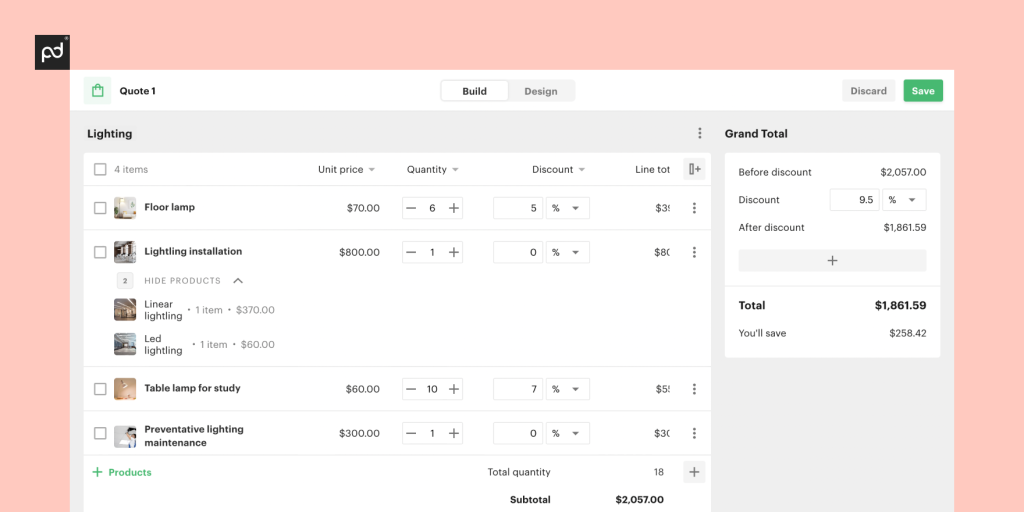
PandaDoc CPQ helps small businesses close deals faster by making quoting and proposal creation simple, accurate, and professional.
The best thing? PandaDoc CPQ is easy to use and implement; no technical expertise is required
PandaDoc has the tools for startup owners and independent contractors to configure personalized, accurate quotes in minutes. Choose from ready-made templates, adjust pricing automatically with built-in product catalogs, and instnatly generate on-brand propsals.
As a small business owner looking for personalized quotes that reflect your brand’s identity, look no further than the PandaDoc CPQ.
“Upgrading our subscription to take advantage of PandaDoc CPQ for HubSpot has been well worth it. I had tried other CPQ options and they were all subpar. I’m super happy with our choice and can’t stress enough how much we needed this solution” – Emerson McCuinDirector of Revenue Operations at HAAS Alert (SMB)
With PandaDoc CPQ, you can:
- Create accurate quotes in minutes using drag-and-drop templates.
- Customize every detail: Add your logo, headers, and branded visuals effortlessly.
- Integrate seamlessly with CRMs like HubSpot, Salesforce, and Pipedrive and payment platforms to automate the quote-to-cash process.
- Access real-time insights with built-in document analytics, so you know exactly when clients view or engage with your proposals.
- Close deals instantly with legally binding eSignatures that make approvals and contracts frictionless.
- Add logos, headers, and other custom fields to your sales quotes within minutes.
Salesforce CPQ
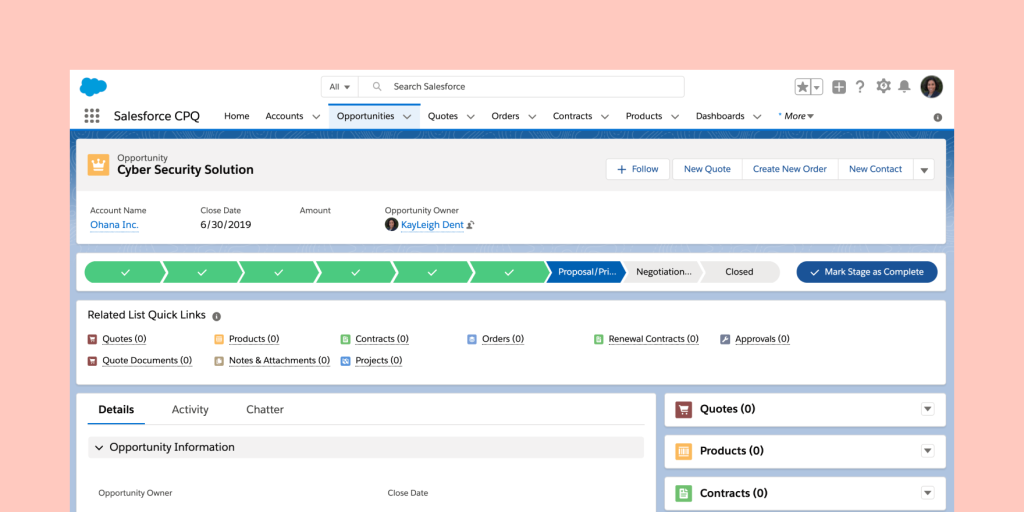
Salesforce CPQ, now Revenue Cloud Advanced (RCA), is a revenue lifecycle management platform and quote-generation tool. RCA is part of the Salesforce ecosystem, which includes Sales Cloud, Service Cloud, Marketing Cloud, and more.
Key features include:
- Centralized product catalog. Manage all products, bundles, and pricing in one place.
- Flexible pricing and discounting. Handle advanced rules, tiers, and promotions.
- Guided product configuration. Build custom bundles or remove options automatically based on set logic.
- Integrated quote-to-cash. Convert quotes to orders, invoices, and revenue records within Salesforce.
Built-in analytics. Use Salesforce reporting for forecasting and performance insights.
Users can choose from two different pricing plans:
- Revenue Cloud Growth
- Revenue Cloud Advanced
Salesforce CPQ vs PandaDoc CPQ
RCA is best for larger or more complex sales organizations that need detailed pricing structures, multiple sales channels, or deep CRM integration. It’s a powerful platform, but can require more setup and ongoing management compared to lightweight tools.
PandaDoc CPQ is designed for growing teams that want to build and send accurate quotes quickly — without the steep learning curve or setup time of enterprise systems.
PandaDoc CPQ focuses on ease of use, fast setup, and affordability, making it ideal for small to mid-sized businesses that want to streamline sales without extra complexity.
We also want to make sure you’re up and running fast and ready to implement our CPQ software quickly. To do this, our Implementation team provides consulting and resources for client-led implementation.
Learn more about CPQ onboarding with PandaDoc.
Oracle CPQ
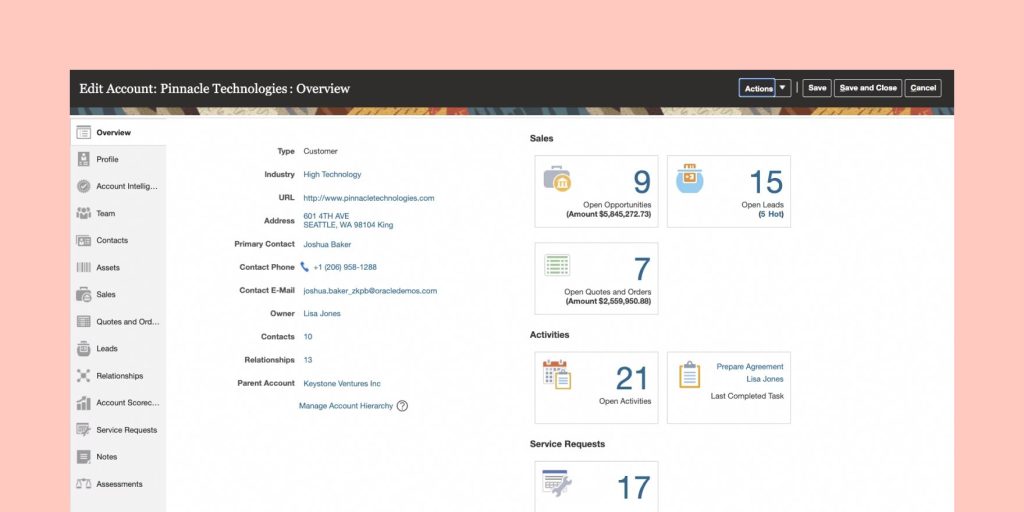
Oracle CPQ is a SaaS CPQ tool designed for companies that need advanced configuration, pricing, quoting, and revenue workflows.
Sales teams or business owners can use Oracle CPQ to configure complex products, bundles, subscriptions, and license contracts. Guided-selling features help recommend appropriate products and services, and built-in approval workflows, pricing engines, and discount logic support high degrees of customization.
Key features:
- Advanced configuration and pricing rules. Manage complex products, bundles, and discounts
- Guided selling. Recommend the right products and options based on customer needs.
- Subscription and renewal management. Support recurring billing and contract renewals when connected with Oracle Subscription Management.
- Automated document generation. Create professional quotes, proposals, and contracts in formats like PDF, Word, or Excel
- Integrations across Oracle Cloud. Connect with Oracle Commerce, CRM, and ERP applications for a unified quote-to-cash process.
The starting price is around $240 per user per month.
Because of its enterprise-grade features and flexibility, Oracle CPQ can be more complex to set up and manage compared to simpler quoting tools.
Oracle CPQ vs PandaDoc CPQ
Based on pricing and complexity, Oracle CPQ ($240/month) is typically a better fit for medium to large enterprises that need advanced configuration, pricing, and guided-selling tools.
PandaDoc CPQ is ideal for small and growing businesses that value speed, simplicity, and ease of use.
While Oracle CPQ includes more advanced guided-selling and product-recommendation features, PandaDoc CPQ focuses on a faster, more intuitive quoting experience designed to help smaller teams close deals quickly.
Learn more about PandaDoc CPQ vs Oracle CPQ.
IBM Sterling CPQ
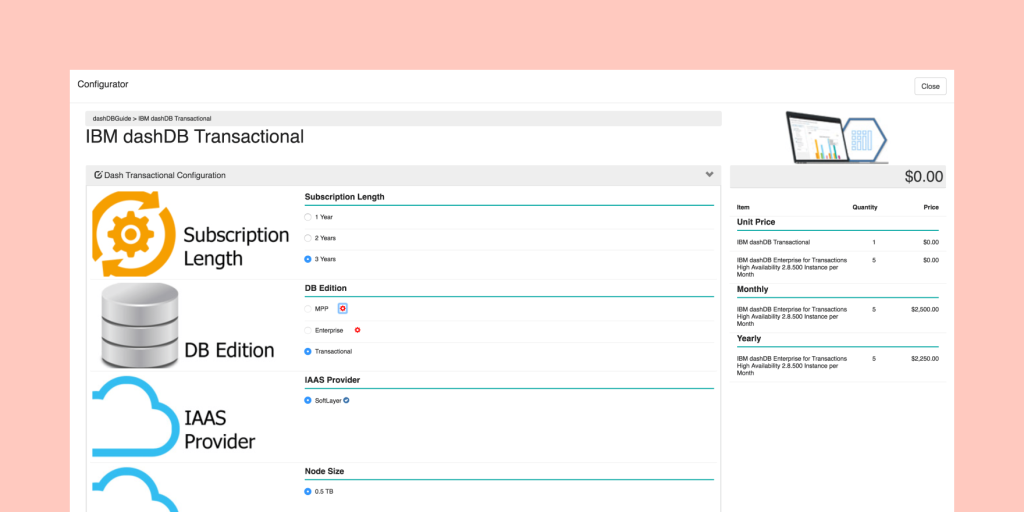
IBM Sterling CPQ is a cloud-based CPQ tool built to help organizations sell complex products and services across multiple channels. It supports sales teams, e-commerce platforms, call centers, and partner networks in configuring bundles, managing pricing, and converting quotes into orders.
Key features:
- Product and bundle configuration. Users can select and assemble products, services, and options based on business rules.
- Pricing automation. Centralizes pricing logic for consistent pricing across channels.
- Guided selling. Help sales teams recommend the best products or bundles for customer needs.
- CRM Integrations. Connect with major CRMs, ERPs, and eCommerce systems.
IBM Sterling CPQ does not list pricing on its website, but you can contact the company to learn more about custom pricing options.
IBM Sterling CPQ vs PandaDoc CPQ
With its advanced features and enterprise-grade setup, IBM Sterling CPQ is best suited for large organizations that sell complex products across multiple channels.
On the other hand, PandaDoc CPQ offers a simpler, faster, and more affordable experience, ideal for small and growing businesses that need to create and send accurate quotes without complex setup or heavy configuration.
SAP CPQ
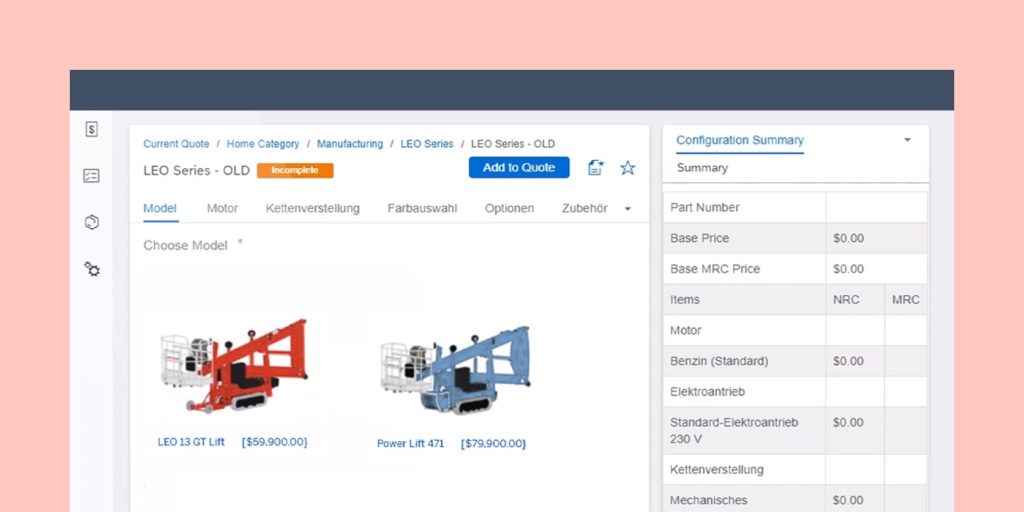
SAP CPQ is a multi-tenant application that enables sellers to deliver the perfect quotes to customers. Its embedded AI automates quoting by eliminating errors and simplifying approvals.
SMBs use the SAP CPQ to generate thousands of quote lines within minutes. The quote engine allows you to explore multiple permutations for your catalog.
Your business can also integrate with the SAP Sales Cloud, SAP Commerce Cloud, and SAP Service Cloud to convert leads and generate more revenue.
Other available integrations include Oracle NetSuite, HubSpot, Salesforce, Microsoft Dynamics, Icertis, AdobeSign, and DocuSign.
SAP CPQ vs PandaDoc CPQ
SAP CPQ is a cloud-based solution for organizations that sell complex, configurable products and services. Users can create accurate quotes, manage approvals, and integrate quoting into the larger sales-to-order process.
Key features:
- Guided selling and product configuration. Sales reps follow questions and logic to pick compatible products, bundles, and options
- Dynamic pricing and discounts. Apply pricing rules, promotions, tiered discounts, and margin protection
- Quote generation and document generation. Create professional quotes and add pricing and terms in formats like PDF and Word
- Large-scale configurations. Handle large catalogs, many quotes lines, complex rules, and high-volume quoting
- Integration across channels and systems. Connect with CRM, ERP, and commerce platforms to streamline quote-to-cash workflows
SAP CPQ vs PandaDoc CPQ
SAP CPQ integrates with external tools like Docusign or Adobe Acrobat Sign for eSignatures, while PandaDoc CPQ includes a built-in eSignature solution that works out of the box.
PandaDoc CPQ also provides ready-to-use quote and proposal templates, making it easier to get started. In contrast, SAP CPQ supports template creation but typically requires configuration and offers less flexibility for quick customization.
If your company already runs on SAP and you need deep integration, their CPQ tools deliver enterprise-grade functionality.
But if you’re a smaller or fast-moving team looking for a more straightforward, more intuitive way to build quotes, automate approvals, and get signatures, PandaDoc CPQ is the easier, faster choice.
What to consider when choosing CPQ software for small businesses
Before choosing CPQ software for your small business, you need to factor in its features and how they align with your goals.
Some questions to answer include:
- What is your budget?
- How easy is it to use?
- Does it have customization tools?
- Can I get guided selling and relevant product recommendations?
If you get a CPQ meant for enterprises and corporations, you’ll end up paying for features you don’t need — and this will put a significant dent in your budget.
You also need a CPQ that your sales reps can configure and use after a short onboarding process without needing additional technical training.
If you want your quote to stand out and reflect your brand, you need a CPQ that can generate custom quotes bearing your company’s logo and other identifiers.
Our recommendation
We know we may be biased, but of all the CPQ solutions we reviewed, PandaDoc is the best CPQ software in terms of usability, functionality, and customizability.
It offers a massive library of customizable templates, which you can edit and sign using the drag-and-drop editor.
PandaDoc integrates with payment services such as PayPal and Stripe, which makes it easy for returning customers and prospects to pay faster.
Maybe most importantly, you can use the PandaDoc document management solution to streamline negotiations and approvals within a single platform.
Start creating custom quotes with an intuitive CPQ solution.
Want to see PandaDoc CPQ in action? Start your 14-day free trial.
Disclaimer
Parties other than PandaDoc may provide products, services, recommendations, or views on PandaDoc’s site (“Third Party Materials”). PandaDoc is not responsible for examining or evaluating such Third Party Materials, and does not provide any warranties relating to the Third Party Materials. Links to such Third Party Materials are for your convenience and does not constitute an endorsement of such Third Party Materials.
Originally published March 26, 2024, updated November 14, 2025
Frequently asked questions
-
CPQ stands for configure, price, quote. The CPQ process is a three-step process that involves configuring a product, calculating its price, and generating a quote for the customer. This quoting process also covers price management, MDQ (multi-dimensional quoting), and bundling.
-
CPQ tools are software programs that allow business owners and salespeople to configure their product catalogs, set realistic prices, and generate custom quotes. CPQ tools often work with CRM and ERP platforms to integrate data seamlessly across several teams and organizations.
-
CPQ software solutions help small businesses with pricing and product recommendations through accurate price forecasting and guided selling. It also speeds up the time frame for quote delivery, which increases the probability of closing deals. Using an AI-powered CPQ platform improves customer satisfaction by automating recommendations using advanced predictive algorithms.
-
Implementing CPQ can cost anywhere from nothing to hundreds of dollars, depending on the size of your business and the solution you choose. PandaDoc costs $19 per month for every user, while Oracle CPQ costs $240.