Help centerLog inHelp center
Mobile Site Logo
Desktop Site Logo
    • Platform

      • Product overview
      • Contract Management
      • CPQ
      • Enterprise
    • Features

      • Image - Document generation - Icon
        Document generationAutomate document creation with customizable templates
      • Image - Payments - Icon
        PaymentsGenerate error-free quotes
tailored for every buyer
      • Image - Deal room - Icon
        Deal RoomsCollaborate and close deals in one personalized deal room
      • Image - Smart content - Icon
        Smart contentAdapt documents to the recipient's requirements
      • All features
    •  

      • automation icon
        Workflow AutomationsStreamline your workflow and reduce manual tasks
      • Approval workflow
        Approval workflowSimplify internal sign-offs before document delivery
      • Workspaces
        WorkspacesDistribute content across teams and departments
      • Tracking & analytics
        Tracking & analyticsGet insights into how users interact with your document
      • All features
    • Request a demo
    • Contact sales
    Product (Dropdown) - Featured Image
    Compare
    • vs DocuSign
    • vs Dropbox Sign
    • vs Adobe Sign
    • vs Proposify
    • View more
    • Image - Use case - Icon

      Use case

      • eSignatures
      • Proposals
      • Contracts
      • Quotes
      • Payments
      • All use cases
    • Image - Industry - Icon

      Industry

      • Software & technology
      • Professional services
      • Education
      • Healthcare
      • Construction
      • All industries
    • Image - Team - Icon

      Team

      • Sales
      • HR
      • Marketing
      • Customer success
      • Legal
      • All teams
    • Request a demo
    • Contact sales
    Customer stories
    • Image - Solution dropdown - Autodesk
      Autodesk now tracks sales metrics across its entire org
    • Image - Solution dropdown - Nomad
      Nomad cut customer acquisition costs by 20%
    • Image - Solution dropdown - TheKey
      TheKey saves 3,000 hours per year using PandaDoc
    • All customer stories
    • Sales and CRM

      • Hubspot
        Hubspot
      • Salesforce
      • pipedrive
        Pipedrive
      • monday.com
        Monday
    • Payment gateways

      • Square Logo
        Square
      • Stripe
        Stripe
      • Authorize Logo
        Authorize.net
      • Paypal Logo
        PayPal
      • QuickBooks
        QuickBooks Payments
      • FreshBooks Logo
        FreshBooks
    • Collaboration and more

      • Zapier
      • Greenhouse
        Greenhouse
      • QuickBooks
        QuickBooks
      • Slack Logo
        Slack
      • All integrations
    • API
    • Documentation
    Integration (Dropdown) - Featured Image
    CPQ Solutions
    • pipedrive
      Pipedrive CPQ
    • Hubspot
      Hubspot CPQ
    • Salesforce CPQ
      Salesforce CPQ
    • Image - Learn- Icon

      Learn

      • Customer stories
      • Blog
      • Templates
      • Webinars
      • Learning academy
      • Security
      • Resource library
      • AI Skills Lab
    • Image - Support - Icon

      Support

      • Help center
      • Contact us
      • Onboarding services
      • Professional services
      • Premium support
      • Partner Directory
    • Image - Developers - Icon

      Developers

      • API
      • Document embedding
      • Documentation
    • Request a demo
    • Contact sales
    Resources (Dropdown) - Featured Image
    Security & Compliance
    • Signature certificate
    • Two-factor authentication
    • HIPAA compliance
    • View more
  • API
  • Pricing
Request a demoStart a trialRequest a demo
Product
  • Pricing
  • Integrations
  • Features
  • Updates
  • Security
  • HIPAA
Use cases
  • Proposals
  • eSignatures
  • Quotes
  • Contracts
  • Payments
  • Forms
  • Notary
  • API
  • CPQ
  • Deal Rooms
  • All use cases
Resources
  • Help center
  • Templates
  • Blog
  • Electronic signature law
  • How to guides
  • Developer center
  • System status
  • Onboarding services
  • Partner Directory
  • Recipes
  • AI Skills Lab
Compare
  • vs DocuSign
  • vs Dropbox Sign
  • vs Adobe Sign
  • vs Proposify
  • vs Docsend
  • All alternatives
Company
  • About us
  • Culture
  • Careers
  • Stand with Ukraine
  • Become a partner
  • Press
  • Contact us
  • Marketing Preferences

© 2026 PandaDoc Inc. All rights reserved.

Privacy Notice
    Legal
        Accessibility Statement
          Do Not Sell My Personal Information
            AI Information

              DOCUMENT GENERATION SOFTWARE

              Automatically create stunning documents with PandaDoc

              Generate accurate, customized documents in seconds using an intuitive, drag-and-drop interface, a dedicated content library, and an entire suite of intuitive editorial tools.

              Request a demo
              Start free 14-day trial

              No credit card required

              G2 Fall 2026 - Best Usability badge
              G2 Fall 2026 - Easiest Setup badge

              PandaDoc helps 68,000+ companies build and deliver incredible business documents

              Bonusly
              SGS
              Bosch
              Konika Minolta
              Rakuten
              TomTom
              HP
              Sylvan Learning
              U-Haul
              Lead Forensics
              Sysco
              Peer logo S3
              April Fleming

              PandaDoc will allow us to work quickly through our high volume of incoming leads. And, with a 100% remote workforce, the ability to create, edit, and manage documents virtually will allow us to maintain business continuity throughout our operations.

              Read full story
              April Fleming

              April Fleming

              Revenue Operations Analyst at Wizehire

              Peer logo S3

              25%

              more documents sent per month

              46x

              faster to get a signature compared to Docusign

              95%

              reduction in time spent creating documents

              What is document generation software?

              Document generation software is a digital solution for automating the creation of business documents like contracts, proposals, quotes, and invoices. It uses automated templates and data from CRMs or forms to produce accurate, customized documents quickly.

              Designed to save time and reduce errors, document generation software is widely used in rev ops, sales, HR, legal, and operations teams. PandaDoc’s software offers e-sign, workflow automation, and AI-powered content creation to streamline the entire document lifecycle.

              Why companies generate documents with PandaDoc

              Create, customize, and send professional documents faster. Close more deals, eliminate errors, and centralize document creation in one secure platform.

              Fast document creation

              Fast document creation

              Design professional proposals using customizable templates and an intuitive drag-and-drop, no-code document editor.

              Better conversions and close rates

              Better conversions and close rates

              Create a seamless buying experience with documents that include multimedia, interactive pricing, and built-in e-signing.

              Error-free, integrated documents

              Error-free, integrated documents

              Sync your document process with your CRM to quickly import customer and product data to proposals, quotes, and invoices.

              How teams create flawless documents
              with PandaDoc

              Build accurate and compliant business documents using intuitive tools,
              powerful integrations, customizable workflows, and advanced automations.

              See content as you build it

              The PandaDoc editor provides a live view of your document as you work. Add text and multimedia, pricing tables, and more. Rearrange content and format documents in real-time, directly from your browser window.

              Api Create Document

              Automate document creation with PandaDoc

              Generate documents at scale using internal data and triggers. Integrate PandaDoc into your systems to eliminate manual work and reduce errors.

              • Generate documents in response to business events (e.g. ‘lead created’ or ‘quote accepted’).

              • Create thousands of documents in batch with consistent structure and branding.

              • Offer document creation directly inside your app or platform.

              • Ensure consistent and accurate document content based on structured data.

              Start automating proposals

              Generate every business document in one platform

              Effortless, polished proposals and quotes

              Impress prospects with branded proposals and quotes featuring custom content, dynamic pricing tables, and built-in multimedia. Customize winning templates to align any industry, market, or vertical.

              Quote Integrations Payments

              Accurate invoices with built-in payment processing

              Maximize accuracy by adding items from the product catalog directly to a quote or invoice. Before sending, integrate with a payment gateway so that customers can pay directly from your document.

              Document Content Locked

              Secure and compliant legal agreements

              Keep contracts, NDA, and other agreements accurate and secure using locked templates, restricted editing, and integrated e-signatures for easy, legally compliant signing.

              Powerful document tools for every team

              • Sales & RevOps

                Drive conversions and win more business

                Transform your sales process with proposals, quotes, and contracts that communicate brand value. Combined with legally binding e-signing and built-in payment tools, prospects can close deals fast.

                Learn more
                Sales Operations
              • Marketing

                Keep every document consistent and on-brand

                Maintain brand consistency using pre-approved templates, locked content, and unique styling across all sales and market collateral. Create brand styles in the editor to expedite future document design.

                Learn more
                Marketing
              • Finance

                Simplify financial oversight and approvals

                Use automated routing and custom processes to review documents that hit established criteria and stop bad deals before they reach the customer.

                Learn more
                Finance
              • Legal

                Ensure every contract and agreement is compliant

                Reduce exposure and risk by adding pre-approved language to document templates and the content library. Using built-in controls, legal teams can lock content to prevent unwanted changes.

                Learn more
                Legal
              • Agencies

                Impress clients with next-level deliverables

                Stand out from competitors and build trust with client-facing documents that integrate multimedia and branded layouts with clear and transparent pricing solutions.

                Agency Service Provider
              • Freelancers

                Build all your documents with a single platform

                Save time and reduce admin with pre-built templates, legally binding e-signatures, and payment collection tools. Simplify processes by keeping document creation in one place.

                Freelancer Consultant

              Learning resources

              Link: Learn more
              What is document generation

              What is document generation? A complete guide

              Learn more
              Link: Learn more

              Frequently asked questions

              • PandaDoc integrates with 15+ CRM solutions, including Salesforce, Pipedrive, HubSpot, and others.

                Using these integrations, it’s possible for customer and deal data to flow directly into your documents. Variables and placeholders within the document can be swapped for specific details so that each document is personalized for a specific buyer. Because this process is automatic, reps won’t need to manually re-key information, expediting the process while reducing the potential for input errors.

                Specifically with Salesforce and HubSpot, PandaDoc also offers two-way data syncing, which allows PandaDoc’s deal information to flow back into the CRM. Teams using this feature will see PandaDoc documents and related status within their CRM instance and can monitor deal status within the CRM sales pipeline.

              • PandaDoc uses AI to accelerate document creation, reduce manual input, and improve accuracy by automatically adding document fields, adapting content based on specific conditions, and assisting with content review. PandaDoc MCP lets developers connect their AI agents to automate complete workflows from document creation to signature and beyond.

              • PandaDoc’s AI-powered assistant can help review and summarize key points, and provide setup guidance based on specific use cases. Additionally, Smart Content allows users to dynamically adjust content based on conditions, making it more relevant and personalized.

              • Absolutely. PandaDoc can automate key document processes, including approval routing, signing orders for e-signature collection, and conditional logic for specific fields and sections. Ultimately, this leads to faster production times and more accurate documents.

                At the same time, some of this functionality will need to be configured manually based on your company’s internal processes. Setup is intuitive and uses easy-to-follow rules. Once these processes and rules are established, PandaDoc will automate document flows based on the established ruleset.

              • Yes, PandaDoc offers a free 14-day trial so you can explore document generation and e-signing features before committing to a paid plan.

              • To create a template in PandaDoc, you can either start by using a pre-built template from the PandaDoc Template Library or by using a document you’ve already built.

                Within the PandaDoc editor, you can edit and modify the document by adding non-personal information and using dynamic fields as variables for unique details like names, addresses, and company details.

                You’ll also need to establish template roles (signer, client, etc.). These are temporary placeholders that remain generic until a specific user or client is assigned to them. Once the template is complete, save it to your library for later use.

                When you generate a document from the template, you’ll assign specific users to existing roles and fill any variables with unique content. Done correctly, it’s possible to create personalized documents in a matter of minutes.

              • Yes. PandaDoc is compliant with modern security standards, including SOC II Type 2, GDPR, eIDAS, and others. Documents are encrypted when on the PandaDoc platform using industry-standard methods both while in transit and at rest.

                PandaDoc also offers additional, optional safeguards for particularly sensitive data. The platform can be HIPAA compliant with a signed BAA and offers a range of identity verification methods that can be optionally applied to critical documents.

              • Teams looking to enforce brand consistency can do so by locking content to prevent changes and by limiting editorial access based on user roles. Both approaches allow admins to determine who can edit and revise existing content while preventing other users from making unwanted changes.

                It’s also easy to create custom branding and document themes that meet your brand guidelines by defining colors, fonts, and other branding elements, as well as uploading rich media content right within your workspace. Once this is done, creating future documents using established guidelines becomes an easy, seamless process.

              • You’ll have a few options with PandaDoc. Using the standard interface, teams can prepare and send documents in bulk with just a few clicks. Combined with template tools, teams can send a large number of documents at once while minimizing the time spent manually preparing each individual document.

                Beyond that, PandaDoc also offers API protocols that allow for document generation at scale. While this requires a more technical setup, teams can generate a high volume of documents with minimal effort and use automated processes to deliver them to appropriate recipients.
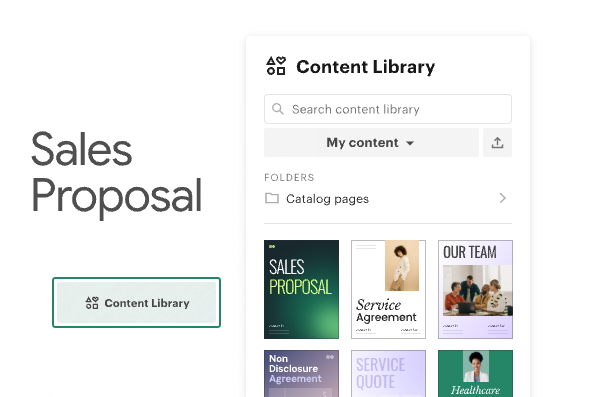
              Generate content from templates

              Teams can kickstart content creation by using a premade template from PandaDoc or by creating branded templates from pre-existing documents. Templates can be saved in the content library and used to generate future documents in moments.

              Ai Generated Content

              Write with AI-powered tools

              PandaDoc’s built-in AI agent can help teams draft and refine document copy. Get suggestions for wording and personalize your message to your intended audience while saving hours of manual work.

              Connect and sync with CRM tools

              Skip manual data entry by connecting PandaDoc to Salesforce, HubSpot, or another leading CRM solution to auto-fill customer information and opportunity details in your document.

              Approval Sigining Order Setup

              Automate document processes

              Use automation to assemble documents faster by pulling in data, locking brand elements, and applying the appropriate templates. Then send documents to approvers and customers via customizable routing that keeps deals moving.

              PandaDoc Template Library

              PandaDoc Template Library

              Learn more
              Link: Learn more
              What is document automation API and how does it work

              What is document automation API and how does it work?

              Learn more
              Drag And Drop Creation

              Trusted by businesses of all sizes

              Sales, HR, legal, and finance teams trust PandaDoc to deliver professional, accurate documents that expedite daily tasks and drive results.

              See all customer stories
              • Badge 1
              • Badge 2
              • Badge 3
              • Badge 4
              • Badge 5
              • Badge 6
              • Badge 7
              • Badge 8
              • Badge 9
              • Badge 10
              • Badge 11
              • Badge 12
              • improved close rates and cut proposal creation time in half

                50%

                improved close rates and cut proposal creation time in half

              • Nomad’s slashed customer acquisition costs by 20%
                Nomad’s slashed customer acquisition costs by 20%

                Nomad’s slashed customer acquisition costs by 20%

              • We’re saving 3,000 hours annually and we’re three times more efficient.

                We’re saving 3,000 hours annually and we’re three times more efficient.

              See PandaDoc document generation in action

              Get personalized 1:1 demo with our product specialist.

              • Tailored to your needs

              • Answers all your questions

              • No commitment to buy

              Chili Piper

              ChiliPiper increased their close rate by 28% after implementing PandaDoc.

              Chili Piper

              ChiliPiper increased their close rate by 28% after implementing PandaDoc.

              Schedule your free live demo

              1. 1Fill out the form
              2. 2Book a time slot
              3. 3Attend a demo

              By submitting this form, I agree that theTerms of ServiceandPrivacy Noticewill govern the use of services I receive and personal data I provide respectively.