Redlining is the process of reviewing a contract and marking edits, comments, or requests for changes.
It’s a core step in modern contracting because it enables all parties to negotiate and finalize details clearly and transparently. When done correctly, redlining reduces risk and exposure by keeping deals compliant and users in sync.
However, it’s common for teams to face conflicting pressure during this stage. Sales wants to move fast. Legal needs precision. Procurement and operations require clear records. Meanwhile, external stakeholders have their own expectations and requirements.
As a process, redlining can be done manually by passing a document back and forth between teams. Realistically, as contracting grows more complex, redlining software is a much better approach.
In this article, we’ll look closely at the benefits of contract redlining software and how it strengthens the contract lifecycle.
Key takeaways
-
Improved speed during negotiations. Redlining software helps teams review edits in real time, rather than waiting for feedback rounds and new versions.
-
Better handling and collaboration. When handling contract negotiation through software, teams can use redlining tools to markup errors, revisions, and unfavorable terms for discussion and review.
- Reduced errors and risk. Software tools offer functionality designed to catch errors while providing tools that help documents remain compliant with both legal and corporate standards.
| Functionality | Manual redlining | Redlining software |
| Basic editing & comments | ✅ | ✅ |
| Track changes in a document | ✅ | ✅ |
| Share files with other parties | ✅ | ✅ |
| Version control without confusion | ❌ | ✅ |
| Real-time collaboration | ❌ | ✅ |
| Centralized document storage | ❌ | ✅ |
| Structured approval routing | ❌ | ✅ |
| Full audit trail | ❌ | ✅ |
| Clause & content library access | ❌ | ✅ |
| Integrated e-signatures | ❌ | ✅ |
| Workflow integrations | ❌ | ✅ |
| Visibility into bottlenecks | ❌ | ✅ |
How contract redlining software works
The redlining process is a defined step in contract lifecycle management (CLM) as part of the contract negotiation process. The cycle starts with drafting, then moves to redlining, approvals, execution, storage, and eventual renewal.
Redlining software supports this middle stage by giving teams a controlled environment for feedback and revisions. Teams and external stakeholders can review contract language, track changes, and manage negotiations before a contract is approved and signed.
Standard document editors such as Google Docs and Microsoft Word offer basic editing and limited collaboration tools. Unfortunately, they lack the infrastructure needed to support extensive contract work. Within these editors, it’s easy for documents to change rapidly and for collaborators to overlook minor but significant details.
By contrast, dedicated redlining solutions like those provided by PandaDoc combine strong version control and real-time editing with audit trails, compliance features, and approval workflows ensuring deals remain above board for all parties. Plus, many redlining features are baked into solutions built around the full contract management process. Once the redlining phase is complete, these platforms can handle contract acceptance, storage, renewals, and more.
Benefits of contract redlining software
In many ways, redlining is the most sensitive part of the contracting process.
Small oversights can introduce risk, extend timelines, or cause disagreements between counterparties. Because nothing has been signed, it’s also easy for misunderstandings to kill a deal before it moves forward.
Redlining software accelerates these processes and reduces these risks by organizing revisions, comments, and markets inside a controlled environment. Every change is visible, and each decision is documented. Automation and AI-powered tools can also help move the process forward.
Here’s a closer look at what makes redlining software stand out.
Faster negotiation cycles
Manual reviews slow down the negotiation process because of the extra administrative duties required between revisions. Teams need to exchange files, review changes, confirm or reject them, and then make their own updates before passing the document to the next person.
Using this approach increases the risk of human error, either because someone misses a comment or overlooks a critical detail. Long term, the resulting delays extend timeliness and increase the chance of confusion, robbing momentum for the deal.
Redlining software streamlines the process by centralizing all activity. Teams can work together using collaborative tools. Legal professionals can keep deals above board while automated notifications help to manage handoffs and improve response times.
Working together, this toolkit helps to close the loop on negotiations and can be a game-changer for teams that feel like negotiations always drag.
Better version control
Teams run into problems when passing legal documents back and forth during contract review. Each update effectively creates another version of the contract, and those iterations become confusing when multiple parties are involved.
For example, if the draft of a contract is sent from one party to two other stakeholders, three versions of that contract will exist:
- The original contract.
- The edited contract from Stakeholder #1.
- The edited contract from Stakeholder #2.
Stakeholders are likely to make separate changes, which the original sender must consolidate before a new version of the contract can be sent for a second round of review. Along the way, stakeholders might update their own copy, forget to track deletions, or overlook markups from another reviewer. These issues make it easy for minor changes to slip through and create risk farther down the road.
Redlining software solves this by centralizing the entire negotiation process onto a single platform and giving all parties the tools they need to see what changed. Behind the scenes, all changes are tracked, reducing the chances that something will get missed.
Most importantly, this approach eliminates all extra contract versions. Every stakeholder always sees the latest version of the contract, so if key details like pricing or providers change, they’re much easier to spot.
Fewer errors and missed edits
Manual reviews are prone to errors because teams handle multiple versions of a contract (as noted above).
The problem is that, without software, they’re practically unavoidable. Neither project dashboards nor contract automation tools are built to catch typos or changes to critical clauses. Some solutions, like the track changes feature in Microsoft Word or Google Docs, can highlight some issues, but it’s still easy to overlook details.
Redlining tools give teams more ways to manage revisions. When all edits appear inside a single workspace, users can review them in context. The platform also tracks each modification, which helps to prevent accidental omissions.
On top of that, legal professionals for both parties can review documents and assist with minimizing legal exposure by approving changes to terms and clauses as they happen.
Note: When redlining is part of an end-to-end contract production suite like PandaDoc, plenty of tools are in place to help eliminate errors and mistakes throughout all stages of the CLM process.
Improved collaboration with all parties
It’s common for teams to struggle during contract reviews because each group works separately.
Sales might adjust pricing or key terms in one file. Legal might flag and update deviations in another section. Procurement may focus more on vendor details and less on other aspects of the contract related to vendor responsibilities.
Working manually, it can take time to consolidate those updates, and that delay creates opportunities for conflicts from the edits themselves. That’s especially true, since one team can’t see all the changes until the new version is published.
With software, the shared contract becomes a single source of truth. All edits, in-line comments, and questions appear in one workspace and in real time. Counterparties can share direct feedback. Supervisors and legal teams can approve or reject changes as they appear.
Taking this approach keeps everyone aligned while reducing administrative entanglements.
Stronger auditability and compliance
Manual reviews create weak paper trails. Correspondence is scattered across emails, untracked conversations, text threads, and other outlets. Teams store files in various locations, which makes it difficult to confirm how a contract reached its final iteration.
Without a clear record, legal teams face more risk when reviewing deviations or negotiating sensitive terms. Missing information can complicate future disputes, and requesting information from various parties is an additional timesink that is likely to yield piecemeal results.
Because redlining keeps all correspondence together and includes an audit trail or changelog for a contract, it’s much easier for reviewers to understand how deals evolve. Compliance checks become easier and offer better accountability, as well as extra support for long-term recordkeeping, because the changelog is attached to the document.
Consistent formatting and clause usage
Contract formatting can break down quickly when teams edit documents in separate files. Fonts, spacing, and headings drift out of alignment, creating confusion as the document evolves.
However, a greater danger is the risk of clauses drifting over time. One line might be deleted from a contract, effectively changing the meaning of the phrase. A word might be replaced with another, allowing for a different interpretation of key points in negotiations.
Redlining solutions solve this by giving teams access to approved clauses and content libraries, as well as standardized templates. Users can insert approved legal language without making unauthorized adjustments or concessions, effectively limiting brand exposure.
Plus, because all edits happen in a single, unified environment, formatting remains stable, and version control remains intact. Negotiators using approved clauses can sidestep legal reviews, and the document can evolve naturally without falling out of bounds.
Integrations that unify the contracting workflow
One major challenge during contracting is the need to move between several systems.
In a disconnected or piecemeal system, users draft legal documents in one tool, store files in another, and track approvals in a third location. While this approach can work, switching between systems makes it difficult to maintain a steady workflow and increases administrative workload.
Often, redlining tools are connected to other aspects of the contract management process. However, few systems offer entirely self-contained processes. Even when that’s the case, brands may prefer to use their own systems they’re more familiar with, rather than switching entirely to a new system or setup.
For example, PandaDoc offers a complete, end-to-end contracting process. Most PandaDoc users prefer using a CRM they’re already comfortable with, such as Salesforce or HubSpot. For those users, native integrations make it easy to connect customer and opportunity information to PandaDoc for even faster contract creation and negotiation. The same is true for productivity solutions like Slack or payment platforms like Stripe.
By connecting these systems with redlining tools, brands can create a contracting experience that minimizes handoffs and manual inputs. When everything is connected, teams will enjoy a more unified and seamless document workflow.
Visibility into bottlenecks and performance metrics
When teams rely on manual processes, they have almost no visibility into bottlenecks.
A contract might sit with one stakeholder for days, but others may not know why progress has stopped. Delays like these can impact the negotiation process and make it much harder to plan next steps, especially if counterparties are unresponsive.
Contract redlining software captures all information and presents it in a clear format. Dashboards can display contract status while audit trails show recent activity. If the platform offers document analytics, such as PandaDoc, supervisors and internal teams can see where external collaborators spend their time and draw conclusions about what might be holding them back.
With sufficient data, organizations can improve contract flows by revising ambiguous language or clarifying areas of uncertainty to prevent confusion in future deals.
Features to look for in redlining software
Effective redlining software does more than track edits.
Ideally, the platform should support the full review process and help teams work from a single source of truth. Many platforms, including PandaDoc, combine these features with broader contract management tools to keep the entire workflow organized.
Here are key features to look for when searching for an effective redlining solution.
-
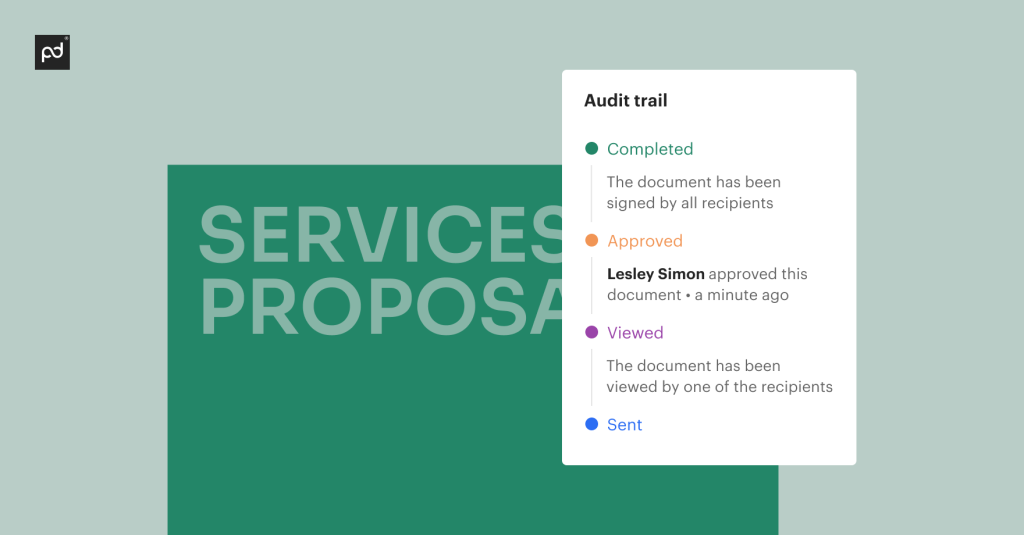
Robust audit trails or activity logs. Teams need clear visibility into any additions, deletions, and markups on a document. Activity trackers can help users ensure no change is overlooked.
- Real-time collaboration with internal/external users. Legal teams, stakeholders, and counterparties need to collaborate in a single document. This approach reduces time-consuming manual reviews and shortens timelines during the negotiation process.
-
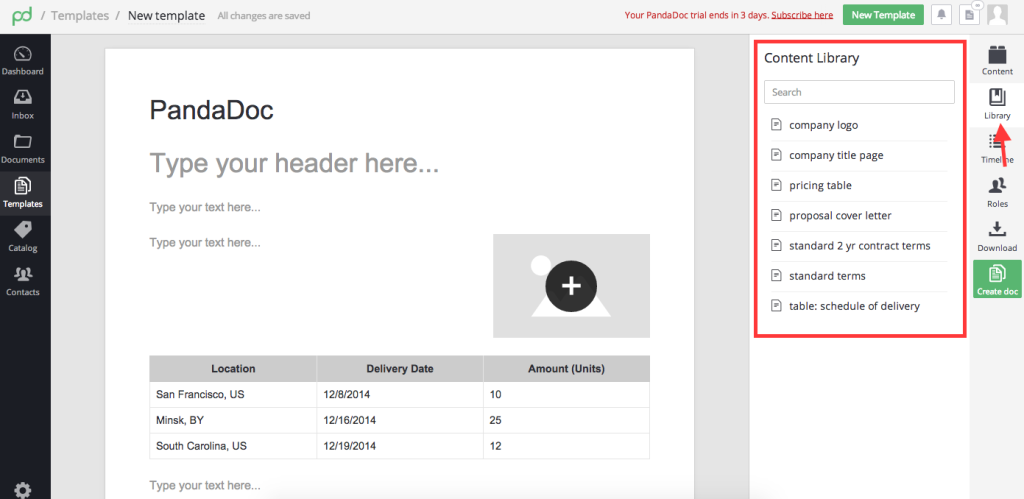
Clause and content libraries. Platforms like PandaDoc that support reusable language and approved snippets can help teams improve risk management and keep legal documents consistent.
-
Template management. Standardized templates help legal teams and in-house staff reduce contract drafting time. Templates can also accelerate other parts of the CLM process.
-
Automated approval workflows. PandaDoc and similar solutions can automatically route legal documents to designated reviewers before final sign-off, reducing wait times and ensuring approval before a contract is finalized.
-
Granular permissions and version control. Users can protect sensitive content and control document access. Strong version control prevents confusion and keeps every revision tied to a clear audit trail.
-
In-document commenting and mentions. Teams can ask questions, record proposed changes, and keep discussions in context. Having these tools built into your preferred solution eliminates the need to share updates by email or via Microsoft Word and Google Docs files.
-
Integrated e-signatures. An electronic signature is essential for a digital contract to become legally binding. By having an e-signing solution built into a redlining platform, teams can move directly to the signing stage without migrating to a third-party solution.
-
CRM and workflow integrations. When redlining and contract management software integrate with external systems, it’s easier to draft documents and link contract data to customer accounts. This minimizes common errors like misspelled stakeholder names, incorrect phone numbers, and similar mistakes.
-
Reporting and analytics. Teams can review timelines and bottlenecks to understand how the negotiation process is performing. Many CLM platforms also now offer AI-powered features that analyze contract data and support advanced use cases.
Strong redlining features give teams more control and agency during the negotiation stage. They also help organizations move through reviews with fewer bottlenecks and delays.
When redlining features connect to drafting and signing flows, the process also becomes more consistent and easier to manage. After reaching consensus, the next steps are obvious, and documents can usually be signed without ever leaving the redlining environment.
Streamline your redlining process with PandaDoc
Successful contracting depends on accuracy, clear communication, and predictable workflows.
Redlining sits at the heart of that process by capturing proposed changes, flagging deviations, and supporting the contract approval stage. Collaborative systems allow teams to move quickly and avoid confusion during negotiation by always working from a single, shared source of truth.
PandaDoc strengthens the entire process by combining redlining tools with a full contract management suite, including virtual data rooms. Users can draft contracts from templates, collaborate in real time, route documents for approval, and collect e-signatures without ever leaving the platform. Every activity is recorded automatically in an audit trail, so teams have a clear record of how the final version of a contract came together.
If your organization wants to streamline its contract management process, PandaDoc can help.
Sign up for a free 14-day trial or request a demo to see how PandaDoc’s streamlined contracting flow and seamless integrations can elevate your CLM process.
Frequently asked questions
-
Contract redlining software helps teams review contract language, mark proposed changes, and track revisions during the negotiation process.
Users can:
- Centralizes edits
- Add comments
- Make contract changes
- Negotiate various terms
- Reach consensus and move to finalize deals
The critical point is that many actions which involve multiple parties can happen in one location. Users don’t need to pass different versions of a contract and relevant conversations back and forth over email. Instead, everything can happen in a live, shared environment.
The software helps with tracking solutions like version control and audit trails, so teams can monitor progress and complete the contract review process with fewer delays and human errors.
-
Technically, redlining is a form of editing. However, in contracting, there is a key difference between the two:
- Editing refers to making direct changes to a document text. This is typically done before the contract is sent to another party for review and negotiation.
- Redlining is part of the negotiation process. Proposed changes are highlighted via text and comments so that all parties can respond and reach agreement before the contract moves forward.
The redlining process is slower and meant to allow both sides to reach consensus, so changes aren’t unilateral. Instead, this process is about flagging potential issues, notifying the other party about those terms, and figuring out a compromise.
-
Contract redlining software is generally secure, although the security of your information will depend on the platform.
Stronger platforms use permission controls, encryption, audit logs, and secure storage. Because most redlining solutions are cloud-based, these features offer protection for legal documents and sensitive information by preventing unauthorized viewing.
For reference, PandaDoc is SOC II Type 2 certified and is compliant with legal frameworks like HIPAA (with a signed BAA) or GDPR. However, not all platforms offer the same level of protection.
If the platform is secure, redlining software is better than manual alternatives like email threads, text chains, or shared drives because it keeps all sensitive information on the platform and in one place.
-
Redlining tools support most teams involved in the contracting process, as well as their main objectives.
Common teams relying on redlining solutions are listed below:
- Sales and revenue operations.
- Legal and compliance.
- Procurement and operations.
- Human resources.
- Nonprofits and education.
- Healthcare and finance.
Usage may vary slightly between teams, depending on negotiation and collaboration requirements.
For example, sales teams want to keep deals moving while legal needs to manage compliance. HR teams use redlining as part of the onboarding and negotiation process, while finance and healthcare teams use redlining for agreements that need clear records and a structured negotiation process.
This collection of needs and use cases make redlining a critical part of any CLM solution.
-
This depends on the software.
Some contract management solutions—including PandaDoc—allow counterparties to review and comment on documents without creating an account. Others require a login or, potentially, a paid seat.
Regarding logins and account creation: Sometimes, redlining software requires this approach to ensure that the individual making the changes is who they say they are. PandaDoc does this through secure, individualized signing links, but account creation is another way to verify identity.
Disclaimer
PandaDoc is not a law firm, or a substitute for an attorney or law firm. This page is not intended to and does not provide legal advice. Should you have legal questions on the validity of e-signatures or digital signatures and the enforceability thereof, please consult with an attorney or law firm. Use of PandaDoc services are governed by our Terms of Use and Privacy Policy.