Human resources departments manage some of the most document-heavy and compliance-sensitive processes in any organization. Everything from hiring agreements to policy acknowledgements requires proper execution and filing so that the company has a record of accountability for every employee and contractor.
When handled manually, these processes are cumbersome and time-consuming. Without digital support, a large portion of an employee’s first day may be spent signing disclosures, acknowledgements, and paperwork.
Fortunately, e-signing solutions have expedited much of the admin workflows required for employee lifecycle management. Workers can sign paperwork in advance, both at home and in the office.
But, in many cases, HR teams need more than simple e-signatures. They need solutions that are more sophisticated and secure. Small teams benefit from automation, while larger departments find scalability invaluable.
In this article, we’ll take a closer look at the top features that HR departments should consider when selecting an e-signing solution.
Key takeaways
-
The best e-signing platforms can expedite HR workflows without sacrificing control or compliance.
-
Strong HR processes require accountability, centralized storage, and audit-ready records.
- Templates, bulk sending, and workflow automation can save time and eliminate recurring, manual HR tasks.

Why HR teams rely on e-signatures
HR teams rely on electronic signature solutions to simplify some of the most repetitive and time-sensitive processes. Without the functionality to securely sign documents, critical documentation must be signed manually and in person.
While analog processes will work for smaller teams, they become harder to manage as document volume grows. With software that enables secure signing, HR operations can be made more consistent for collecting, tracking, and storing essential documents.
Here’s how e-signature software can help administrative HR processes:
-
Faster onboarding and time to productivity. Electronic signatures enable new hires to complete required paperwork before their first day, reducing admin delays and enabling employees to focus on their roles sooner.
-
Improved accuracy and document consistency. Standardized digital documents reduce errors caused by missing fields, outdated versioning, and manual data entry. Records are more accurate and consistent with fewer points of failure.
-
Better experience for candidates and employees. Digital signing eliminates unnecessary friction and delays in HR interactions. Both candidates and employees gain more time to review and complete documents without the need to appear in person.
-
Stronger compliance and audit readiness. Strong e-signing solutions automatically generate audit trails and detailed records of when and how documents are signed, supporting internal audits and lowering compliance risk.
- Easier collaboration between HR, legal, finance, and managers. Digital workflows make it easier for documents to move between departments and teams. This process can be automated, so documents move through their own approval workflow.
Beyond growth and scalability, HR departments remain responsible for accountability and compliance.
The right e-signature solution will comply with company policies and legal requirements while providing teams with the tools needed to expedite critical workflows.
Strong solutions will address short-term needs, such as document signing, while remaining compliant with legal frameworks such as eIDAS and the Uniform Electronic Transactions Act (UETA). In the long term, they provide a toolkit that HR teams can use to optimize and automate core processes, improving speed and accuracy.
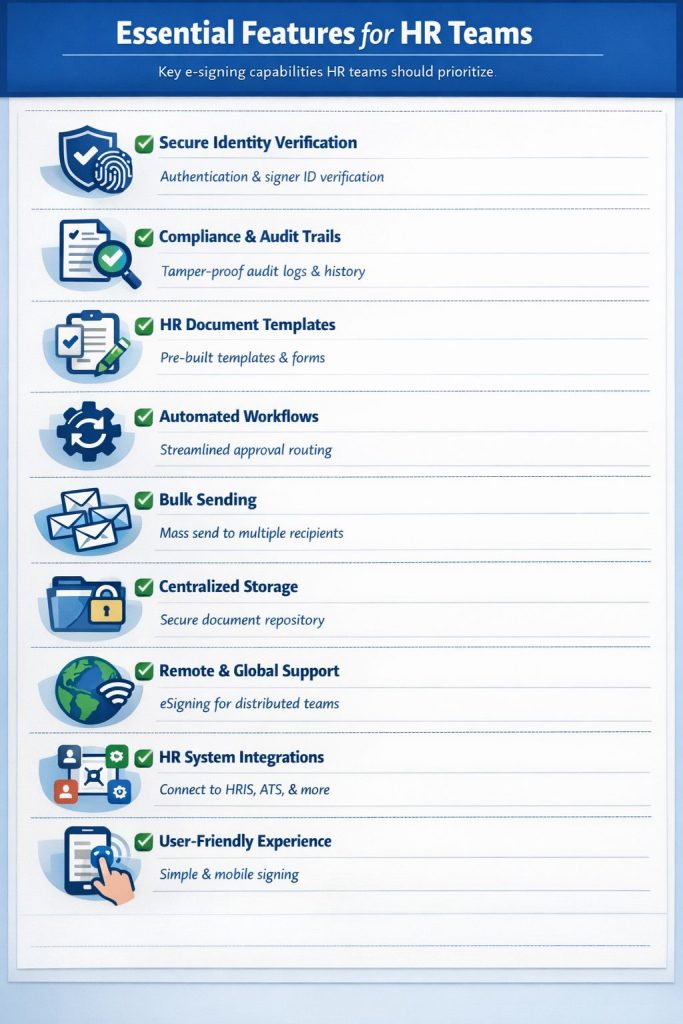
Essential features for HR teams
Many e-signature tools focus only on the e-signing process. For most HR teams, signature capture is only one part of a much larger process that includes approvals, recordkeeping, compliance, and long-term document management.
The most effective e-signing platforms offer feature sets designed to support the complete employee lifecycle by standardizing processes and eliminating manual bottlenecks.
Below, you’ll find a list of core capabilities and features that HR teams should prioritize when evaluating e-signing solutions. Used together, these features can help teams operate with greater confidence, flexibility, and control.
1. Secure identity verification and signer authentication
HR documents regularly carry legal, financial, and regulatory implications that must be accounted for during the e-signing process. Teams must authenticate signers and verify identities in order to avoid disputes and invalid documents.
Many e-signing tools offer multiple methods to confirm signer identity, including email verification, SMS authentication, and single sign-on integrations. Other solutions, such as Qualified Electronic Signatures and biometric data, can be used for sensitive contracts and agreements.
By combining those details with essential information such as IP addresses, locations, and email addresses, teams can be confident that documents are signed by the correct individual. This helps ensure that NDAs, confidentiality agreements, and similar documents remain legally valid if their authenticity is challenged.
2. Built-in compliance and audit trails
Compliance requirements can extend beyond capturing and retaining signatures. In many cases, HR professionals must be able to show how a document was executed and confirm that all required steps were followed.
Strong e-signing tools generate unalterable, detailed audit trails that capture timestamps, signer activity, and document state changes. They may also capture other details, such as access, views, and document analytics, which can be used to track document evolution.
The best audit trails are attached to a document and are tamper-resistant. For example, PandaDoc audit trails can’t be accessed by any party, including the team that created the document. All activity on a PandaDoc document is tracked in real time and attached specifically to that individual document. In the event of an audit or investigation, the history associated with any contract or agreement is easy to find and review.
3. HR-specific document templates and forms
Many HR documents are reused repeatedly with only minor changes (names, roles, compensation details, etc.). Creating these documents manually can be time-consuming and prone to inconsistency. They also create exposure for a company if any approved language is manually changed or altered.
Reusable templates for documents such as offer letters and NDAs help HR teams quickly generate critical documents without starting from scratch. Standardized language can be combined with features such as content locking and required fields to reduce input errors and maintain consistency across all documents of a given type.
Templates can be combined with digital forms to quickly capture and consolidate essential information, such as names, addresses, and other confidential details. In PandaDoc, teams can combine form inputs with variables to quickly personalize documents during preparation.
4. Automated workflows and approval routing
Growing HR teams need to manage an increasing number of documents across multiple processes.
Stakeholders across departments may also play a role, complicating coordination as complexity increases. A single hiring process may involve multiple decision-makers and cross-functional involvement from finance, legal, and operations.
Approval routing and workflow automation can prevent documents from becoming lost as they move between stakeholders. Once configured, these systems will guide a document through a predefined workflow so that every decision-maker has time to review it. Once approved, the system automates the document’s progression to the next reviewer, eliminating manual intervention.
These systems eliminate bottlenecks and, combined with automated notifications, can keep documentation moving with minimal oversight. Teams with multiple departments and complex processes can use conditional workflows that trigger when specific conditions are met, enabling them to plan for a variety of contingencies.
5. Bulk send for high-volume HR actions
Sending HR documents individually or as a small packet is fine when use cases are narrow. For example, if the company onboards two new employees per year, managing a bundle of electronic documents is relatively simple.
Unfortunately, high-volume HR actions are relatively common. Current employees need to be informed of critical or regulatory information as circumstances change. Employee handbook updates, open enrollment and benefits forms, security changes, and policy re-acceptance initiatives often require proof of acknowledgement in order to maintain accountability.
While email could be used for the mass distribution of documents, it doesn’t allow for tracking or mandatory sign-offs. Teams sending files this way have no visibility into how users interact with them.
Bulk sending capabilities in robust e-signature tools enable HR teams to create and send personalized documentation at scale. Document tracking tools enable reps to monitor completion status for each recipient and follow up on a case-by-case basis if documents aren’t returned.
6. Centralized document management for HR records
HR teams are responsible for maintaining accurate, accessible records for employees and contractors. Without good systems in place, it’s easy for these documents to end up on shared drives, in email threads, or parked on local systems, where they become scattered and easily lost.
E-signing platforms with a centralized document repository can store all HR-related contracts, along with signed contracts and agreements. By allocating permissions appropriately, each team will have access to the documents that are most relevant to their use case without gaining access to sensitive information.
With PanadaDoc, all signed documents end up in secure, on-platform storage. A team member’s workspace, user role, and permission level determine what can be accessed. For example, sales managers may need to review old contracts but not HR documents, while HR teams probably won’t need access to service agreements.
Secure storage protects important information, supports internal security policies, and helps teams keep documents, big and small, in one place.
7. Support for remote and offshore teams
Global hiring and remote initiatives regularly require HR to oversee policy and compliance requests from afar. For teams spanning across multiple time zones or global brands without a local office, waiting for in-person signatures or coordinating live interactions can drastically delay critical documentation.
E-signature solutions help teams offer asynchronous signing options, allowing documents to be completed without scheduling conflicts. Especially when combined with pre-set signing orders and approval workflows, it’s possible to create automatic processes that function across multiple countries and/or time zones.
Taking this approach helps reduce delays while also supporting distributed teams working in remote environments.
8. Integrations with HR and business systems
Most HR teams use human resources information systems (HRIS), applicant tracking systems (ATS), and payroll systems to automate some of their duties. Using dedicated integrations and API tools, it’s possible to connect these systems to e-signature platforms and configure specific actions as triggers.
For example, while PandaDoc offers a native integration with Greenhouse, we don’t have one for BambooHR. However, with the Zapier integration, PandaDoc can be configured to automatically generate a document from a template when a new employee is created in BambooHR.
By taking this approach, HR teams can generate all necessary signing documentation with a single click. Similar connections and triggers can be built using PandaDoc API, but we also offer support for CRMs like Salesforce and many other software solutions. HR teams can use these and similar integrations so that records are created as a byproduct of strong recordkeeping.
However, your mileage will vary based on your e-signature solution. While PandaDoc allows teams to create documents entirely from scratch, e-signature-only solutions like Docusign don’t offer the same flexibility. Even solutions like Proposify and GetAccept — both of which allow for document editing — can’t quite match PandaDoc due to their focus on proposal-only document creation.
9. User-friendly experience for employees and candidates
For many candidates, HR-related paperwork is their first interaction with the company. While it’s a necessary step for compliance, the process shouldn’t cause friction or impede worker productivity.
Leveraging a platform with strong e-signing and logical workflows can save time and greatly reduce the administrative workload for all employees and candidates. Responsive, mobile-friendly apps and platforms that offer guided walkthroughs as signers interact with a document are essential for success.
While these systems provide interactive guidance, HR teams also benefit from setting up approval flows on the backend so that handoffs for review, approval, and storage are automatic. When everything is working together, HR processes move smoothly for everyone involved.
How e-signature features improve key HR processes
HR teams manage a wide range of processes that rely on signed documents, but each one varies in terms of requirements, timelines, and stakeholders.
The following examples show how core eSignature features can support common HR workflows and help teams reduce administrative effort while maintaining accountability and control.
Hiring and onboarding
While much of the modern hiring process occurs online, onboarding is often in person (though it can also happen digitally). Some organizations require in-person signing for specific documents or situations, while others operate in fully remote environments.
A dedicated e-signature platform allows HR teams to send offer letters, employment agreements, disclosures, and new-hire paperwork before the first day. New hires can complete all related documentation and arrive prepared to work on their start date, without spending hours sorting out necessary forms and final sign-offs.
The result is a smoother, more flexible transition without a first-day bottleneck.
Employee lifecycle management
As employees progress within an organization, HR teams need to maintain visibility into past agreements and acknowledgements. Changes and updates over time (promotions, transfers, performance reviews, etc.) also need to be recorded consistently.
Without centralized documentation, it’s easy to overlook this progressive essential documentation as it accumulates. Problems and disputes can arise if an employee claims that offers were made, but HR has no record of those changes.
E-signature solutions with built-in storage help to preserve a complete history of employee documentation so that HR teams can quickly reference past agreements, approved changes, and confirm compliance during internal reviews and audits.
Offboarding and transitions
Employee departures can introduce legal and security risks if documentation is incomplete or improperly handled. Missing signatures or unclear records regarding confidentiality and disclosure restrictions can create issues after an employee has left the organization.
By standardizing offboarding workflows, HR teams can close gaps and loopholes while maintaining clear records during transitions. Signed agreements serve as reference documentation and evidence of acknowledgement when employees breach their NDAs and confidentiality obligations, enabling companies to pursue legal recourse.
All of this is essential, especially when an employee’s departure is sudden. For HR teams to remain responsive during speedy transitions, the process needs to be systematized and positioned for rapid deployment. E-signature solutions that offer templates, content libraries, and pre-built document are critical to this process.
Top features to consider when choosing an e-signing platform
An e-signing platform becomes deeply embedded in HR operations after adoption. For that reason, it’s important to choose the right tool from a long-term perspective.
Teams need to consider how well a platform supports growth, compliance, and collaboration as organizations need to evolve. The right set of features can allow HR departments to thrive, while narrow solutions may lack the adaptability required as processes and requirements evolve.
Here are a few of the most important features to consider when choosing an e-signing platform:
-
Secure, encrypted electronic signatures. Encryption and security controls help safeguard sensitive employee information throughout the e-signing process. The right tool can facilitate legally compliant digital signatures in most cases, with options to use Qualified Electronic Signatures for critical documents.
-
Tools for scalability and automation. Hands-off automation workflows reduce the need for time-consuming, manual tasks. Using automation also ensures that documents follow consistent approval and signing workflows as volume increases. Savvy HR teams can use these tools to make sure that no steps are missed.
-
Ease of use for non-technical users. Clear, intuitive interfaces and guided experiences make the e-signing process less intimidating for non-technical users. Keep in mind that many stakeholders and signers may be unfamiliar with the platform you choose. Guided walkthroughs will flag action items and reduce confusion, resulting in a smoother signing flow.
-
Support and onboarding resources. Having access to top-tier support is a game-changer when problems arise. Many e-signing solutions offer limited onboarding, ticket-based support, or paid support plans. The best e-signing platforms offer accessible, fast support, productive onboarding, and premium plans for users who want a personal touch.
-
Platforms that reduce app switching. It’s common for e-signing solutions to only focus on end-of-document processes. Even DocuSign, one of the biggest players in the space, only handles e-signing. However, some of the best solutions bundle e-signing with other aspects of document creation and storage to create an all-in-one workflow that can minimize time spent switching apps, uploading files, and (re)formatting business documents before initiating the e-signing process.
By focusing on workflow alignment, HR teams can select an e-signing solution that supports daily operations and existing processes. The right features will reduce manual effort and support the efficiency that makes both teams and organizations more productive.
Go beyond e-signing with PandaDoc
Expectations around speed, accuracy, and compliance only increase as HR responsibilities expand.
Tools that address individual steps in the process can limit long-term efficiency by introducing workflow issues. For example, introducing new software that doesn’t integrate or connect with your existing tech stack also forces teams to pull documents and data from one app, upload it to another, and continue working in an entirely new environment.
PandaDoc eliminates the need for task and app switching by offering a comprehensive document automation platform that goes far beyond e-signing. HR teams can upload existing DOCX files, create new documents from scratch with the built-in document editor, build templates, set automation workflows, and manage e-signing all from a single platform.
By consolidating all aspects of document creation and management into one place, teams can spend more time on people and less on paperwork.
Come explore PandaDoc with a free 14-day trial or sign up for a guided tour from a product expert to see how the PandaDoc platform can level up your document flow.