
If you’re shopping for the best electronic signature solution in 2026, Docusign may be the first stop on your search.
Unfortunately, while Docusign offers a variety of plans at affordable price points, most come with restrictions around configuration and distribution and add additional surcharges when those limits are reached.
For example, Docusign indicates that users on most plans are only allowed to send 100 envelopes per year. However, users are also restricted to 10 sends per month, but these details and others like them are hidden in the fine print!
While it might be tempting to sign up for a plan, there are better solutions out there. Many Docusign competitors offer secure and competitive solutions without enforcing similar restrictions, but they can be hard to find.
If you’re still comparing options, we’ve done the hard work for you.
In this article, we’ll break down how Docusign’s pricing and plans compare against other e-signature solutions and take a look at what those competitors have to offer.
Key takeaways
- Docusign is a strong eSigning platform with a variety of solutions for businesses of all sizes.
- Limitations on Docusign plans can force users into pricing tiers that don’t meet all their needs.
- Recent additions to the Docusign ecosystem, including IAM, CLM, Navigator, and IRIS, have further restricted what Docusign’s e-signature plans offer by modularizing the product line.
- Many Docusign competitors and alternatives offer additional features — including PDF editing, document creation, and workflow management — in addition to e-signing as part of their platform.
How we sourced our data
For big comparison articles like this, our team spends hours sifting through the offerings provided by these services. We check pricing pages, support documentation, ask questions, and much more.
We’ve also personally tested and sampled many of these platforms as part of our research process. Our team compared subscription plans, the features of each eSignature software platform, and the price points at which those features were available.
After we had all the data, we matched it to different Docusign pricing plans along the way to make everything easier to compare and contrast.
About Docusign alternatives
In order to provide the best analysis of Docusign’s pricing, this article compares Docusign to various other platforms based on tiers and feature sets.
While we occasionally offer alternatives to Docusign here, our primary Docusign alternatives article provides a clear platform-to-platform comparison that will be useful for users in search of the best eSigning tools.
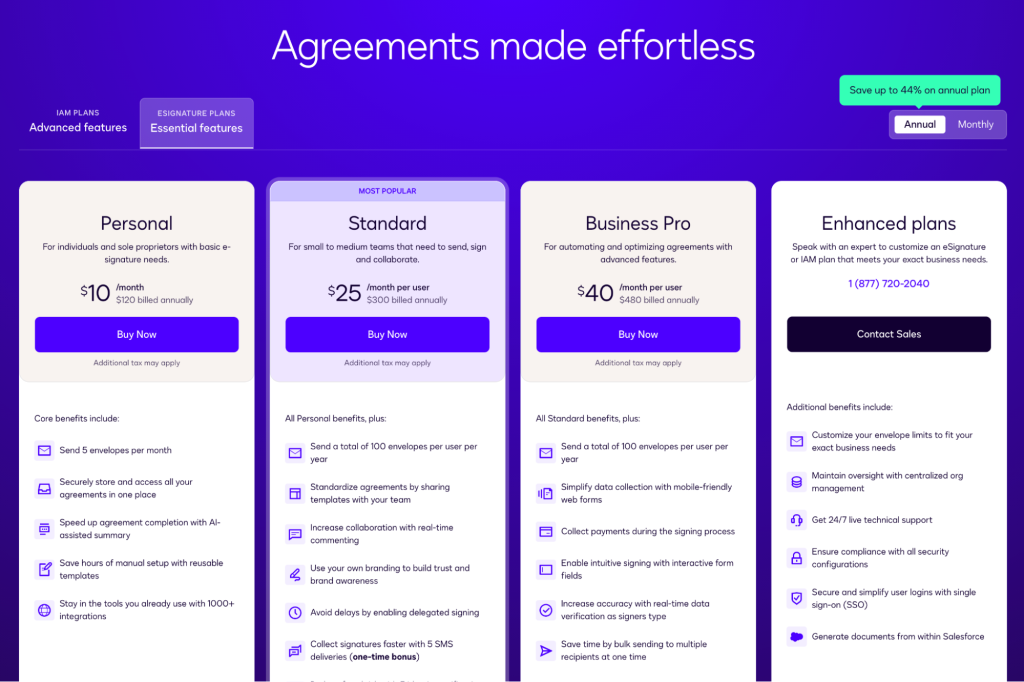
Docusign offers three standard plan options, as well as a custom plan option for larger organizations.
How much does Docusign cost?
Docusign operates a relatively straightforward three-tier pricing structure. Discounts are available if you’re happy to take out an annual, rather than a monthly, subscription.
Here’s a quick overview of Docusign’s standard rates:
| Rates (per user/seat) | Personal | Standard | Business |
| Annual billing | $10/month or $120/year | $25/month or $300/year | $40/month or $480/year |
| Month-to-month billing | $15/month | $45/month | $65/month |
Docusign also offers a custom enterprise plan for organizations that require higher-level features, such as employee administration tools, API access, integrations, and advanced branding.
Prospective users can take advantage of an unrestricted free trial, which reverts to the Docusign free plan upon expiry. A 30-day refund guarantee is included with annual subscriptions, and a seven-day refund window is available during the first month of a month-to-month plan.
Users can also downgrade their subscription at any time. Depending on when and how this is done, you may receive billing credits or plan adjustments.
Envelope limits and overage rates
In a nutshell, an envelope or transaction limit is a cap on the number of documents users can send over a given term—usually a month or a year—used by many e-signature companies.
These limits can be a major drawback for companies planning to use Docusign and other platforms for bulk distribution or as a core part of their main business functionality.
That’s because they severely restrict the number of documents that can be sent using the software.
Docusign imposes the following limits on their plans:
| Billing cycle | eSignature personal | eSignature Standard and eSignature Business Pro |
| Monthly | 5 envelopes per month | 10 envelopes per user/month |
| Annual | 5 envelopes per month | 100 envelopes per user/year |
For Docusign Standard and Business Pro plans, users exceeding their envelope limits will be charged a per-envelope overage fee between $3 and $8, depending on the plan and whether you paid for your overages in advance.
However, keep in mind that these limitations vary between e-signing platforms. Many e-signature companies hide their usage caps behind “fair use” or “reasonable use” clauses hidden in their terms and conditions, but these are vague about limitations.
With that in mind, be sure to read the fine print prior to choosing your e-signature vendor. If you exceed the transaction limit, expect to pay more in order to send additional documents.
Based on our research, PandaDoc is one of the only companies on the market today that offers truly unlimited sending.
The vast majority of e-signing companies will cap your usage.
If you’re worried about paying extra because you’re exceeding a rate limit, take a look at our free trial options to test out PandaDoc today.
Free Plan: $0/Month
Often, plans in this category aren’t widely advertised and are intended as a perpetual free trial or a minimal-use plan for users who might need to send a document for e-signature once every few months.
| eSignature solution | Free plan available? |
| Docusign | ✓ |
| PandaDoc | ✓ |
| Dropbox Sign | ✓ |
| Foxit eSign | X |
| airSlate signNow | X |
| Adobe Acrobat | X |
| SignRequest | ✓ |
| Signeasy | ✓ |
While all companies we reviewed for this article offer a free trial, only about half offer a free plan and the ability to test-drive their software on a perpetual basis.
We’ve chosen to skip any time-limited trials—since they have a limited lifespan—and solutions that only offer self-sign or signatures that aren’t legally enforceable. For example, Foxit eSign has a “free plan,” but the signatures it provides aren’t legally binding. Similarly, Adobe offers self-signing for a PDF form, but it can’t be used to send documents to other signers.
However, keep in mind that many platforms only default to a free plan after a free trial of a paid plan. That means you may have access to advanced features for a set period before being downgraded to a free plan with limited features.
Comparing the Docusign Free plan
For its free plan, Docusign gives users everything they need to send three documents per month for electronic signature.
Users can add signature fields and basic information to a document, send documents to multiple recipients, and use the real-time audit trail features to track document changes. You can also link to cloud storage integrations in order to import your documents as a PDF, but advanced features like template creation, bulk sending, and in-person signature collection aren’t available.
It goes without saying that the Docusign free plan won’t be a great fit for power users. It’s a no-frills, no-cost solution that works well for individuals and (very) small business owners who need digital signatures for a few documents every few months.
By comparison, PandaDoc also offers a free plan with nearly double the amount of documents that can be sent both yearly and monthly.
Here’s a full breakdown:
| Feature | Docusign | PandaDoc |
| Send limit | 36/year | 60/year |
| Recipient limit | 10 per document | 2 per document |
| Usage | ||
| Legally-binding eSignatures | ✅ | ✅ |
| Documents sent | 3/month | 5/month |
| Mobile app | ✅ | ✅ |
| Create professional, error-free docs | ||
| Reuse your own documents | ✅ | ✅ |
| Bulk import | ✅ | ✅ |
| Templates | ❌ | Up to 5 |
| Collaborate efficiently | ||
| Inline comments | ❌ | ❌ |
| Send & sign | ||
| Signing order | ✅ | ✅ |
| Store and manage documents | ||
| Unlimited storage | ✅ | ✅ |
| Organize with folders and tags | Limited | ✅ |
| Search and filters | ✅ | ✅ |
| Track and monitor to take action | ||
| Real-time notifications | ✅ | ✅ |
| Audit trail | ✅ | ✅ |
| Auto reminders | ✅ | ✅ |
| Renewal notifications | ✅ | ✅ |
| Do more with integrations & API | ||
| Productivity | Storage only | Storage only |
| Ensure security and compliance | ||
| Signature certificate | ✅ | ✅ |
| Two-facter authenitication | ✅ | ✅ |
| SOC 2 Type II compliance | ✅ | ✅ |
| GDPR compliance | ✅ | ✅ |
| eIDAS | ✅ | ✅ |
| U.S. ESIGN Act of 2000 | ✅ | ✅ |
| Admin and user management | ||
| User management | ❌ | ✅ |
| Get support | ||
| Help center & knowledge base | ✅ | ✅ |
| Web ticket & email support 24/7 | ✅ | ✅ |
| Chat support | ❌ | ✅ |
| Premium support | ❌ | ❌ |
Even using the free plan as a baseline, Docusign alternatives like PandaDoc simply have more to offer. In our case, PandaDoc offers template options, inline commenting, and 24/7 chat support for all users, including those on the free plan!
Users on the Pandadoc free plan can save uploaded documents for later reuse as templates, which saves time during the preparation stage. Signers can also comment in the document if they have concerns before signing, which allows users to pull a document offline and fix any mistakes before legally binding e-signatures are applied.
However, one key advantage that Docusign has is the number of signers that can be added to a document. While PandaDoc restricts this to two signers per document, Docusign supports up to 10 signers on its free plan documents. If you need a multi-signer solution but don’t want to pay for anything, Docusign might be a good fit.
PandaDoc, Docusign, and most other e-signing platforms will require an account for a free plan.
Other competitor highlights
Many competitors follow Docusign’s lead by offering no-charge solutions that provide a very limited capacity to make use of the service.
This is usually done by capping the number of documents that users can send and restricting usable features.
Most services will allow you to sign an unlimited number of documents sent to you (from another sender) for free, but this can sometimes be accomplished without creating an account.
Many of the plans we reviewed offered unique features and variations on the free plan:
- SignRequest caps signature requests at 10/month but doesn’t allow users to set a signing order.
- Signeasy offers a full document prep and e-signing experience at 3/month and includes an AI contract summary.
However, of the competitive options on our list, PandaDoc takes things to an entirely new level.
The Free eSign Plan from PandaDoc allows users to send five documents per month, up to 60 per year, at no cost.
We also capture the lifecycle of every document through our audit trails, and each document will receive a unique certificate of completion, confirming its validity once the e-signing process is complete.
Personal: $15/month (billed monthly) or $10/month (billed annually)
This collection of plans is intended for individuals, freelancers, and small business owners with limited usage requirements and a simplified e-signing process.
When reviewing Docusign and its competitors, price played a major factor in determining what counted as a Personal plan.
| eSignature solution | Plan name | Price (month-to-month) | Price (monthly cost, billed annually) |
| Docusign | Personal | $15 | $10 |
| PandaDoc | Free | N/A | N/A |
| Dropbox Sign | Essentials | $15 | $15 |
| Foxit eSign | eSign Essentials | N/A | $10 |
| signNow | Business | $15 | $8 |
| Adobe Acrobat | Acrobat Standard | N/A | $17 |
| SignRequest | Professional | $11 | N/A |
| Signeasy | Personal | $15 | $10 |
The hallmark for many entry-level plans is the presence of a restricted usage limit. If the platform offers a free plan, this restriction is only a minor upgrade from that account.
For Docusign users, the Personal plan increases the send limit from 3/month on the free plan to 5/month on the Personal plan.
Reusable templates also become available, allowing users to create standardized processes around frequently used documents. However, this may not be all that useful, considering the usage restrictions.
Assuming you max out your envelope limit each month, expect to pay $15/month or $120/year to send a total of 60 documents in a 12-month period.
Comparing the Docusign Personal plan
While comparing DocuSign’s Personal plan with plans in the PandaDoc lineup, we found that the PandaDoc Free plan is a better competitive fit than our entry-level paid plan!
| Feature | Docusign – Personal | PandaDoc – Free |
| Monthly cost | $15/month | Free |
| Annual cost | $10/month ($120 annually) | Free |
| Send limit | 60/year | 60/year |
| Recipient limit | 99 | 2 per document |
| Usage | ||
| Legally-binding eSignatures | ✅ | ✅ |
| Documents sent | 5/month | 5/month |
| Mobile app | ✅ | ✅ |
| Create professional, error-free docs | ||
| Reuse your own documents | ✅ | ✅ |
| Bulk import | ✅ | ✅ |
| Templates | ✅ | Up to 5 |
| Collaborate efficiently | ||
| Inline comments | ❌ | ✅ |
| Send & sign | ||
| Signing order | ✅ | ✅ |
| Store and manage documents | ||
| Unlimited storage | ✅ | ✅ |
| Organizez with folders and tags | Limited | ✅ |
| Search and filters | ✅ | ✅ |
| Track and monitor to take action | ||
| Real-time notifications | ✅ | ✅ |
| Audit trail | ✅ | ✅ |
| Auto reminders | ✅ | ✅ |
| Renewal notifications | ✅ | ✅ |
| Do more with integrations & API | ||
| Productivity | Storage only | Storage only |
| Partner integrations | ✅ | ❌ |
| Ensure security and compliance | ||
| Signature certificate | ✅ | ✅ |
| Two-factor authentication | ✅ | ✅ |
| GDPR compliance | ✅ | ✅ |
| eIDAS | ✅ | ✅ |
| U.S. ESIGN Act of 2000 | ✅ | ✅ |
| Admin and user management | ||
| User management | ❌ | ✅ |
| Get support | ||
| Help center & knowledge base | ✅ | ✅ |
| Web ticket & email support 24/7 | ✅ | ✅ |
| Chat support | ❌ | ✅ |
| Premium support | ❌ | ❌ |
When comparing the Docusign Personal plan to the PandaDoc Free plan, you’ll notice a few key similarities. The number of documents that can be sent and signed are the same, and both solutions provide an option to capture legally binding e-signatures.
PandaDoc has some advantages around collaboration tools, as users can leave in-line comments. Users can also enjoy chat support and better organizational tools for storage.
Docusign opens access to partner integrations at the Personal level, meaning that it will be easier to integrate your signing process with an existing workflow. Templates also open at this stage, which can further boost user productivity.
While PandaDoc has similar features on its paid plans, those cost a little more than Docusign at this level, so we’ve withheld those details for a more direct comparison in later sections.
Other competitor highlights
Several competitors we looked at offered a plan that competes with Docusign at this level. Most companies offer more features or higher usage limits for a negligible increase in cost.
That’s especially true if you’re willing to purchase an annual subscription, rather than paying a month-to-month contract.
Here are the most unique highlights at this tier:
- Dropbox Sign offers unlimited document sending and signing for $15/month (annual).
- Dropbox also offers a Standard subscription from its main website for $15/month, billed annually. If you care more about storage than features like templates or integrations, that plan exchanges some e-signing features for 3TB of storage.
- SignRequest offers a full suite of features at this level. The plan includes unlimited signatures, integrations, the ability to request signer attachments, and custom branding options.
- Sheets, and Gmail. That makes Signeasy a good option for smaller brands using Google as their infrastructural backbone
eature set.
Several of our top choices offer additional perks, features, or capabilities that aren’t covered by Docusign’s e-signing tools. That’s a huge consideration when considering Docusign’s pricing and document limitations.
Savvy shoppers may actually get more for their money by going with a Docusign competitor that offers a broader scope of features.
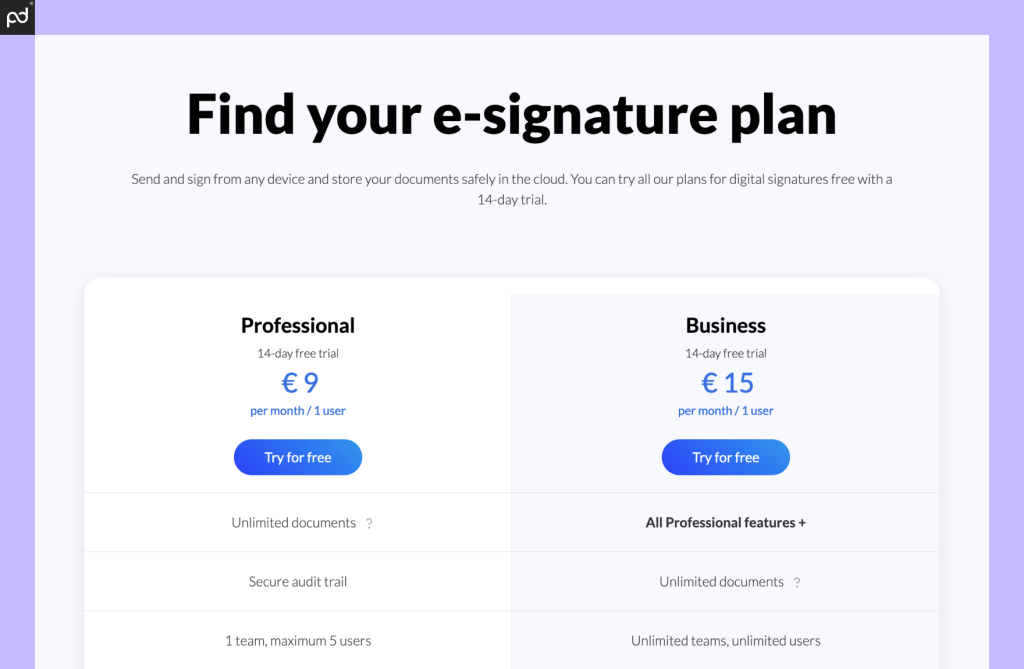
For roughly $10/month, SignRequest is a great alternative to Docusign e-signing.
The best free plans: PandaDoc Free eSign or SignRequest Professional
If you’re looking for a rock-solid e-signing solution at this level, PandaDoc and SignRequest are hard to beat.
In our view, SignRequest provides the greatest number of features at the lowest price point, making it a clear winner for paid services at the entry-level tier.
The service offers many features, like custom branding and in-person signing, that are only available in higher-tiered plans from other e-signature companies.
While they still limit templates, the platform offers branding options, the ability to receive signer attachments, and much more for less than half of what most competitors offer.
On the other hand, the PandaDoc Free eSign plan is the way to go if you’re just trying to upload documents and get them signed. Our offering is very similar to what Docusign and other platforms present at this level — including similar limitations — but it’s free!
Standard: $45/month (billed monthly) or $25/month (billed annually)
Designed for small businesses and teams with limited signing needs, most standard plans toe the line between the more-limited personal plans and the higher-tier business plans.
Plans in this category offer mid-tier pricing and features. They’re a good fit for advanced freelancers and companies where a small collection of users need to handle the majority of the signing obligations.
While you may find some collaboration tools at this tier, advanced team administration and oversight tools are typically reserved for higher-end plans.
| eSignature solution | Plan name | Price (month-to-month) | Price (Monthly cost, billed annually) |
| Docusign | Standard | $45 | $25 |
| PandaDoc | Starter | $35 | $19 |
| Dropbox Sign | N/A | N/A | N/A |
| Foxit eSign | N/A | N/A | N/A |
| signNow | Business Premium | $30 | $15 |
| Adobe Acrobat | Acrobat Pro | N/A | $24 |
| SignRequest | N/A | N/A | N/A |
| Signeasy | Business | $30 | $20 |
The Docusign Standard plan is the company’s lower-mid-tier pricing plan designed for small to medium teams that need a mix of signing, sending, and collaboration tools.
The plan runs $45/month or $25/month (annual) and offers a significant upgrade from the Personal plan in the previous tier.
At this level, Docusign introduces collaborative commenting tools, some limited custom branding options, team reporting tools, and more. The plan also expands from a single seat user cap to a 50-seat user maximum, which remains in place until the enterprise-level plans.
Most competitors follow suit by offering similar branding and customization experiences at this level. One notable exception is SignRequest, the winner in our previous category, where many of those features are already on offer.
Additionally, most plans we looked at in this category lack or withhold integration opportunities. Docusign is a little different here, in that they offer integrations with all solutions except for CRMs like Salesforce, NetSuite, and Microsoft Dynamics. Those require a Docusign Enterprise plan and are otherwise impossible to access.
However, the biggest changes come down to the number of documents that users can send. Docusign users on the Personal plan can only send five envelopes each month. With the Standard plan, standard usage rates apply, allowing envelopes to be sent at a rate of around 10/month (max 100/year on the annual plan). You can raise your usage limits by adding additional seats or buying more envelopes (discussed above).
If you’d rather avoid usage and transaction limits entirely, plans at this tier are a strong starting point, as other brands also raise restrictions or (in some cases) remove them entirely.
Comparing the Docusign Standard plan
The most direct comparison to the Docusign Standard plan is the PandaDoc Starter plan.
This is the first paid tier in the PandaDoc lineup, and it opens up an entirely new set of tools and features that put PandaDoc on another level when it comes to document workflows and e-signature management.
| Feature | Docusign – Standard | PandaDoc – Starter |
| Monthly cost | $45/month | $35/month |
| Annual cost | $25/month ($300 annually) | $19/month ($228 annually) |
| Send limit | 100/year | Unlilmited |
| Recipient limit | 99 | Unlimited |
| Usage | ||
| Legally-binding eSignatures | ✅ | ✅ |
| Documents sent | 10/month | Unlimited |
| Mobile app | ✅ | ✅ |
| Create professional, error-free docs | ||
| Reuse your own documents | ✅ | ✅ |
| Bulk import | ✅ | ✅ |
| Document editor | ❌ | ✅ |
| Templates | ✅ | Up to 5 |
| Embedded videos | ❌ | ✅ |
| Themes | ❌ | ✅ |
| Custom branding | Limited | ❌ |
| Content library | ❌ | ❌ |
| Smart content | ❌ | ❌ |
| Content locking | ❌ | ❌ |
| Web forms | ✅ | ❌ |
| Collaborate efficiently | ||
| Inline comments | ✅ | ✅ |
| Suggest edits | ❌ | ❌ |
| Approval workflows | ❌ | ❌ |
| Rooms | ❌ | ❌ |
| Send & sign | ||
| Signing order | ✅ | ✅ |
| In-person signing | ✅ | ❌ |
| Email whitelabeling | Limited | ❌ |
| Bulk send | ❌ | ❌ |
| Sell & get paid | ||
| Pricing tables | ❌ | ❌ |
| Collect payments | ❌ | ✅ |
| Product catalog | ❌ | ❌ |
| Configure Price Quote | ❌ | ❌ |
| Store and manage documents | ||
| Unlimited storage | ✅ | ✅ |
| Organize with folders and tags | ✅ | ✅ |
| Search and filters | ✅ | ✅ |
| Auto expirations | ✅ | ❌ |
| Track and monitor to take action | ||
| Real-time notifications | ✅ | ✅ |
| Audit trail | ✅ | ✅ |
| Recipient analytics | ❌ | ❌ |
| Auto reminders | ✅ | ❌ |
| Renewal notifications | ❌ |
❌ |
| Automated reports | ✅ | ❌ |
| Do more with integrations & API | ||
| Productivity | ✅ | ✅ |
| CRM integrations | ❌ | ❌ |
| Salesforce integration | Varies by plan | ❌ |
| Webhooks | ✅ | ❌ |
| API | ✅ | ❌ |
| Ensure security and compliance | ||
| Signature certificate | ✅ | ✅ |
| Two-factor authentication | ✅ | ✅ |
| SOC 2 Type II compliance | ✅ | ✅ |
| GDPR compliance | ✅ | ✅ |
| eIDAS | ✅ | ✅ |
| U.S. ESIGN Act of 2000 | ✅ | ✅ |
| Data residency in US or EU | ❌ | ❌ |
| Qualified Electronic Signature (QES) | ❌ | ❌ |
| Recipient verification | ❌ | ❌ |
| HIPAA compliance | ❌ | ❌ |
| Passcode Verification | ✅ | ❌ |
| SMS Verification | ❌ | ❌ |
| Knowledge-Based Authentication (KBA) + ID Verification | ❌ | ❌ |
| Admin and user management | ||
| User management | ✅ | ✅ |
| Single sign-on (SSO) | ❌ | ❌ |
| Team workspaces | ❌ | ❌ |
| Custom user roles | ❌ | ❌ |
| Get support | ||
| Help center & knowledge base | ✅ | ✅ |
| Web ticket & email support 24/7 | ✅ | ✅ |
| Chat support | Requires support plan | ✅ |
| Premium support | Optional | Optional |
| Dedicated customer support manager |
❌ |
❌ |
At this tier, Docusign and PandaDoc feature sets start to diverge.
While Docusign remains focused entirely on e-signatures, PandaDoc adds access to our document editor, which allows users to create, edit, and prepare documents prior to initiating the e-signing process. While Docusign’s e-signature tools remain relevant at the end of the document process — after a document has been created in another software and uploaded for e-signing — PandaDoc users can handle the entire, end-to-end document workflow in one place.
The other major difference comes in the form of e-signing limits. Docusign users are capped at 100 envelopes per year while PandaDoc users at this tier can send an unlimited number of documents for e-signature. Power users on PandaDoc can send quotes, contracts, invoices, HR documents, and more without ever worrying about needing to pay extra, and there are no monthly limits on the number of sent items.
Docusign still has the upper hand when it comes to integrations and templates. However, PandaDoc’s ability to replace word processors like Microsoft Word or Google Docs, document monitoring tools, and other e-signing solutions means that it’s possible for teams to consolidate their entire document workflow in one place.
Other competitor highlights
While most Docusign competitors follow a similar trajectory in their product offering, there are a few key features that stand out for users who want to consider other options:
- Adobe Acrobat offers competitive pricing at this level that includes native PDF editing. It’s not the same as PandaDoc’s from-scratch creation tools, but Adobe is one of only a few tools that offers these capabilities.
- airSlate signNow integrates with the rest of the airSlate ecosystem and can be used as an endpoint for airSlate products using robotic process automation.
- Signeasy allows for bulk sending at this stage, which isn’t available in Docusign and most other platforms until the next solution tier.

Adobe Acrobat offers PDF editing and markup tools that aren’t available in other eSigning tools.
The best standard plan: Adobe Acrobat, SignRequest, or PandaDoc
The best plan at this level comes down to what you want to get out of an e-signature solution.
Adobe’s PDF editing capabilities are genuinely unique for users who work with locked documents. Most e-signing solutions — including Docusign and PandaDoc — only offer limited functionality when working with PDFs.
Although not listed as a core competitor in this category, SignRequest is still a strong contender. Compared to the plans at this tier, SignRequest is more affordable while still offering competitive features.
Similarly, PandaDoc offers a unique, end-to-end document experience that you won’t see in other software solutions. Users can create documents entirely from scratch, streamline processes using templates, and send an unlimited number of documents for eSigning.
Business Pro: $65/month (billed monthly) or $40/month (billed annually)
As you’ve probably guessed, plans in this category are designed for companies operating just shy of the enterprise level.
We define plans in this category as the most expensive plans before the enterprise tier, meaning these plans offer the greatest number of features before a custom configuration is required.
This category typically introduces high-end integrations, form creation, and bulk sending, as well as custom branding and payment gateways (if those features haven’t been introduced on other plans).
| eSignature solution | Plan name | Price (month-to-month) | Price (monthly cost, billed annually) |
| Docusign | Business | $65 | $40 |
| PandaDoc | Business | $65 | $49 |
| Dropbox Sign | Premium | $50 | $50 |
| Foxit eSign | eSign Business | N/A | $300 |
| signNow | Enterprise | $50 | $30 |
| Adobe Acrobat | Acrobat Studio | N/A | $30 |
| SignRequest | Business | $18 | N/A |
| Signeasy | Business Pro | $40 | $30 |
Docusign’s Business Pro plan is designed to help businesses optimize their signing process with advanced features and automation tools.
With Business Pro, Docusign introduces payment collection, bulk sending, signer attachments, and even template locking.
You’ll also see the addition of more advanced form fields in this category, including the ability to include drop-down forms, radio buttons, and approve/decline fields while preparing documents.
Unfortunately, many of these features feel long overdue since competitors like PandaDoc and SignRequest offer advanced fields as part of their lower-tier platform subscriptions.
The Business Pro plan also offers PowerForms, which are documents that can be built and embedded into websites. However, many e-signing solutions offer a form builder at this tier, so you have options if you need to break away from Docusign in search of greener pastures.
Comparing the Docusign Business Pro plan
For pre-packaged and baseline plans, Docusign’s Business Pro plan is the most expensive and offers the greatest number of features. It compares most directly to the PandaDoc Business plan, where month-to-month pricing is the same and a $9 monthly difference separates annual pricing.
But, while Docusign offers almost all of its pre-enterprise features here, the e-signing solution remains functionally the same as users experience in lower tier plans while PandaDoc further extends its scalability and team workflows.
| Feature | Docusign – Business Pro | PandaDoc – Business |
| Monthly cost | $65/month | $65/month |
| Annual cost | $40/month ($480 annually) | $49/month ($588 annually) |
| Send limit | 100/year | Unlilmited |
| Recipient limit | 99 | Unlimited |
| Usage | ||
| Legally-binding eSignatures | ✅ | ✅ |
| Documents sent | 10/month | Unlimited |
| Mobile app | ✅ | ✅ |
| Create professional, error-free docs | ||
| Reuse your own documents | ✅ | ✅ |
| Bulk import | ✅ | ✅ |
| Document editor | ❌ | ✅ |
| Templates | ✅ | ✅ |
| Embedded videos | ❌ | ✅ |
| Themes | Limited | ✅ |
| Custom branding | Limited | ❌ |
| Content library | ❌ | ✅ |
| Smart content | ❌ | ❌ |
| Content locking | ❌ | Optional |
| Web forms | ✅ | Optional |
| Collaborate efficiently | ||
| Inline comments | ✅ | ✅ |
| Suggest edits | ❌ | ✅ |
| Approval workflows | ❌ | ✅ |
| Rooms | ❌ | Up to 3 rooms |
| Send & sign | ||
| Signing order | ✅ | ✅ |
| In-person signing | ✅ | ✅ |
| Email whitelabeling | Limited | Optional |
| Bulk send | ✅ | Optional |
| Sell & get paid | ||
| Pricing tables | ❌ | ✅ |
| Collect payments | ❌ | ✅ |
| Product catalog | ❌ | ✅ |
| Configure Price Quote | ❌ | ❌ |
| Store and manage documents | ||
| Unlimited storage | ✅ | ✅ |
| Organize with folders and tags | ✅ | ✅ |
| Search and filters | ✅ | ✅ |
| Auto expirations | ✅ | ✅ |
| Track and monitor to take action | ||
| Real-time notifications | ✅ | ✅ |
| Audit trail | ✅ | ✅ |
| Recipient analytics | ❌ | ✅ |
| Auto reminders | ✅ | ✅ |
| Renewal notifications | ❌ |
Optional |
| Automated reports | ✅ | ✅ |
| Do more with integrations & API | ||
| Productivity | ✅ | ✅ |
| CRM integrations | ✅ | ✅ |
| Salesforce integration | Varies by plan | Optional |
| Webhooks | ✅ | ❌ |
| API | ✅ | ❌ |
| Ensure security and compliance | ||
| Signature certificate | ✅ | ✅ |
| Two-factor authentication | ✅ | ✅ |
| SOC 2 Type II compliance | ✅ | ✅ |
| GDPR compliance | ✅ | ✅ |
| eIDAS | ✅ | ✅ |
| U.S. ESIGN Act of 2000 | ✅ | ✅ |
| Data residency in US or EU | ❌ | ❌ |
| Qualified Electronic Signature (QES) | ✅ | Annual plan only |
| Recipient verification | ✅ | Annual plan only |
| HIPAA compliance | ❌ | ✅ |
| Passcode Verification | ✅ | ✅ |
| SMS Verification | Varies by plan | ✅ |
| Knowledge-Based Authentication (KBA) + ID Verification | ❌ | ✅ |
| Admin and user management | ||
| User management | ✅ | ✅ |
| Single sign-on (SSO) | ❌ | Optional |
| Team workspaces | ❌ | Optional |
| Custom user roles | ❌ | ✅ |
| Get support | ||
| Help center & knowledge base | ✅ | ✅ |
| Web ticket & email support 24/7 | ✅ | ✅ |
| Chat support | Requires support plan | ✅ |
| Premium support | Optional | Optional |
| Dedicated customer support manager |
Varies by plan |
Conditional |
Part of the problem with Docusign’s Business Pro plan is that the platform is limited in how it can expand.
In recent years, Docusign has modularized its service by introducing Docusign CLM, IAM, and others. While this isn’t bad for the business, it means customers may need to purchase more than one product in order to create a complete, end-to-end solution.
For example, Docusign can support document creation and agreement management, but those functions are handled through IAM and CLM, respectively. This approach limits the feature set available in the e-signing plans, as many tools end up housed in other solutions.
PandaDoc takes a different approach by offering the vast majority of its platform tools and features in a single plan. Document creation, e-signing, lifecycle management, and more all happen within PandaDoc. Add-ons are also available, but many have niche use cases and won’t be a good fit for every customer.
As a result, Docusign only introduces minor additions on Business Pro, such as the ability to create interactive forms, bulk send, and collect payments. Meanwhile, PandaDoc adds similar features in addition to deal rooms, approval workflows, and modularized templating tools via the Content Library.
Perhaps most importantly, Docusign still caps envelopes at 100 per year. Especially for power users like HR specialists or sales reps, the $9 difference in pricing will easily be consumed by purchasing extra envelopes to prevent overage fees.
Other competitor highlights
At this level, Docusign challengers are offering their best solutions at relatively competitive prices. However, while pricing is a factor, it’s also important to note the shift toward integrations and scalability on higher-tier plans.
Many plans at this level are focused on helping to scale your e-signing workflow or integrate e-signing more effectively with the rest of your tech stack.
While Docusign is generally open with its integrations, many solutions add robust integrations at this level to create a more efficient signing process.
Here are a few of the key takeaways from most Docusign competitors:
- Dropbox Sign and Foxit eSign introduce mandatory seat minimums at this level, which accounts for Foxit’s higher price. The Dropbox Sign Standard plan carries two seats while Foxit sets a five seat minimum for its higher-end plan.
- PandaDoc offers qualified electronic signatures (QES) as part of its annual plan (additional charges may apply), which is something that Docusign, signNow, and most other solutions withhold until the enterprise level.
- SignRequest remains the most affordable plan and includes a great selection of features. However, the platform lacks a document editor and will force any contract changes/revisions to be handled via other software tools.
Best business plan: PandaDoc or SignRequest
We’re proud to recommend PandaDoc as the best solution for business and pro-level users.
We’ve worked hard to ensure that our Business plan has everything customers need, from key integrations to the ability to design important business documents from scratch. If you’re looking for an all-in-one solution that combines ease of use, simple user and content management, and maximum flexibility, PandaDoc is the right solution for you.
On the other hand, users who need an affordable signing-only solution may want to take a second look at the SignRequest Business plan. Despite having limited integrations and capping sends around a fair use policy (making it hard to determine overages) the solution costs a fraction of what Docusign and other competitors will cost at this level.
Enterprise plans
These plans represent the most flexible and customizable solutions that Docusign and its competitors have to offer.
They provide the greatest number of features and the most scalability, but almost every plan at this level must be created in conjunction with a sales rep. To access enterprise plans, users will need to call in, discuss what they actually need with a rep, and then purchase based on a custom quote generated by a dedicated team.
Because of the added flexibility, both final costs and total features will vary from user to user.
A closer look at Docusign Enhanced plans
Docusign’s enterprise plans are called “Enhanced” plans, and it handles them a little differently from its competitors.
Most competitors, including PandaDoc, include everything in the highest-tier pre-packaged plan as part of the enterprise plan. For example, if you chose to purchase a PandaDoc Enterprise plan, everything from the PandaDoc Business plan would be included by default, as well as any new features unlocked by the Enterprise tier.
Docusign takes a counterintuitive approach by removing many of the document and workflow features previously available on the Business Pro plan and listing them instead as à la carte options competing with enterprise-exclusive features.
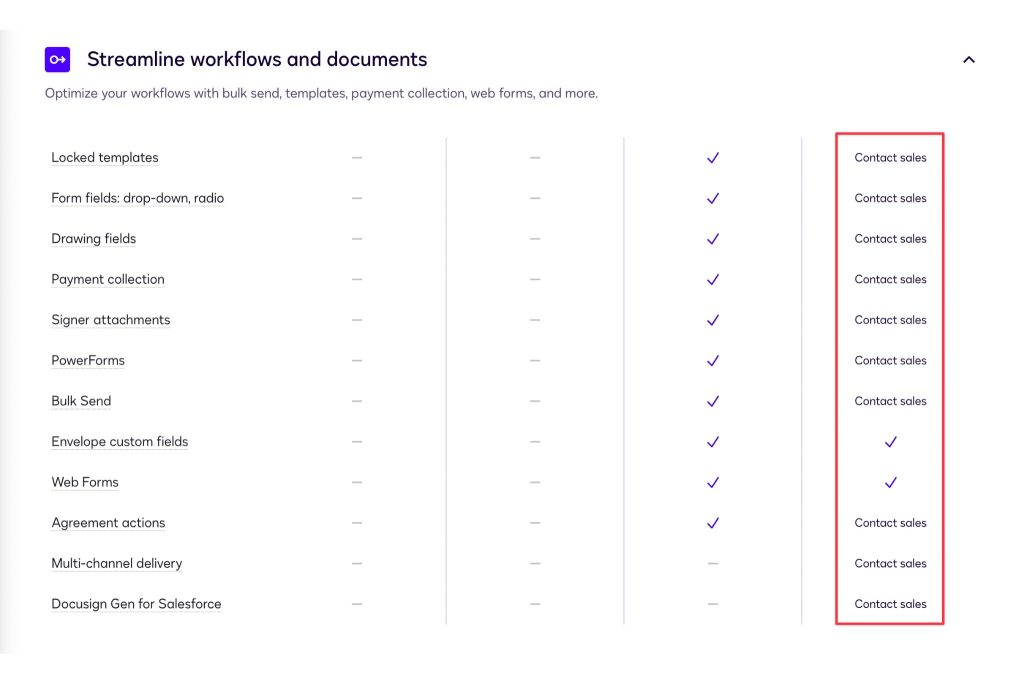
While this could be an advantage for users who don’t want to pay for things they don’t need — such as payment collection if a team doesn’t collect payments — Enhanced plans are the highest-tier plan and are generally more expensive pre-packaged solutions. With Docusign, teams must effectively re-purchase previously included functionality, alongside any enterprise-exclusive features, further increasing the cost.
| Feature | Docusign – Enhanced | PandaDoc – Enterpise |
| Monthly cost | N/A | N/A |
| Annual cost | Custom | Custom |
| Send limit | Varies by plan | Unlilmited |
| Recipient limit | 99 | Unlimited |
| Usage | ||
| Legally-binding eSignatures | ✅ | ✅ |
| Documents sent | Varies by plan | Unlimited |
| Mobile app | ✅ | ✅ |
| Create professional, error-free docs | ||
| Reuse your own documents | ✅ | ✅ |
| Bulk import | ✅ | ✅ |
| Document editor | ❌ | ✅ |
| Templates | ✅ | ✅ |
| Embedded videos | ❌ | ✅ |
| Themes | Limited | ✅ |
| Custom branding | Limited | ✅ |
| Content library | ❌ | ✅ |
| Smart content | ❌ | ✅ |
| Content locking | ❌ | ✅ |
| Web forms | Varies by plan | Varies by plan |
| Collaborate efficiently | ||
| Inline comments | ✅ | ✅ |
| Suggest edits | ❌ | ✅ |
| Approval workflows | Varies by plan | ✅ |
| Rooms | ❌ | Unlimited |
| Send & sign | ||
| Signing order | ✅ | ✅ |
| In-person signing | ✅ | ✅ |
| Email whitelabeling | Limited | ✅ |
| Bulk send | Varies by plan | ✅ |
| Sell & get paid | ||
| Pricing tables | ❌ | ✅ |
| Collect payments | Varies by plan | ✅ |
| Product catalog | ❌ | ✅ |
| Configure Price Quote | ❌ | Optional |
| Store and manage documents | ||
| Unlimited storage | ✅ | ✅ |
| Organize with folders and tags | ✅ | ✅ |
| Search and filters | ✅ | ✅ |
| Auto expirations | ✅ | ✅ |
| Track and monitor to take action | ||
| Real-time notifications | ✅ | ✅ |
| Audit trail | ✅ | ✅ |
| Recipient analytics | ❌ | ✅ |
| Auto reminders | ✅ | ✅ |
| Renewal notifications | ❌ |
✅ |
| Automated reports | ✅ | ✅ |
| Do more with integrations & API | ||
| Productivity | ✅ | Storage only |
| CRM integrations | ✅ | ✅ |
| Salesforce integration | Varies by plan | Optional |
| Webhooks | ✅ | ✅ |
| API | ✅ | Optional |
| Ensure security and compliance | ||
| Signature certificate | ✅ | ✅ |
| Two-factor authentication | ✅ | ✅ |
| SOC 2 Type II compliance | ✅ | ✅ |
| GDPR compliance | ✅ | ✅ |
| eIDAS | ✅ | ✅ |
| U.S. ESIGN Act of 2000 | ✅ | ✅ |
| Data residency in US or EU | Vaires by plan | ✅ |
| Qualified Electronic Signature (QES) | ✅ | Annual plan only |
| Recipient verification | ✅ | Annual plan only |
| HIPAA compliance | Varies by plan | ✅ |
| Passcode Verification | Varies by plan | ✅ |
| SMS Verification | Varies by plan | ✅ |
| Knowledge-Based Authentication (KBA) + ID Verification | Varies by plan | ✅ |
| Admin and user management | ||
| User management | ✅ | ✅ |
| Single sign-on (SSO) | ✅ | ✅ |
| Team workspaces | ❌ | Unlimited |
| Custom user roles | ❌ | ✅ |
| Get support | ||
| Help center & knowledge base | ✅ | ✅ |
| Web ticket & email support 24/7 | ✅ | ✅ |
| Chat support | Requires support plan | ✅ |
| Premium support | Optional | Optional |
| Dedicated customer support manager |
Varies by plan |
Conditional |
As you’ll notice, many of the features that are automatically included in PandaDoc Enterprise plans are optional add-ons for Docusign Enhanced plans, especially around features related to workflow automation and support.
- Docusign Enhanced plans offer more integrations than PandaDoc and other platforms, but only Salesforce, Netsuite, and Microsoft Dynamics integrations are exclusive to Enhanced plans.
- PandaDoc Enterprise plans generally provide more features and optional extendibility. In addition to e-signing and document creation features, Enterprise plan users can add CPQ systems, custom user roles, HIPAA compliance, and more.
In many ways, Docusign feels like it’s competing against its Business Pro plan in terms of cost and functionality.
But, even with every feature enabled, the platform lacks the extensibility found in PandaDoc, where entirely new systems like CPQ can be added to the sales flow to help with quote-to-cash processes and lightning-fast document creation.
Other competitor highlights
Setting Docusign aside, most competitors focus on scalability at the enterprise level. Some include API access or offer seat-based discounts when plans are purchased at scale. Many offer new features, as well.
- Adobe offers an entirely different enterprise solution called Acrobat Sign at the enterprise level. E-signatures captured with Acrobat Sign follow more stringent security standards than those captured with Acrobat Standard and Pro plans, bringing them more in line with digital signatures captured by competitors.
- Signeasy introduces specialized pricing for nonprofits and high-volume customers at the enterprise level but plans carry a five-seat minimum.
- Foxit doesn’t offer enterprise-specific plans, and its PDF editor is separate. However, users who want to stay away from Adobe but need PDF editing capabilities and are willing to pay enterprise-level prices may find a solution here.
- PandaDoc remains the only solution for end-to-end document creation and e-signing, even at the enterprise tier.
Which plan is right for you?
Ultimately, it’s up to you to decide which electronic signature solution is the best fit, but we hope this guide to Docusign pricing and more helps you determine your best fit.
Across every e-signature company, some functionality is standardized.
Mobile apps for Android and iOS, for example, are commonplace across nearly all Docusign competitors, but every plan varies slightly from Docusign services.
While you’re considering your options, we recommend trying out the PandaDoc Free eSign Plan or signing up for a free demo to see exactly how PandaDoc can shake up your document creation process.
Or, if you want to test drive everything yourself, sign up for a 14-day trial for a hands-on feel of what our platform can do. We know you’ll love it.