Help centerLog inHelp center
Mobile Site Logo
Desktop Site Logo
    • Platform

      • Product overview
      • Contract Management
      • CPQ
      • Enterprise
    • Features

      • Image - Document generation - Icon
        Document generationAutomate document creation with customizable templates
      • Image - Payments - Icon
        PaymentsGenerate error-free quotes
tailored for every buyer
      • Image - Deal room - Icon
        Deal RoomsCollaborate and close deals in one personalized deal room
      • Image - Smart content - Icon
        Smart contentAdapt documents to the recipient's requirements
      • All features
    •  

      • automation icon
        Workflow AutomationsStreamline your workflow and reduce manual tasks
      • Approval workflow
        Approval workflowSimplify internal sign-offs before document delivery
      • Workspaces
        WorkspacesDistribute content across teams and departments
      • Tracking & analytics
        Tracking & analyticsGet insights into how users interact with your document
      • All features
    • Request a demo
    • Contact sales
    Product (Dropdown) - Featured Image
    Compare
    • vs DocuSign
    • vs Dropbox Sign
    • vs Adobe Sign
    • vs Proposify
    • View more
    • Image - Use case - Icon

      Use case

      • eSignatures
      • Proposals
      • Contracts
      • Quotes
      • Payments
      • All use cases
    • Image - Industry - Icon

      Industry

      • Software & technology
      • Professional services
      • Education
      • Healthcare
      • Construction
      • All industries
    • Image - Team - Icon

      Team

      • Sales
      • HR
      • Marketing
      • Customer success
      • Legal
      • All teams
    • Request a demo
    • Contact sales
    Customer stories
    • Image - Solution dropdown - Autodesk
      Autodesk now tracks sales metrics across its entire org
    • Image - Solution dropdown - Nomad
      Nomad cut customer acquisition costs by 20%
    • Image - Solution dropdown - TheKey
      TheKey saves 3,000 hours per year using PandaDoc
    • All customer stories
    • Sales and CRM

      • Hubspot
        Hubspot
      • Salesforce
      • pipedrive
        Pipedrive
      • monday.com
        Monday
    • Payment gateways

      • Square Logo
        Square
      • Stripe
        Stripe
      • Authorize Logo
        Authorize.net
      • Paypal Logo
        PayPal
      • QuickBooks
        QuickBooks Payments
      • FreshBooks Logo
        FreshBooks
    • Collaboration and more

      • Zapier
      • Greenhouse
        Greenhouse
      • QuickBooks
        QuickBooks
      • Slack Logo
        Slack
      • All integrations
    • API
    • Documentation
    Integration (Dropdown) - Featured Image
    CPQ Solutions
    • pipedrive
      Pipedrive CPQ
    • Hubspot
      Hubspot CPQ
    • Salesforce CPQ
      Salesforce CPQ
    • Image - Learn- Icon

      Learn

      • Customer stories
      • Blog
      • Templates
      • Webinars
      • Learning academy
      • Security
      • Resource library
      • AI Skills Lab
    • Image - Support - Icon

      Support

      • Help center
      • Contact us
      • Onboarding services
      • Professional services
      • Premium support
      • Partner Directory
    • Image - Developers - Icon

      Developers

      • API
      • Document embedding
      • Documentation
    • Request a demo
    • Contact sales
    Resources (Dropdown) - Featured Image
    Security & Compliance
    • Signature certificate
    • Two-factor authentication
    • HIPAA compliance
    • View more
  • API
  • Pricing
Contact salesStart a trialContact Sales
Product
  • Pricing
  • Integrations
  • Features
  • Updates
  • Security
  • HIPAA
Use cases
  • Proposals
  • eSignatures
  • Quotes
  • Contracts
  • Payments
  • Forms
  • Notary
  • API
  • CPQ
  • Deal Rooms
  • All use cases
Resources
  • Help center
  • Templates
  • Blog
  • Electronic signature law
  • How to guides
  • Developer center
  • System status
  • Onboarding services
  • Partner Directory
  • Recipes
  • AI Skills Lab
Compare
  • vs DocuSign
  • vs Dropbox Sign
  • vs Adobe Sign
  • vs Proposify
  • vs Docsend
  • All alternatives
Company
  • About us
  • Culture
  • Careers
  • Stand with Ukraine
  • Become a partner
  • Press
  • Contact us
  • Marketing Preferences

© 2026 PandaDoc Inc. All rights reserved.

Privacy Notice
    Legal
        Accessibility Statement
          Do Not Sell My Personal Information
            AI Information
              • LinkedIn
              • Facebook
              • X

              What should a home loan application form include?

              Home loan application forms need to include all necessary information that permits lenders to decide whether or not to approve a loan. This includes:

              • Borrowers’ information: The name, age, marital status, dependents, and social security numbers of any borrowers needs to be included on the form. You’ll also want to obtain information such as the borrower’s current employment status and place of employment.

              • ‌Financial information:Banks need to know all sorts of financial information. Credit history, current assets, and outstanding debts need to be on the home loan or home equity loan application form.

              • ‌Property information:This section contains details about the property the borrower wants to purchase, including its address, cost, and valuation.

              • ‌Declarations:Borrowers are required to explain how they plan to use a property, whether they will reside there permanently, live in it part-time, or rent it out to other people.

              • ‌Signatures:Borrowers must sign that they believe the information they’ve provided is accurate. If the loan is approved, the lenders will also need to sign the application form. ‌

              Should you use a template to create a home loan application form?

              Yes! If you work with home loan application forms regularly, using a template is a great idea.

              Although home loan applications contain a lot of specialized information when they’re completed, the forms themselves are fairly straightforward.

              Creating a home loan application form from a template centers all the information you need in one place. You don’t have to worry about forgetting a section or reinventing the wheel with each new borrower.

              A template keeps things looking professional and streamlined — one with drag-and-drop capabilities and customization options also ensures that you can request additional or out-of-the-ordinary information as needed.

              How can an online home loan application form improve accuracy?

              When applicants have online access to your application forms, they can gather the required documentation on their own time.

              This takes the pressure of having all their information together the moment they step into your office off of your customers. It is especially helpful for first-time homebuyers who are new to the home loan application process.

              Borrowers can still ask questions or come into the office if they get confused. But by offering the application form directly to them, they’ll be better equipped to collect the necessary documents.

              Online forms can also remind people not to leave sections blank.

              Instead of highlighting each line borrowers need to sign, you can direct the form to navigate them through those fields, preventing them from advancing prior to completing all sections.

              Notice a typo in your home loan application after it has already been sent? No problem! With PandaDoc, you can track documents and know immediately whether people have already opened them.

              You can also edit documents in real-time to fix typos or clarify wording without having to track multiple file versions or resend a document link.

              PandaDoc offers a complete history of all changes made to a document throughout the signing process for audit purposes and to help you with any potential negotiation debates.

              PandaDoc also offers legally binding electronic signature capabilities.

              You don’t have to worry about documents getting lost or misplaced as they are shuffled from one signing party to the next.

              The document can be sent to all necessary parties and signed even if the applicants for the home loan aren’t all in the same physical location. ‌

              FAQ

              What is a home loan application form? 

              A home loan application form, also known as a mortgage application form, is a document that someone submits to a lender when they want to buy a home.

              Unlike a pre-approval form, a home loan application form is specific to a particular piece of real estate.

              Who needs to complete a home loan application form? 

              Any person who wants to purchase real estate and plans to take out a loan must complete a home loan application form and send it to their lender.

              Can you save time with home loan application forms? 

              Yes! Using a home loan application form can save you and your customers time. You don’t have to create new forms each time you have a new applicant.

              Signatures can be collected in real-time and automatically uploaded into your system for a quick, paperless process.

              How can I get a home loan quickly?

              To get a home loan quickly, you must be pre-approved for the loan. It would help if you also had documents like your home loan application, bank account statements, tax returns, income statements, proof of address, and other supporting documents at hand to make the process of getting a home loan extremely swift.

              What is a home loan?

              A home loan is a form of loan that is taken from a bank or a lender by a borrower to buy a house. To apply for a home loan, you need a home loan application (which includes details about the borrower such as name, mobile number, address), and statements of your bank account, income, etc.

              Disclaimer

              Materials (e.g. templates, educational articles, blog posts and informational content), made available through PandaDoc, including via any integrations, connectors, extensions, plugins, or third-party AI platforms (e.g. ChatGPT, Claude, or similar tools) are for general information purposes only and are provided "as is." These materials do not constitute legal, regulatory, or compliance advice and should not be construed as such. It is your responsibility to ensure materials meet your specific legal requirements. Consult a qualified attorney licensed in your jurisdiction before relying on these materials. PandaDoc disclaims all warranties, express or implied, including fitness for a particular purpose or non-infringement.

              Related templates

              website standart terms and conditions

              Website Standard Terms and Conditions Template

              Use this free Website Standard Terms and Conditions Template to disclose legal obligations and protect your copyright, along with other overriding jurisdiction.

              Copyright License Agreement Template
              TOP 100

              Copyright License Agreement Template

              Use this Copyright License Agreement to authorize others to use your intellectual property.

              Insertion Order Template

              Insertion Order Template

              The insertion order is used to enter into a legal binding agreement between a client and publisher for the running of the agreed upon advertisements.

              Form W-8BEN

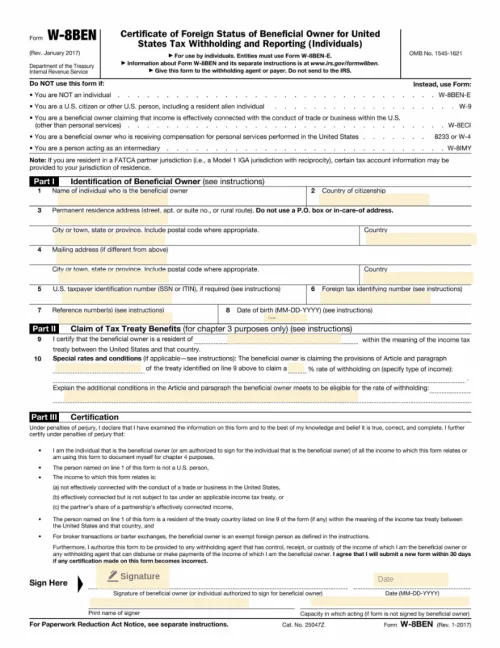
              Form W-8BEN

              The W8-BEN Form is a form required by the IRS, similar to the W9 form that employees and subcontractors in the United States must submit to employers

              TemplatesForms

              Home Loan Application Form

              Create a custom home loan application for your customers with easy drag-and-drop form fields, automated workflows, and convenient electronic signatures.

              Use this template

              No credit card required

              Home Loan Application Form