A wide variety of organizations use donation forms, including charities, event organizers running one-off fundraisers, nonprofits, businesses with charitable arms, and more.
Regulations on fundraising campaigns vary from country to country. Sometimes, specific jurisdictions have their own rules. So if you are thinking about accepting donations through your website, it is essential to familiarize yourself with all the relevant legislation beforehand. There are also controls on how the personal details of benefactors can be stored and used.
In most cases, it is perfectly legal for organizations to accept donations, even if they are not charities and the fundraising cause is not charitable – this is also sometimes referred to as “crowdfunding”.
While it is common practice for organizations to tailor forms to meet their unique needs, most online donation forms tend to follow a similar structure.
A generic online donation form should include the following sections:
Introductory description– Non-profit organizations and charities may wish to include a brief description covering charitable initiatives and fundraiser objectives, along with a reminder that any donations will be put to good use.
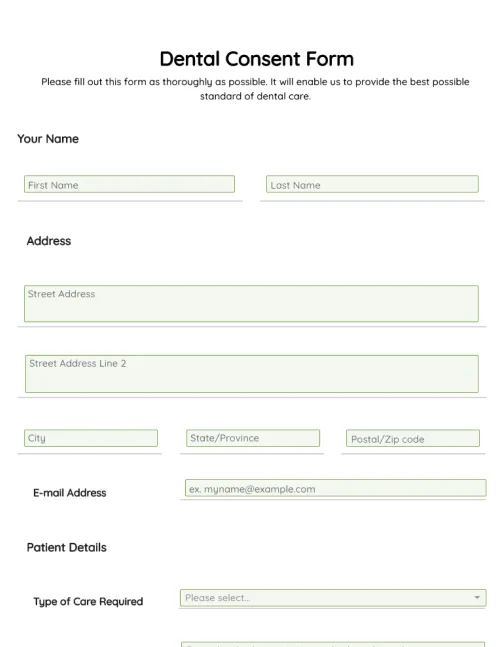
Contact Information – This section should include fields for the giver’s name, address, phone number, and email.
Types of donations– If you run multiple initiatives and allow benefactors to choose how their money will be allocated, you should include a dropdown listing the various options.
Donation amount– It is common practice to include a dropdown with a set of predefined donation amounts or “giving options” along with an empty field for givers that wish to enter a custom amount. You may also wish to include an option that allows people to make a recurring donation or ongoing sponsorship.
Payment options – Benefactors will usually be prompted to pick a payment option before selecting the donate button and moving on to the “checkout” stage of the donation process.
Online donation forms are not the same as checkout forms, although they are both used during the donation process.
Once an individual has completed an online donation form by entering their personal details, choosing a donation amount, and picking a payment option, they will be directed to a checkout form, either on the host’s site or in the form of a third-party payment gateway. Here, they will be prompted to enter their credit card or debit card details.
Most organizations use third-party solutions, such as PandaDoc, to create and host checkout forms on their website. These tools integrate with payment providers and remove the need for fundraisers to create their own checkout forms and payment gateway integrations. Donors will also usually receive a donation receipt automatically.
In the vast majority of cases, organizations are not required to collect electronic signatures from donors. However, this can vary from jurisdiction to jurisdiction, so it is important to familiarize yourself with local rules.
In some cases, it may be necessary for a potential donor to consent to a recurring donation. Consent may also be required if their money will be spent in a particular way (which would be outlined on the form).
If you want to add electronic signature fields to your donation forms, consider using a drag-and-drop form builder like PandaDoc. Whenever a donor signs a form, their signature will be stored securely in the cloud along with an auto-generated signature certificate.
An online donation form is a type of form used to collect charitable donations and fundraising contributions. Many different types of organizations have donation pages on their websites, including non-profits, charities, and event organizers.
Online donation forms tend to be straightforward, simple documents that exist for the sole purpose of accepting charitable donations from individuals and organizations. As such, they usually include fields for a limited number of personal details, dropdowns for donation amounts (along with a field for custom donation amounts), and integrations with popular payment providers like Stripe and Paypal.
The vast majority of donation forms are hosted online nowadays, although some organizations still use more traditional paper forms. In most cases, hosting a form online and integrating with payment processors is a simple process, especially if a third-party solution is used.
Online donation forms are useful because they allow organizations of all shapes and sizes to collect donations without expending large amounts of resources.
Once a donation form has been hosted online, benefactors can access it from anywhere, including on mobile devices, and quickly make donations. If an online fundraising form is connected to a backend payment provider and data storage solution, donations are processed automatically and details are synced to a secure environment, without any further input required.
Charities may also choose to include social media share buttons on their forms, thus increasing the likelihood that others will promote the form and more people will make donations.
Templates are beneficial for a number of reasons. If you regularly create donation forms for use on dedicated web pages, or if you are thinking about hosting a generic form for the first time, using a template with customization options will save you a significant amount of time and resources.
A good, user-friendly template will include all the fields required for collecting benefactor details and processing donations. If you use a third-party solution like PandaDoc, you can also integrate seamlessly with popular payment providers and automate the checkout process.
Download and start customizing the free template provided by PandaDoc to get started. You can use it as the basis of all your future online donation forms.
Donating money or resources often improves your mood and mental health. Donations are also necessary because they help people in need, they’re a sustainable practice, they help raise awareness, and they help make an impact on the future generation.
An online donation form helps you save time, it can allocate your money far and wide, helps you join a large pool of donors, and send money to a reputed organization. Online forms are also easy to fill, have secure payment methods, and they help you make regular contributions.
Disclaimer
Materials (e.g. templates, educational articles, blog posts and informational content), made available through PandaDoc, including via any integrations, connectors, extensions, plugins, or third-party AI platforms (e.g. ChatGPT, Claude, or similar tools) are for general information purposes only and are provided "as is." These materials do not constitute legal, regulatory, or compliance advice and should not be construed as such. It is your responsibility to ensure materials meet your specific legal requirements. Consult a qualified attorney licensed in your jurisdiction before relying on these materials. PandaDoc disclaims all warranties, express or implied, including fitness for a particular purpose or non-infringement.
Create and host fully customized online donation forms quickly and easily. Leverage drag-and-drop form fields, ready-made templates, and time-saving automation tools.
No credit card required