

Small Estate Affidavit Florida Form
No credit card required

Complete your Florida Small Estate Affidavit in minutes. This document lets you, as an heir, receive the property of a deceased relative without formal probate.
What is a Small Estate Affidavit in Florida?
A Florida small estate form is a document that’s needed when the deceased person did not leave a will and his estate is valued at an amount that does not exceed the small estate limit. It reduces cost and time as legislation has implemented this procedure to expedite the handling of inheritance disputes.
Small Estate Affidavit: Florida Requirements
Before filling out the form, make sure you qualify with Florida State requirements.
Time After Death: 2 years maximum
Small estate limit: $ 75,000 (as of 2022-2023)
Notarization: Obligatory
Time After Death
In Florida, the waiting span from the moment of the deceased’s death is absent, so you start the form completion and filing straight away as you get the death certificate. Make sure that at least 2 years have passed since the person’s death.
Small Estate Limit
The small estate must contain at least $75,000 of undisclosed assets. Such rules apply specifically in Florida. If the property is located in Florida, you must choose the appropriate court in that region to decide probate matters. But you should go to this step after you’ve filed the Affidavit and made sure you’ve done everything according to the requirements.
Signing and Notarizing
The Florida state requires you to notarize the small estate affidavit.
How to Get a Small Estate Affidavit in Florida
You can get a state of Florida small estate affidavit form at PandaDoc from any device to download a ready-made affidavit template. It is designed by experts, so immediately after downloading, start editing. The main thing is to follow all the rules because it is strictly checked. Otherwise, your document will not be accepted and you will have to start all over again.
The free form can be filled out in a few minutes, which is an advantage. Especially if deadlines are looming and time is tight. Moreover, it eliminates the need to look for a notary and wait for an appointment, consultation, and filling out the document.
Small Estate Affidavit Florida 2023: Instructions
A small estate in Florida is a formal process for drafting an Fl small estate affidavit, but it is important to include information such as:
Name and permanent (registered) residence of the deceased person.
A detailed list that lists all of a person’s assets, including information about each asset and calculating its value. Assets may also include stocks, bank accounts, cars, insurance policies, etc.
Funeral expenses, as well as debts, if any. This even includes card debt.
A list of people who legally own property. Detailed information about each such person.
Other heirs are entitled to their part of the property. They must be notified at all times.
A will, if written.
Confirmation that all the information was written correctly and that the person writing the document assumes responsibility in the case of false testimony.
This is the basic sequence to follow for your affidavit of small estate Florida to be accepted and confirmed.
An affidavit of small estates in Florida cannot be filed by non-adults, and in cases where there are unsettled debts, an inheritance may be contested, a criminal case opened, and several other situations.
How to Notarize a Small Estate Affidavit Florida Online?
In Florida, a small estate affidavit form must be notarized. Notarizing a document is now also possible online, which makes life a lot easier with PandaDoc.
Step 1: Signup/ Register
Sign up to PandaDoc using your valid email and open the blank Florida affidavit form. You can edit the document template online.
Step 2: Fill in the Form
Provide the required information and place your e-signature. Add other heirs who claim to inherit the property. They need to put their e-signatures too. After you fill out the free form, take care of notarizing it.
Step 3: Notarize Online
At this step, you may once again review the document. It’s critical to make sure there are no errors, and all the needed information is included.
Proceed to ‘Notarize Now’. The PandaDoc service will start a live video session with a notary, who will require you to present one of the ID documents of your choice. When your (and other participants’) identity is verified, the notary signs the document in real time, and it comes into legal force.
Step 4: Download / Share the Form
You can download, print, or share your notarized Florida form as soon as the session is over. The document is sent to your email, provided at the registration step.
How to Fill Out a Florida Small Estate Affidavit?
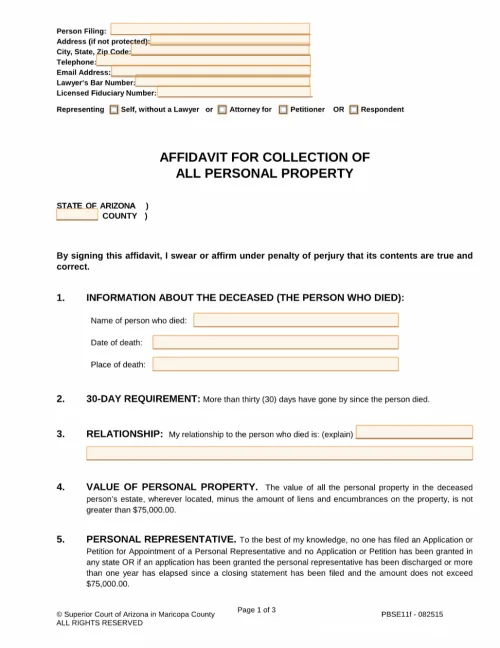
If you choose to fill out the free form online, take care to write all the information correctly. In the special boxes, you should fill in information about the:
name of the deceased;
the date of death;
the total value of the assets left with deductions for debts, if any.
Where it asks about a will, note whether or not there is one. If there is no will, you will also need to fill in information about all heirs.
At the end of the form, don’t forget to put the date of the small property affidavit and put your signature on it. After that, attach the requested ID to the document. The final step is to submit the affidavit in the required form and wait. The affidavit is filed along with a copy of the death certificate with the local probate court.
FAQ
What is the purpose of a small estate affidavit in Florida?
The main goal of a small estate affidavit in Florida is to legalize documents and speed up the inheritance process for personal property. The small estate affidavit is aimed at transferring real or movable property to an heir unless it passes a total of $75,000. This requirement applies in Florida.
Does a small estate affidavit need to be notarized in Florida?
The Florida small estate affidavit statute says notarization is required. Without it, the document cannot be filed in court and used, because, without this step, it will have no legal effect.
How do I file a small estate affidavit in Florida?
Go to the PandaDoc website, where you can find all the tools you need to make a quality affidavit. You can get a ready template for free and instantly start drawing up and filling in your personal information. Before filling out, prepare all the information about the deceased person, including the date of death, the list, and the total value of the estate with the deduction of debts. If there are other heirs, list them.
What is the small estate affidavit amount in Florida?
Before drafting an affidavit, you need to make sure that it fits into the category of a small property affidavit. If the amount of the total estate with the deduction of debts is more than $75,000, then it cannot be a small estate affidavit because the amount must be less.
Disclaimer
Materials (e.g. templates, educational articles, blog posts and informational content), made available through PandaDoc, including via any integrations, connectors, extensions, plugins, or third-party AI platforms (e.g. ChatGPT, Claude, or similar tools) are for general information purposes only and are provided "as is." These materials do not constitute legal, regulatory, or compliance advice and should not be construed as such. It is your responsibility to ensure materials meet your specific legal requirements. Consult a qualified attorney licensed in your jurisdiction before relying on these materials. PandaDoc disclaims all warranties, express or implied, including fitness for a particular purpose or non-infringement.